Repair of Faults
WARNING
Disconnect all units from power supply and have it repaired by a qualified service person if any of the following occurs:
If any power cord or plug is damaged or frayed.
If a unit does not operate normally when operating instructions are followed.
If a unit is exposed to rain/water or if any liquid has been spilled into it.
If a unit has been dropped or damaged.
If a unit shows a change in performance, indicating a need for service.
LED Status Indicators
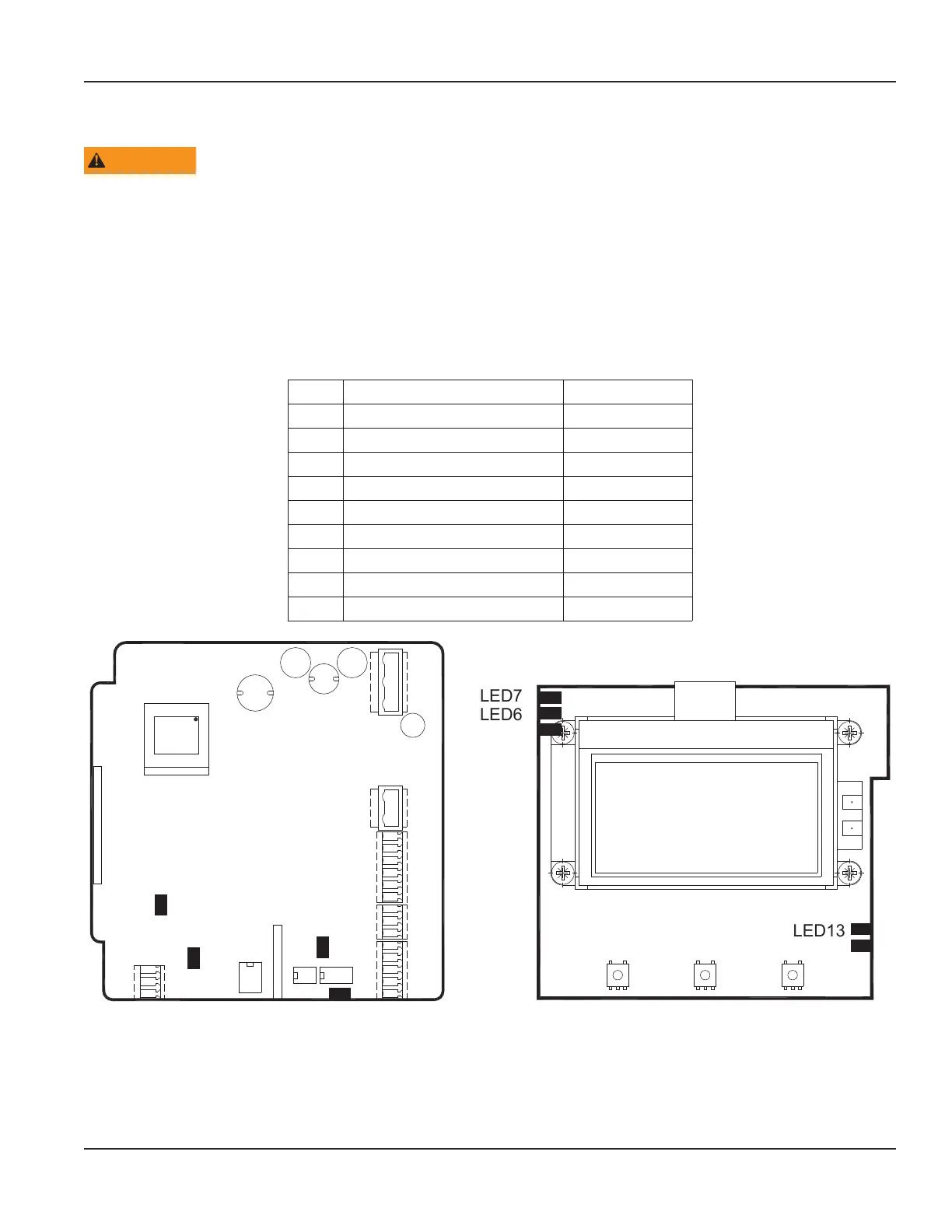
When the LEDs on the circuit board are active, they indicate the status of the device.
LED Device Status Label on PCB
LED1 Coil loop connected COIL
LED2 Communication – receiving RX
LED3 Communication – transmitting TX
LED5 Flash memory activity DISK
LED6 Digital output #1 OUT 1
LED7 Digital output #2 OUT 2
LED8 Digital input INPUT
LED10 Power ON POWER
LED13 USB, HOST mode USB
Figure 30: LED locations
Troubleshooting
Page 37 March 2020 MAG-UM-00379-EN-07


 To Next Page