Communication Menu
Communication: Port Settings
Interfaces Modbus RTU RS-232, RS-485 and RS-422 with Modbus RTU.
Connector
Label
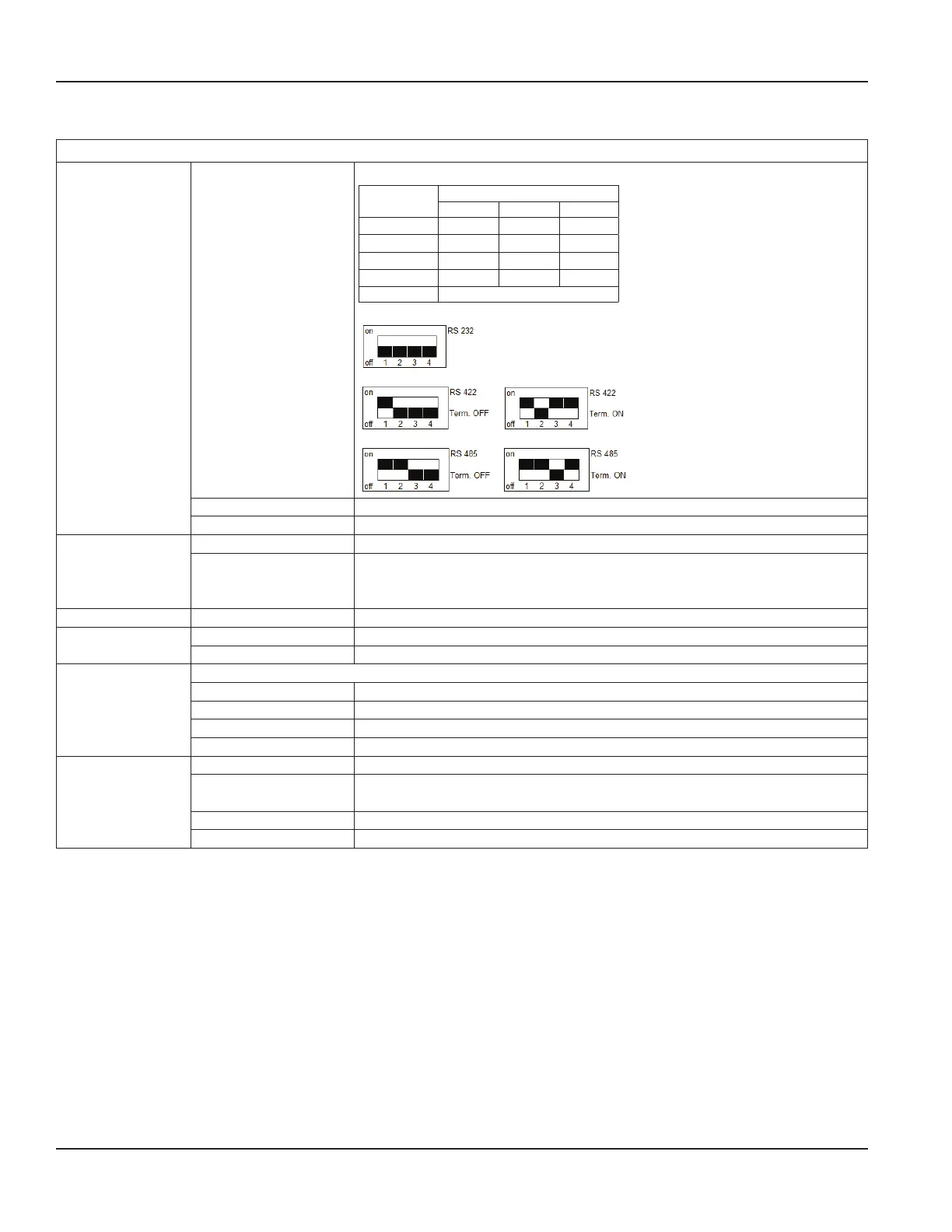
RS Interfaces
422 232 485
A A RxD —
B B — —
Z Z TxD B
Y Y — A
G G (GND)
See Figure 28 on page 21 for
wiringdiagram.
Mode can be configured by DIP switches also if Termination is ON or OFF.
M-Bus Additional hardware required.
HART Additional hardware required.
Modbus Address This parameter configures the Modbus address in the range from 1…247.
RS-232
RS-422
RS-485
Baud rate: 1200, 2400, 4800, 9600, 19200, 38400 Bd
Parity: Even, Odd, Mark, None
M-Bus Address 0…250
HART Physical Signaling Bell202 Current or RS-485
Polling Address Configure the polling address
Ethernet Modbus TCP/IP with MEAP-Header
IP Address IPv4-Address
IP Mask IPv4 subnetting reference
IP Gateway Gateway address
MAC Address Media-Access-Control-Address
ADE Control On or Off
Protocol 1 standard message
2 extended messages
Dial 4…9
Resolution 0.001 / 0.01 / 0.1 / 1 / 10 / 100 / 1000 / 10,000
ModMAG® M1000 Electromagnetic Flow Meter
Page 32 March 2020MAG-UM-00379-EN-07


 To Next Page