Using Removable Disk
22 23
Before installing the Transcoder
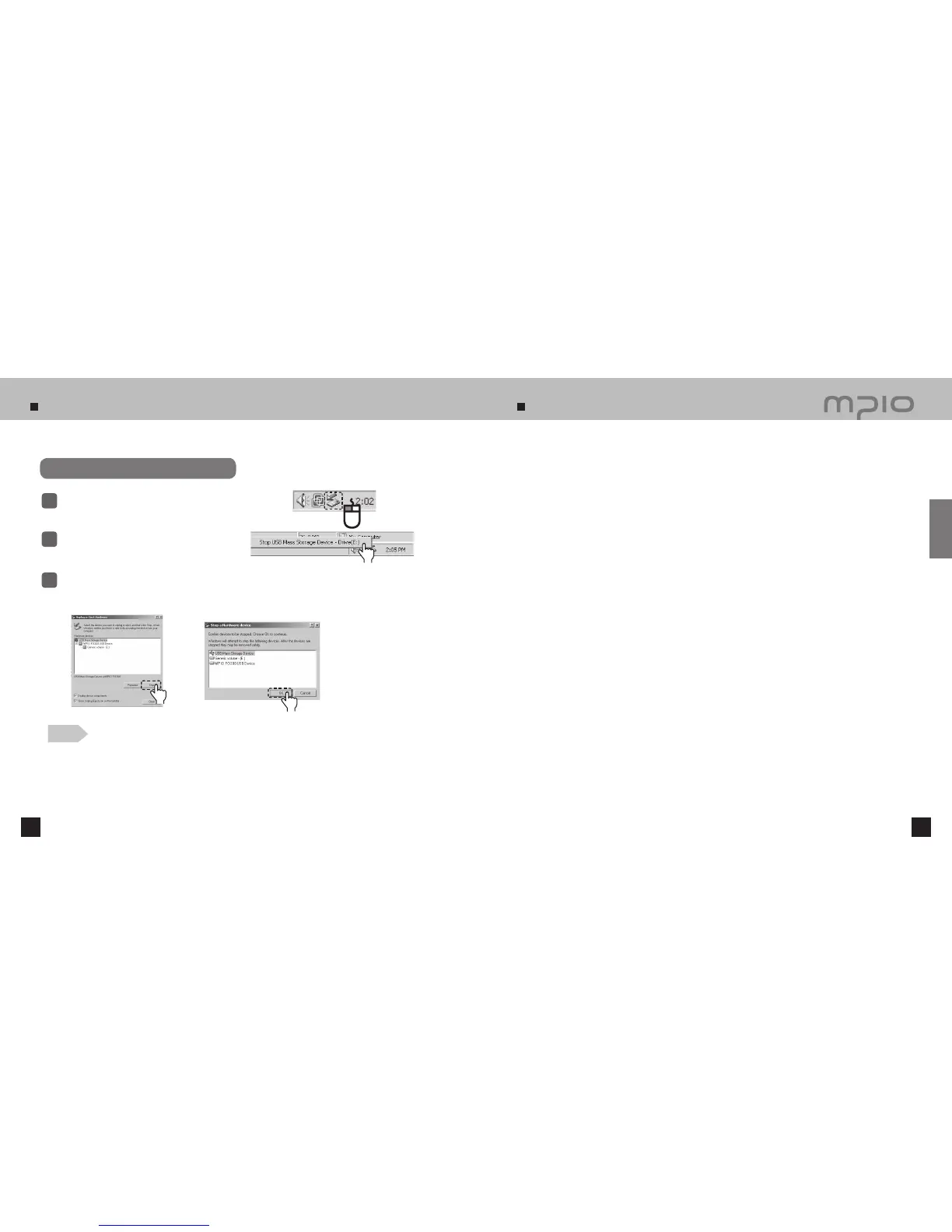
Disconnecting the USB Cable
Place mouse cursor on “Stop a Hardware Device” icon in
the system tray, and click right mouse button.
1
Select “Unplug or Eject Hardware”.
Select USB Mass Storage Device from the list of hardware, and click the [Stop] button.
When the “Stop a Hardware Device” window appears, select MPIO FG200 USB Device.
Then, click the [OK] button and disconnect the USB Cable.
2
3
Note
●
In Windows 2000, disconnect the USB cable by clicking the
[OK] button after the “Safely Remove Hardware”
message appears.
In Windows XP, disconnect the USB cable after the “Safely Remove Hardware” message appears.
●
Window 98/98SE Users
- There is no Safely Remove Hardware command in Windows 98/98SE. The user must wait until the file/data
transfer is complete, and then disconnect the USB Cable.
It is recommended that you follow these directions for separating the device from the PC safely. If these instructions
are not followed, it may result in data damage or product malfunction.
To use the movie playback function appropriately, use the included PMP
Transcoder to convert the file into the required format.
All convertible files types may be converted and tested using the Transcoder.
About Transcoder…
MP4 PMP Transcoder is a program that converts the WMV, ASF, MPEG4, DivX, AVI file formats use
in desktop PC environment into MP4 file format, which can be played by the PMP Player FG200.
●
Supported File Types: AVI, MPEG4, WMV, DivX
The following hardware, software requirements must be met for the Transcoder to operate.
H/W Requirements
●
CPU: Intel Pentium4 1 GHz or higher
●
HDD: 20 MB or more
S/W Requirements
●
Microsoft DirectX 9.0 or later (required)
●
Microsoft Media Player 9.0
●
Unified Codec Pack (K-Lite Codec Pack)
●
OS : Windows98 SE / Windows ME / Windows 2000 / Windows XP
■
Please check the hardware specification of the PC to make sure it supports the Transcoder. The software
specifications may be checked by downloading the required programs from the internet.
Click
Click
Click
Connection



 To Next Page