Setting Recorde Functions
60 61
Setting Automatic Level Control (ALC)
Select RECORD in the menu.
1
Push the lever in + /
-
directions to select ALC and then, push the lever in
direction or press it
to enter.
2
3
Push the lever in + /
-
directions to turn the ALC On or Off and then, push the lever in
direction
or press it to save. After saving, the device will return to its previous menu.
Allows enhances the input signal level (or gain) from a line-in input, allowing the user to record distant sounds and
adjust recording quality.
(VAD and ALC are functions used in professional voice recorders. The same quality of functions are provided in
FG200)
On: Turning the ALC ON will enhance the input signal and record distant sounds clearly.
Off: Turning the ALC OFF will recording the input signal without any enhancements.
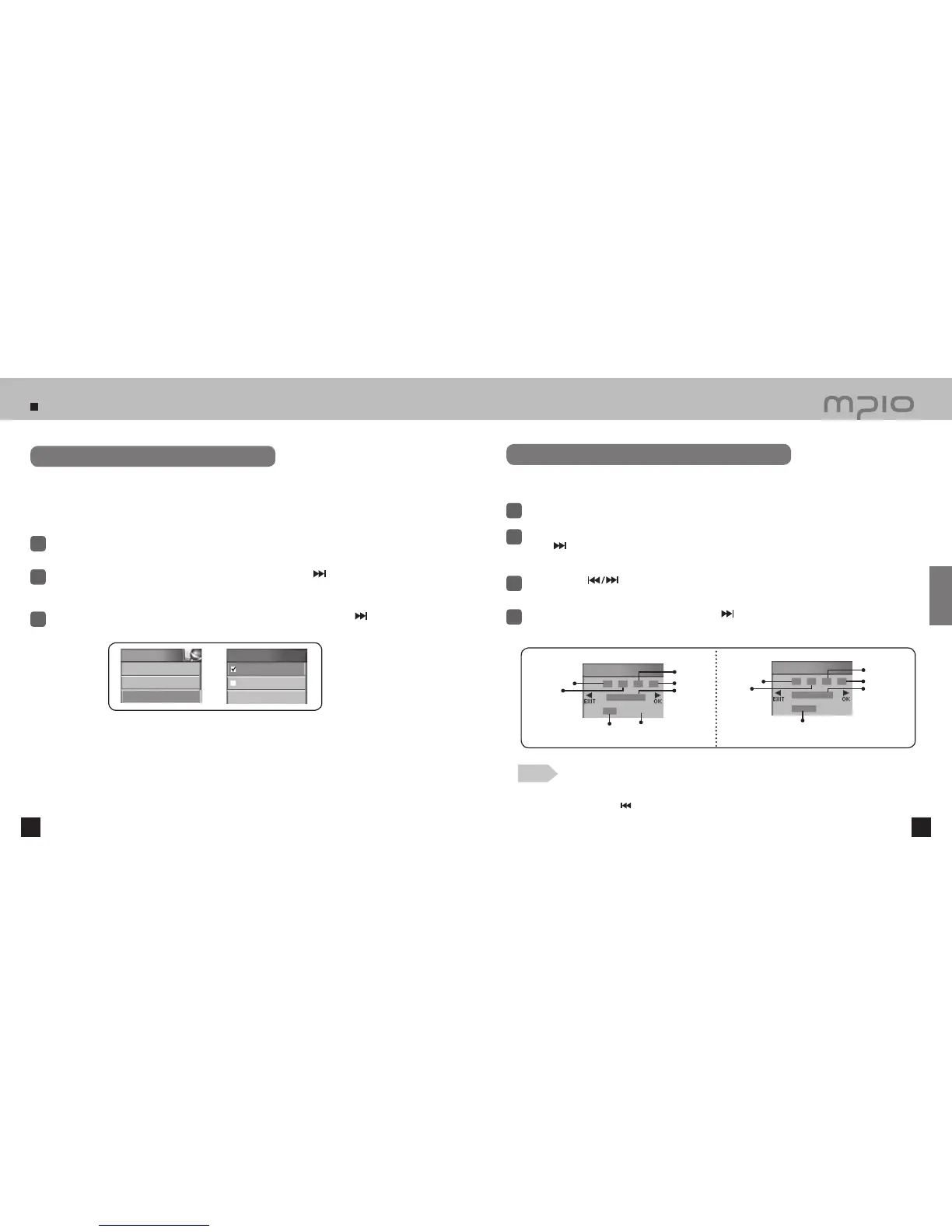
Setting Tuner Reservation / Voice Reservation
Select RECORD in the menu.
1
Push the lever in + /
-
directions to select Tuner Reservation or Voice Reservation. Push the
lever in
direction or press it to Enter.
●
Reservation screen will appear on the LCD screen.
2
Tuner Reservation / Voice Reservation function allows the user to reserve date, time,
frequency and duration for recording.
Push the lever in
directions to move the cursor and then, push the lever in + /
-
directions to
set the date, time, frequency and duration.
3
When finished, save the setting by pushing the lever in
direction toward OK. Pressing the lever
shortly will also save the setting. After saving, the device will return to its previous menu.
4
Note
●
Canceling reserved settings
Push the lever towards the
direction and move to the Exit direction to cancel the reservation settings.
RECORD
4. VAD
5. Autosync
6. ALC
ALC
On
Off
Tuner Reservation
00
AM
00
`
00
87.50MHz
001
OFF
Minute
Hour
Day
AM/PM
Frequency
Reserved recording time
(minute)
Save Setting (ON/OFF)
Voice Reservation
00
AM
00
00
001 MIN
OFF
Minute
Hour
Day
AM/PM
Save Setting (ON/OFF)
Usage
Reserved
recording time
(minute)



 To Next Page