Formatting
86 87
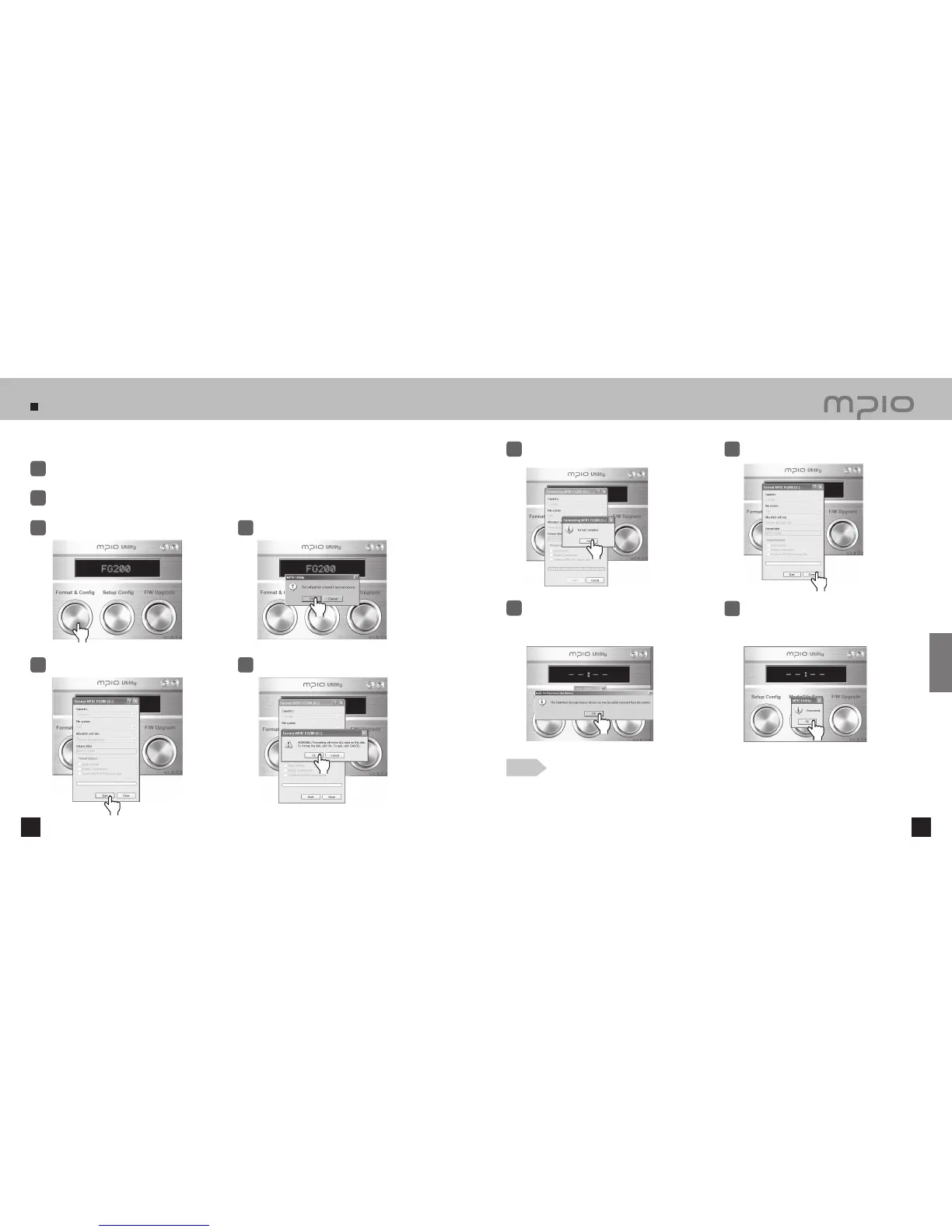
You can format FG200 from a Windows PC using MPIO Utility.
Connect the player to the PC USB terminal while the power is on, using the USB cable.
1
Double-click MPIO Utility icon in your desktop.
2
Click the [Format & Config] button.
3
Click
Click the [ OK ] button.
4
Click the [ Start ] button.
5
Click the [ OK ] button.
6
When formatting is complete, click the [ OK ]
button.
●
The captured screens of MPIO Utility may vary for the user’s PC environment.
●
MPIO Utility cannot be run under MAC OS.
●
For information regarding MPIO Utility installation, refer to [Installing the software]
on page 15.
7
Click the [ Close ] button.
8
Click the [ OK ] button after the “Safely
Remove Hardware” message appears as
shown.
9
After clicking the [ OK ] button, Format & Config
(Default Setting Restoration) is complete. You
may separate the device from the PC.
10
Note
Click
Click
Click
Click
Click
Click
Customer Support
Click



 To Next Page