10 Maintenance, inspection and care
97BA6820378-03 EN
Starting a quick test in normal operation
ü Device is not in the regeneration process (the silica gel is not being heat-
dried; the yellow LED is off).
► Briefly press the test button (hold down for ≤ 3 seconds).
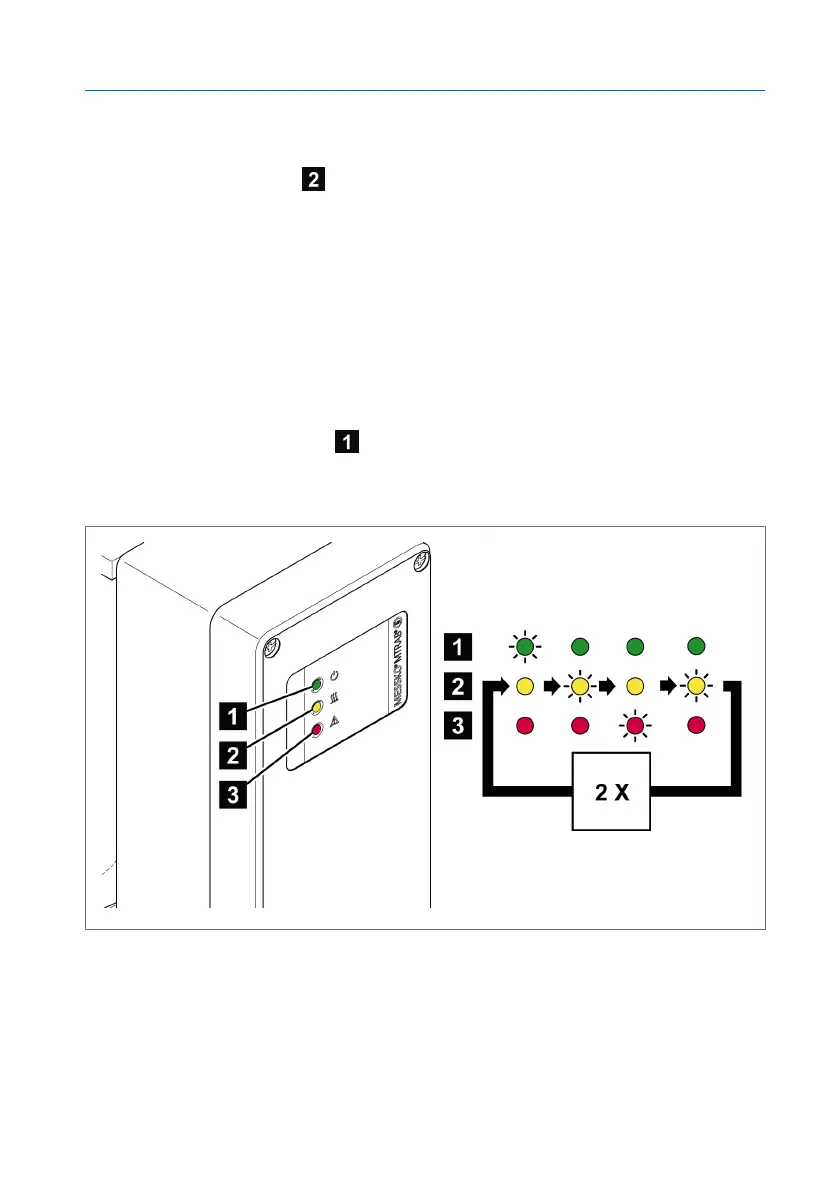
ð The start of the quick test is signaled by an LED sequence (see following
figure).
ð The code for the device humidity will be displayed via the LEDs (see ta-
ble) for 30 seconds.
► If necessary, make a note of the code for the humidity.
ð The end of the quick test is signaled by an LED sequence (see following
figure).
ð After this, the power LED alone is permanently lit in error-free opera-
tion.
Figure70: LED signal sequence at the beginning and end of the quick test
If the LEDs signal again or if an error is signaled over the device error signal-
ing relay, observe the chapter Error messages and troubleshooting
[►Section 9, Page 83].



 To Next Page