Probe Filter
•
The MSA sampling probe
contains a filter to:
•
block dust and dirt
•
block the passage
of water.
•
If the probe tip is
accidentally submerged in
water, the filter prevents
the water from reaching
the internal pump. The
filter is not designed to
stop other liquids, such as
gasoline or alcohols.
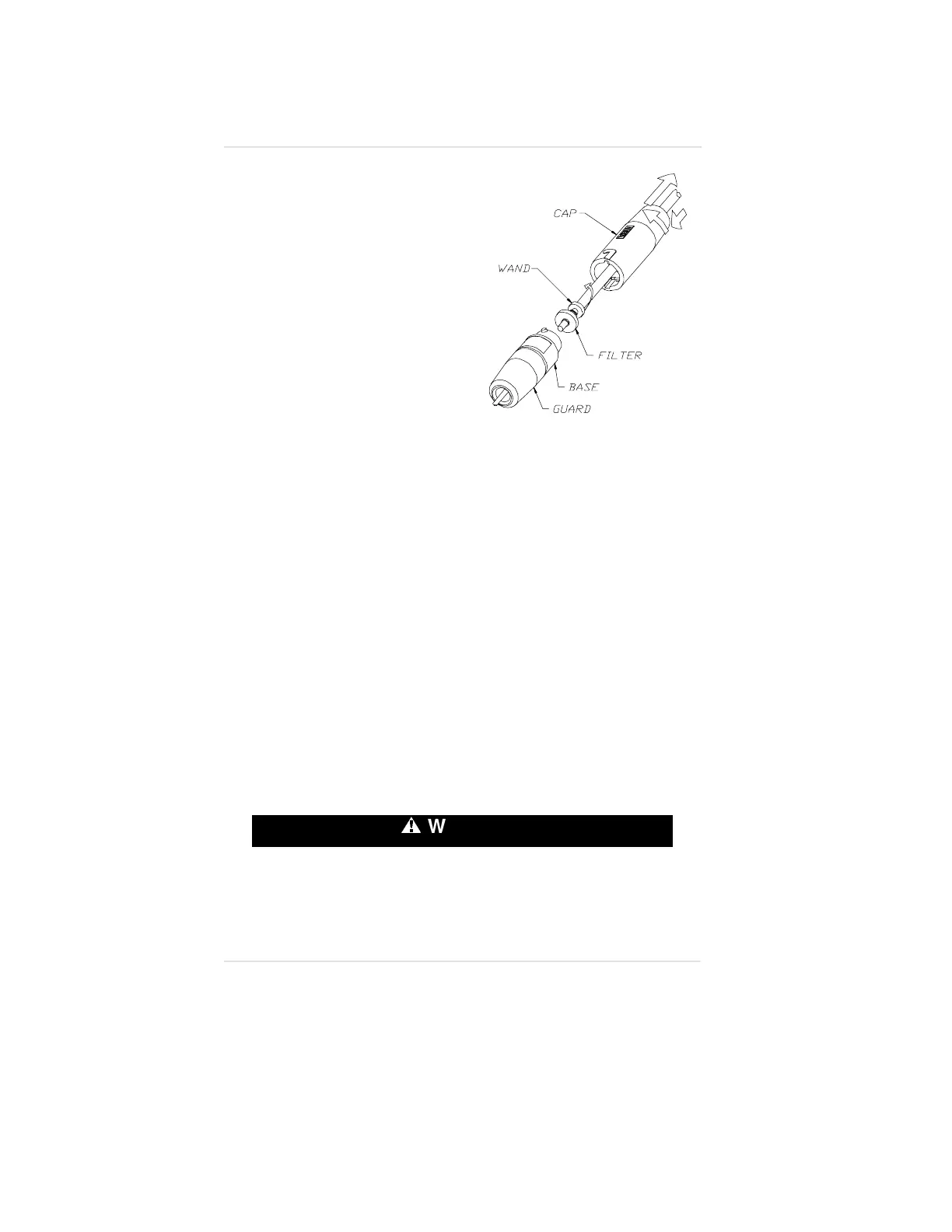
To Replace the Probe Filter
(FIGURE 6-1):
1. Grasp the probe handle by the base and guard.
2. Push the cap section toward the other two and turn clockwise.
•
The spring pushes the sections apart.
3. Grasp and spin the wand clockwise while pulling to disengage.
4. Remove the water trap filter (P/N 801582) and replace.
Storage
•
When not in use, store your Orion Multigas Detector in a safe,
dry place between -5
o
and 40
o
C (23
o
and 104
o
F).
•
The Orion Multigas Detector with the NiMH rechargeable
battery pack can be stored on charge indefinitely.
º
WARNING
After storage, always recheck instrument calibration before
use. During storage, sensors may drift or become inoperative
and may not provide warnings of dangers to the health and
lives of users.
Figure 6-1. Replacing the Probe
Filter
Chapter 6, Warranty, Maintenance and Troubleshooting Operating Manual
6-6


 To Next Page