English
Tester MS016
18
WARNING! The test mode (Fig.9) should correspond to the type of the tested voltage regulator.
Connect both cable MS-33502 and a power unit equipped with «Quick Charge 2.0» to the tester
through USB Type-C port to launch the diagnostic procedure.
WARNING! If the connected power unit doesn’t feature «Quick Charge 2.0», the tester can test
12V voltage regulators only.
WARNING! Operation of some TM Bosch voltage regulators requires a heavy current, the tester
cannot deliver. Voltage regulators of this type cannot be tested.
4.1. Voltage regulator connection
Assessment of the voltage regulator operability requires a proper connection of the diagnostic
cable to the voltage regulator.
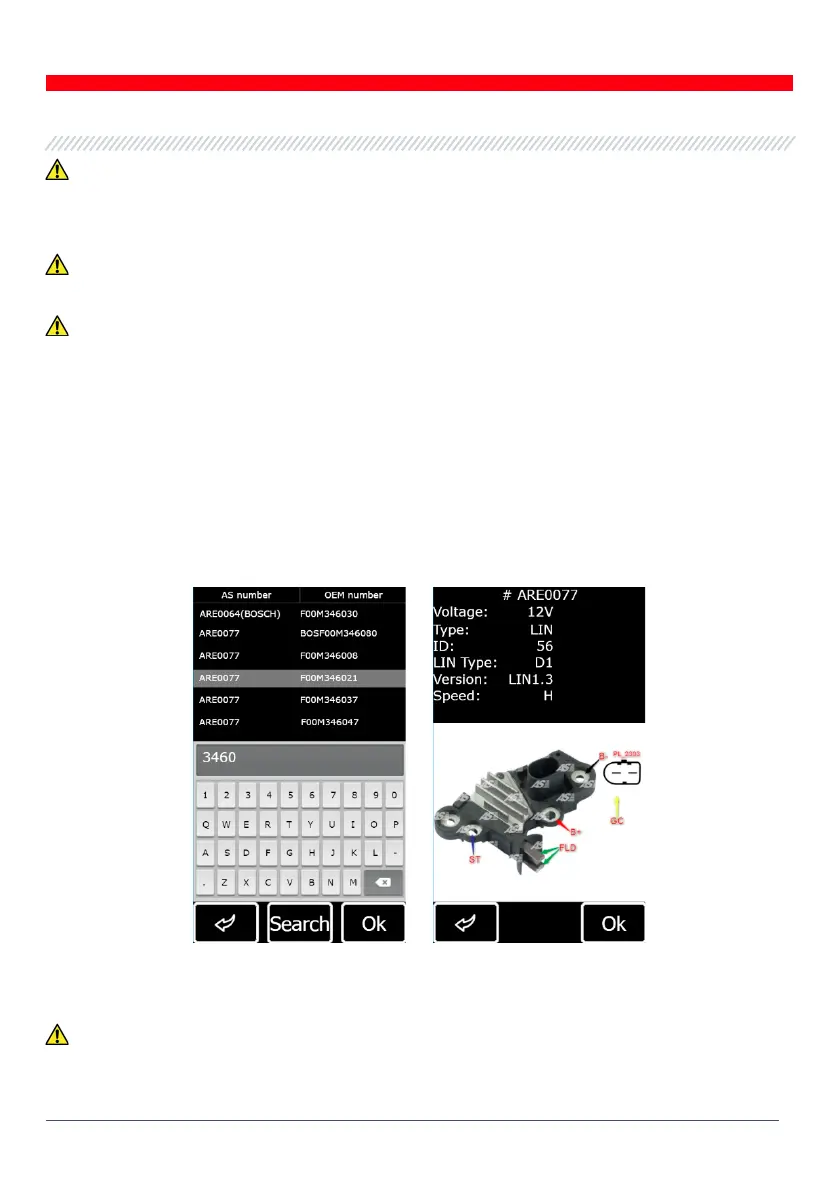
Use the voltage regulator OEM number to search the terminal markings against the database
(Fig.17).
Figure 17 - Voltage regulator search against the database and search results
Connect the diagnostic cable to the voltage regulator as shown on the diagram.
WARNING! To avoid damage (failure) to the voltage regulator, extra care should be taken when
connecting the cable clips to the contacts in the terminals. Use either a well-insulated clip (Fig.18)
or a proper adapter cable (Fig.5).


 To Next Page