-15-
5.4 Setup Utility
5.4.1 Channel Setup Properties
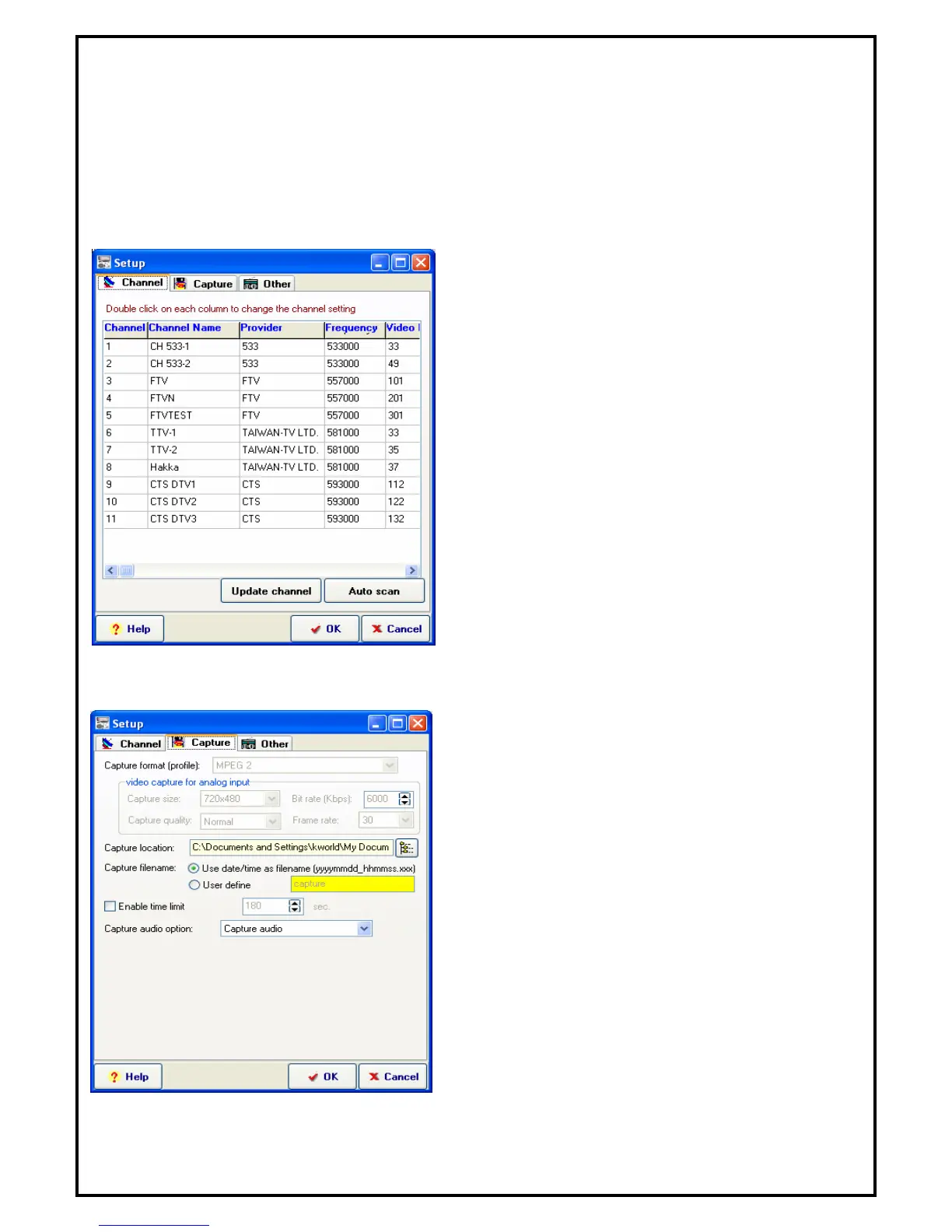
The “Channel Setup” property page allows users to customize and configure TV channels and edit users’
favorite channels by grouping them. Signals from satellite dish can be scanned for channels automatically
and users can label and identify their favorite channels, as well as include or exclude channels from the
scanned channels list. Channel settings such as Channel Name, Provider and frequency fine tune can be
changed by double clicking on the selected channel.
Update Channel: Please select the channel you want
to see and click “Update Channel”.
Auto Scan: Click the button to start Auto-scan
function.
5.4.2 Capture Setup Properties
Video capture: When you select the DVB-T as the
capture source, you can only use MPEG2 as capture
format.
Capture location: Setting your capture folder.
Capture filename: Setting your capture file name.
You can choose “User date/time” as filename or
define by yourself.
Enable time limit: To limit your record time.
Capture audio device: You can select “Capture
audio”, “Capture audio only, No Video” or “no
audio”.


 To Next Page