-22-
Chapter 6 : MPEG Encoder
6.1 User Interface
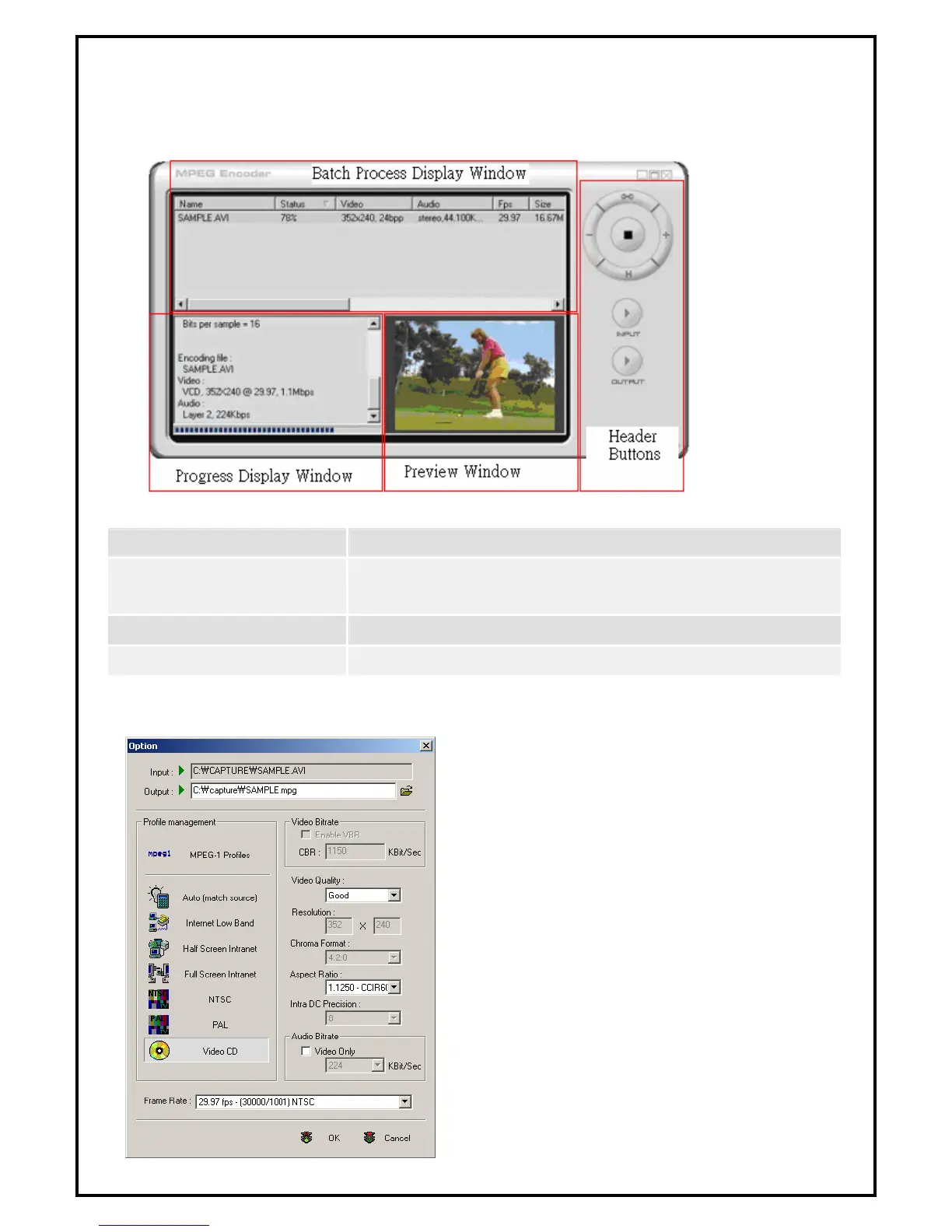
Fig. 6.1 is an example of how the main panel looks like when executing MPEG Encoder:
Fig. 6.1
The main panel is composed of four segments. Refer to Fig. 6.1
Header Buttons
Add input files; Delete files; Edit options; Start and Stop transcoding.
Batch Process Display Window
Displays file name, encoding status, screen size and play time of files
to be transcoded.
Progress Display Window
Displays formatting information about the file being transcoded.
Preview Display Window
Displays the video of the file being transcoded.
6.2 Practice Streaming Video File Format Conversion
MPEG Encoder 5.0 transcodes multimedia files between
video formats. For multimedia files to be transcoded using
Encoder 5.0, they must be playable under Windows Media
Player. File formats that can be transcoded are: AVI,
DV-AVI, MPEG 1, MPEG 2, ASF, WMV, DivX, and
DAT.
Fig. 6.2


 To Next Page