-33-
FAQ 2 : How to capture video clip in MPEG4 format?
If you use other capture source such as composite or S-Video, you could record video clips in MPEG 4.
(When you select DVB-T as the capture source, you can’t be able to capture video in MPEG 4 format.)
Please follow the following steps to record files in MPEG 4 format.
Step 1: We provide two kinds of MPEG 4 format, Microsoft and DivX.
Please download the MPEG 4 Codec from Internet.
DivX: http://www.divx.com/
Microsoft: http://www.microsoft.com
Step 2: Install the MPEG 4 codec
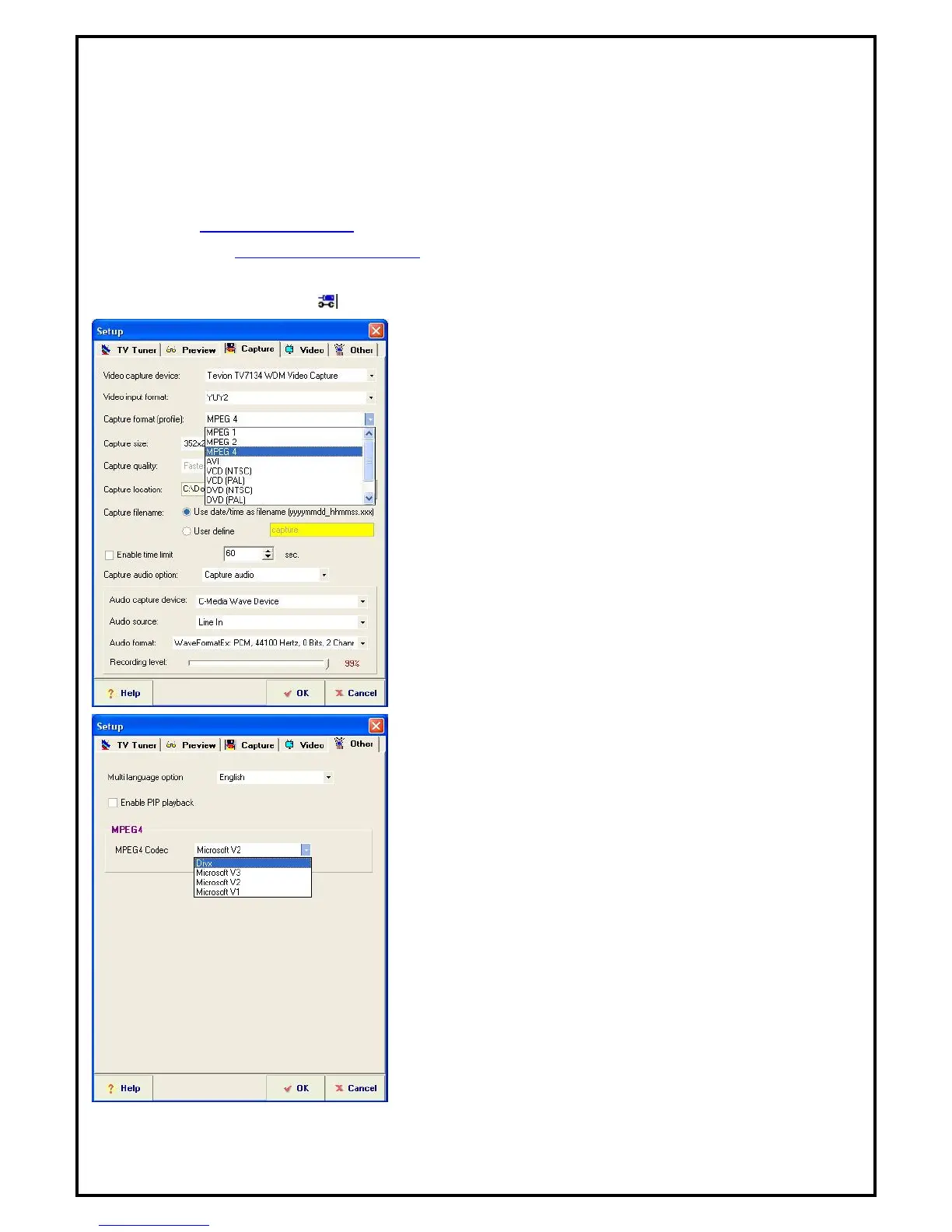
Step 3: Click the setup button, ( ) and enter the capture setting. Select MPEG 4 as the recording format.
Step 4: Go to the other setting. Select the MPEG 4 codec you
want to use, Microsoft or DivX.
Step 5: When you finish the setting, please click “OK” to save
your setting. Then you can use the record function to capture TV
programs in MPEG 4 format.



 To Previous Page