-20-
5.10 Pop-Up Menu
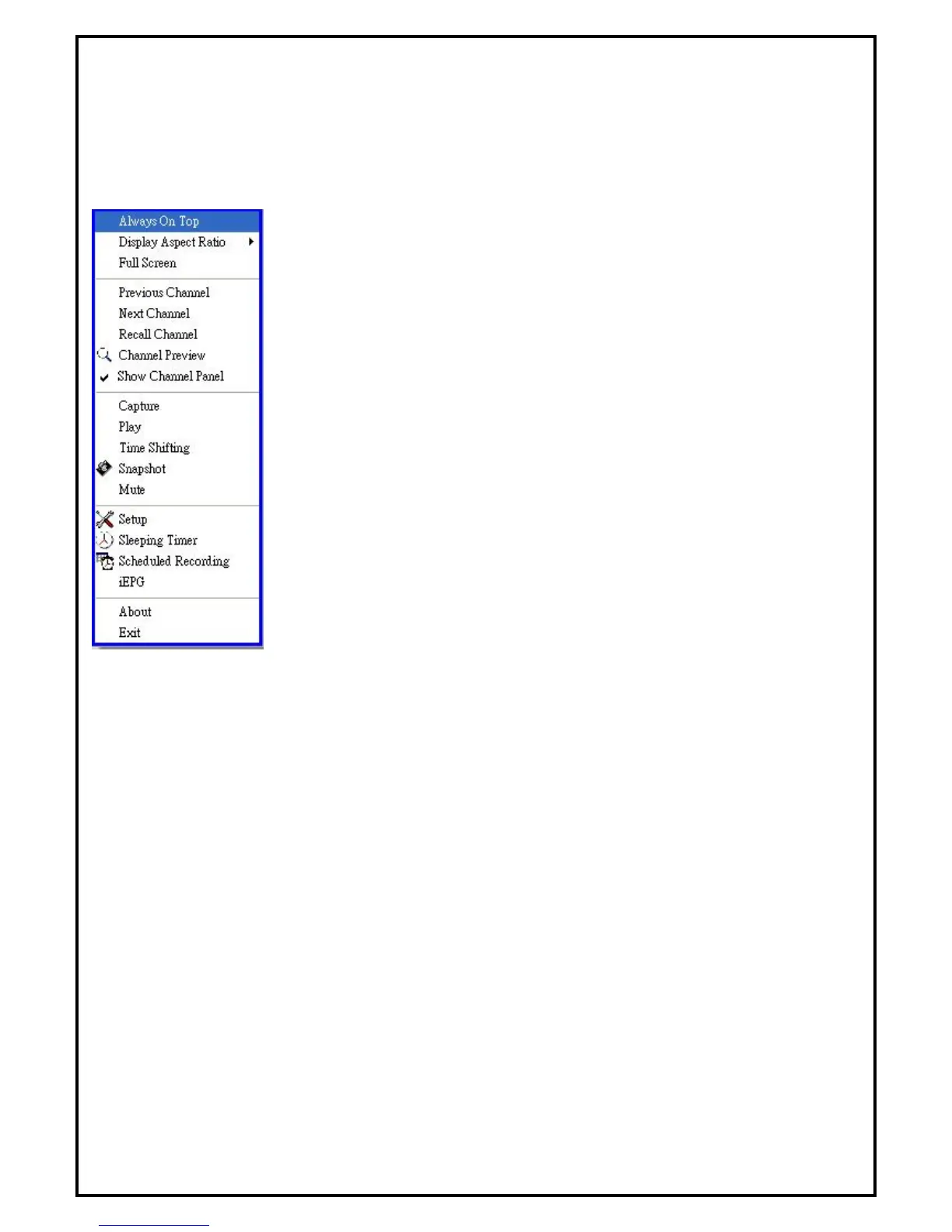
When running DTVR, you can move the cursor onto the display window or control panel and right-click the
mouse for the menu to pop-up. This menu will also appear when you press the [F12] key on your keyboard.
The commands on this right-click menu are the same as those on the DTVR control panel, along with some
extra options added.
Always On Top - Set display window to topmost
Display Aspect Ratio - Sets the aspect ratio of the display window (Free, 4:3
or 16:9)
Full Screen - Switch to full screen or restore to normal window
Previous Channel - Go to previous available channel
Next Channel - Go to next available channel
Recall Channel - Go back to last selected channel
Channel Preview - Browse available channels as sub-window
Show Channel Panel – Show available channels as sub-window
Capture - Start recording video
Play - Start playback of recorded program
Time shifting - Start time shifting
Snapshot - Capture still images of current picture
Mute - Mute or restore sound
Setup - Open DTVR setup window
Sleeping Timer - Set sleeping timer on/off
Schedule Recording - Open scheduling recordings
iEPG - Use the iEPG function to preset record programs from internet
About - Show version and copyright information
Exit - Exit DTVR


 To Next Page