-18-
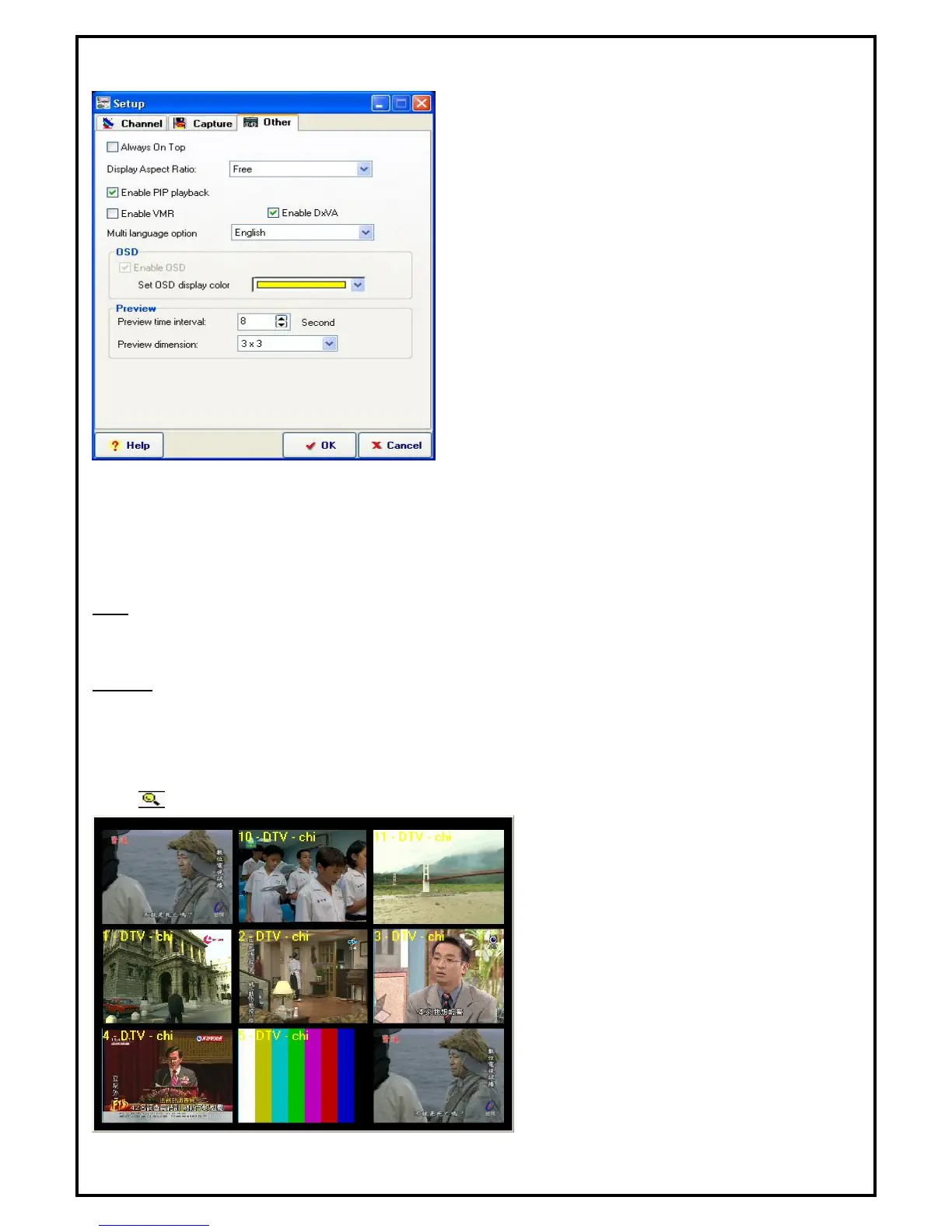
5.5.3 Other Function
Always on Top: The preview window will always be on
top.
Display Aspect Ration: You can change the display
aspect ratio to 4 : 3 , 16 : 9 or free mode.
Enable PIP playback: Enable the Picture-In-Picture
function while playing back files.
Enable VMR: If your VGA card supports VMR, please
use it as the display mode. If your VGA card doesn’t
support VMR, please disable this function.
Enable DXVA: DXVA (DirectX VA) is the new
Microsoft standard API for accelerating video rendering
under DirectShow. If your VGA card supports hardware that can accelerate MPEG2 video playback, please
enable this function for better video playback performance, and reduce the amount of CPU usage. Your
display window will be smoother when you enable this function.
Multi language option: To select the different language interface on line.
OSD
Enable OSD: Enables OSD function.
Set OSD display color: Set the On Screen Display’s font color.
Preview
Preview time interval: Setting the interval time. The minimized value is 8 seconds.
Preview dimension: To select the Preview dimension as 2x2, 3x3, 4x4 or 5x5.
5.6 Channel Preview
Click from the control panel or choose "Channel Preview" on popup menu.
While in channel preview mode, use the arrow
keys on the keyboard and press “Enter” or
double click the left button on the mouse to
exit the preview mode and watch the selected
channel.


 To Next Page