-17-
5.5 Setup Utility for composite and S-Video
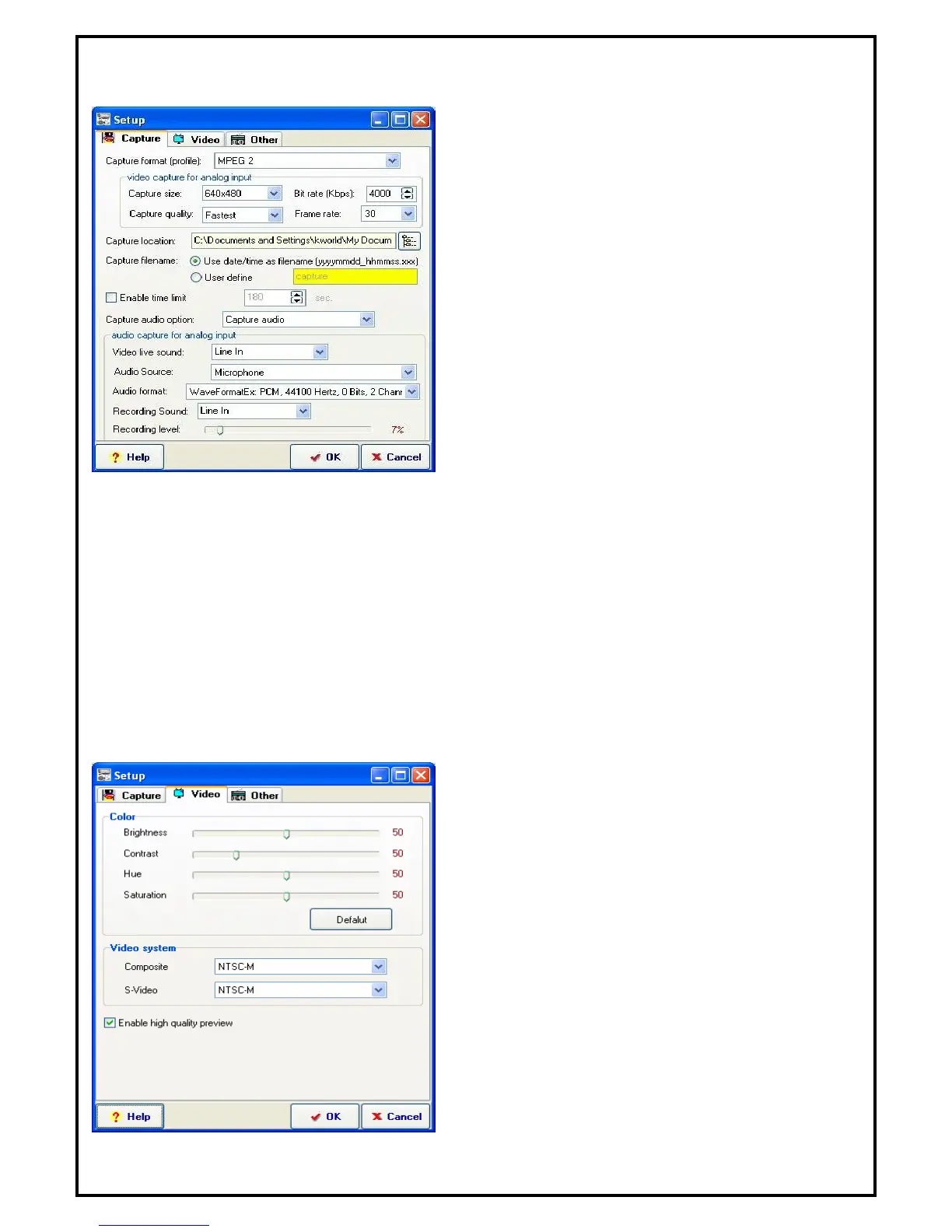
5.5.1 Capture Setup Function
Capture format (profile) :
Settings for the video format in which you want to record
the files in.
Video Capture for analog input :
Capture Size: Setting video capture size.
Bite Rate (Kbps): Setting capture bite rate.
Capture quality: Setting capture quality.
Frame Rate: Setting capture frame rate.
Capture location: Setting your capture folder.
Capture filename: Setting your capture file name.
You can choose “User date/time” as filename or
define by yourself.
Enable time limit: To limit your record time.
Capture audio device: You can select “Capture audio”, “Capture audio only, No Video” or “no audio”.
If you select “Capture audio only, No Video”, you can capture the file as WAV or MP3 format.
Audio Capture for analog input :
Video live sound: External audio source input port.
Audio Source: To setting where the audio source. (Recommend using Line in.)
Audio format: Setting your audio capture format.
Recording Sound: External audio source input port
Recording level: Setting your audio capture volume level
5.5.2 Video Setup properties
Color: Brightness, contrast, hue and saturation
adjustment.
Video System: Sets the system format for the input
sources from composite video and S-Video
Enable high quality preview: Enables high quality
preview mode


 To Next Page