-32-
Chapter 9 : FAQ
FAQ 1 : How do I use the “Schedule Record in Power-Off mode (SRPO)” function?
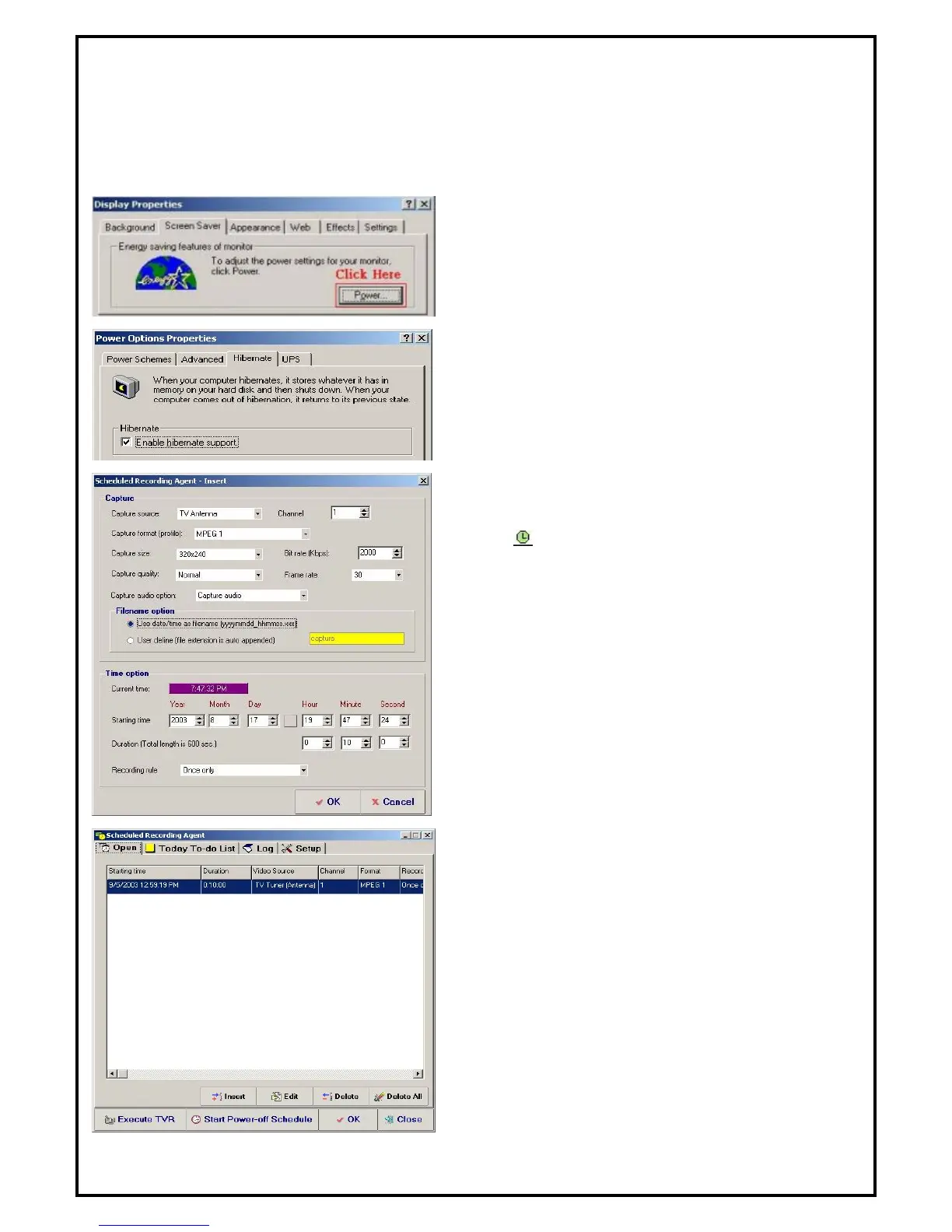
ANS: Before you use the power-off schedule recording function, please make sure your system can support
hibernate function.
Enter to the “Display Properties” and choose “Screen
Saver”.
Click the “Power” button to and enter to the Hibernate”
function. You would see the option “Enable hibernate
support”. Check the box to activate the settings of
“Schedule Recording in Power-Off” function.
Click on to start setting the Schedule Recording
Properties. After you finish the setting, please click the
“OK” to the next step.
Then you would see your setting in the schedule. If you
want to use power-off schedule recording now, click on
the “Start Power-off Schedule” button. A confirmation
message will pop up to confirm if you want to shutdown
system. If you click “YES”, the system will shutdown
immediately. PC will be turned back on automatically few
minutes prior to the recording schedule.
.



 To Next Page