Operation Instructions Spitfire 65/90 Extreme
CHAPTER 2 : PRODUCT OVERVIEW
16 AP-77140 – Rev. 1.1 – 05/04/07
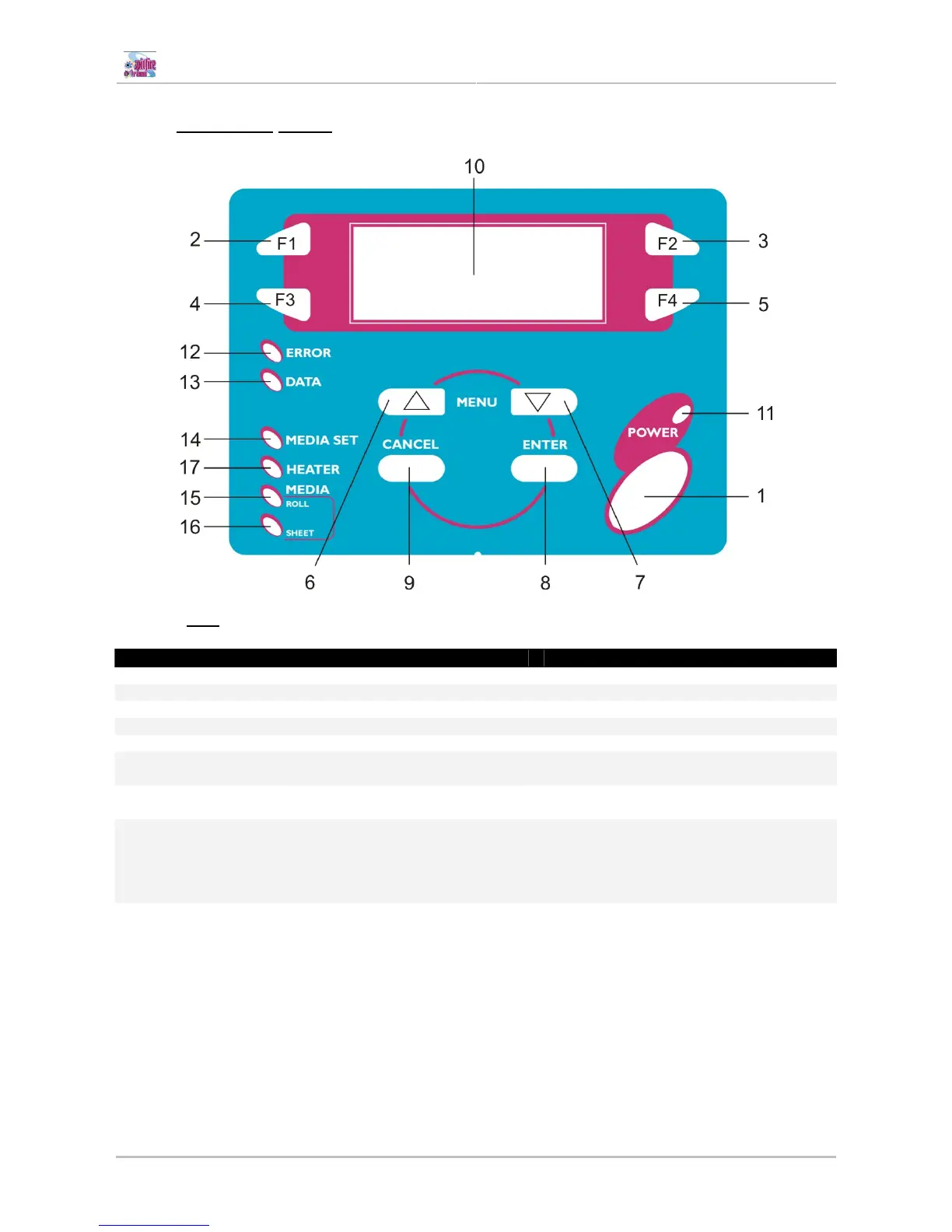
2.1.4 Operation panel
2.1.4.1 Keys
No Name Normal Setup menu display
1
[POWER] key Switch the printer ON and OFF Switch the printer ON and OFF
2
[F1] key Executes the function assigned to F1. Executes the function assigned to F1.
3
[F2] key Executes the function assigned to F2. Executes the function assigned to F2.
4
[F3] key Executes the function assigned to F3. Executes the function assigned to F3.
5
[F4] key Executes the function assigned to F4. Executes the function assigned to F4.
6
[MENU ↑] key
Changes the LCD monitor display to
the setup menu status.
Changes the menu in reverse order.
7
[MENU ↓] key
Changes the LCD monitor display to
setup menu status.
Changes the menu in forward order.
8
[ENTER] key Displays the print mode currently set. Determines the new parameter value and
changes the LCD monitor display to the
next menu. Sets the parameter value and
changes the LCD monitor display to the
next menu.
9
[CANCEL] key - Cancels the new parameter value and
changes the LCD monitor display to the
next menu. Clears the parameter value
and changes the LCD monitor display to
the next menu.















 To Next Page