Operation Instructions Spitfire 65/90 Extreme
CHAPTER 6 : PRINTER MENU
64 AP-77140 – Rev. 1.1 – 05/04/07
6.3 OPERATION PANEL DURING PRINTING
When sending a file to your printer, following messages can be displayed.
6.3.1 When heaters are not ready
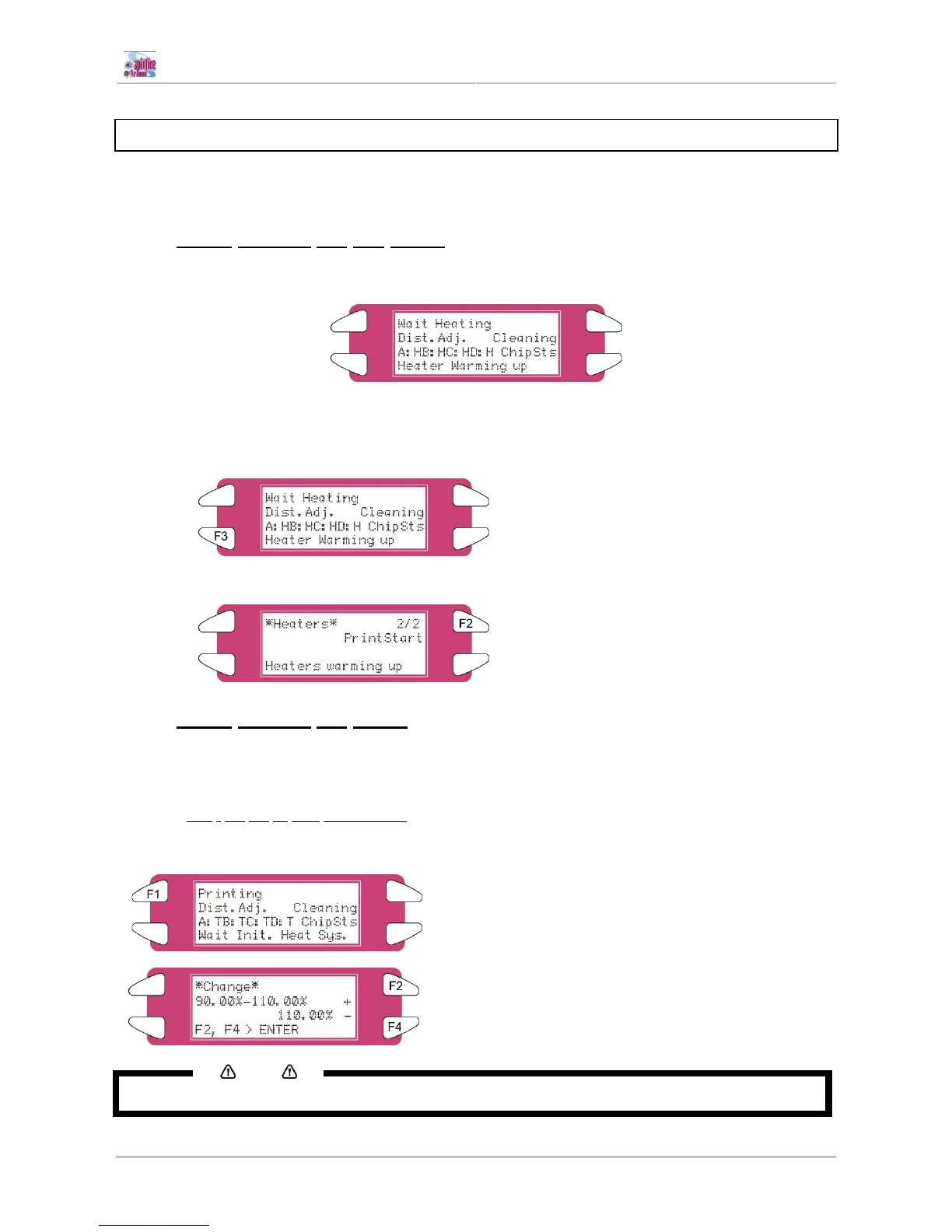
When the heaters are not reached their target temperature, the following screen will be displayed.
Still, it is possible to start the print. However, the heater will continue to warm up in order to reach the
requested temperature.
Step 1 : Press the F3 key to ENTER the HeaterStatus menu.
Step 2 : Go to submenu 2/2 and press the F2 key to start the print.
6.3.2 When heaters are ready
When heaters are ready, the printer will start printing.
While printing, some actions can be taken.
6.3.2.1 [F1] - On the fly step adjustments.
In case of overlapped printing images or white lines on printing image, the step should be adjusted.
(+) Increase in case of overlap
(-) Decrease in case of white lines between swats
Notes
For more details about step adjustment, please refer to “Media Feed Compensation”















 To Next Page