Operation Instructions Spitfire 65/90 Extreme
CHAPTER 4 : PERIODICAL MAINTENANCE
42 AP-77140 – Rev. 1.1 – 05/04/07
4.1.3 Monthly Maintenance
4.1.3.1 Replacing
the wipers
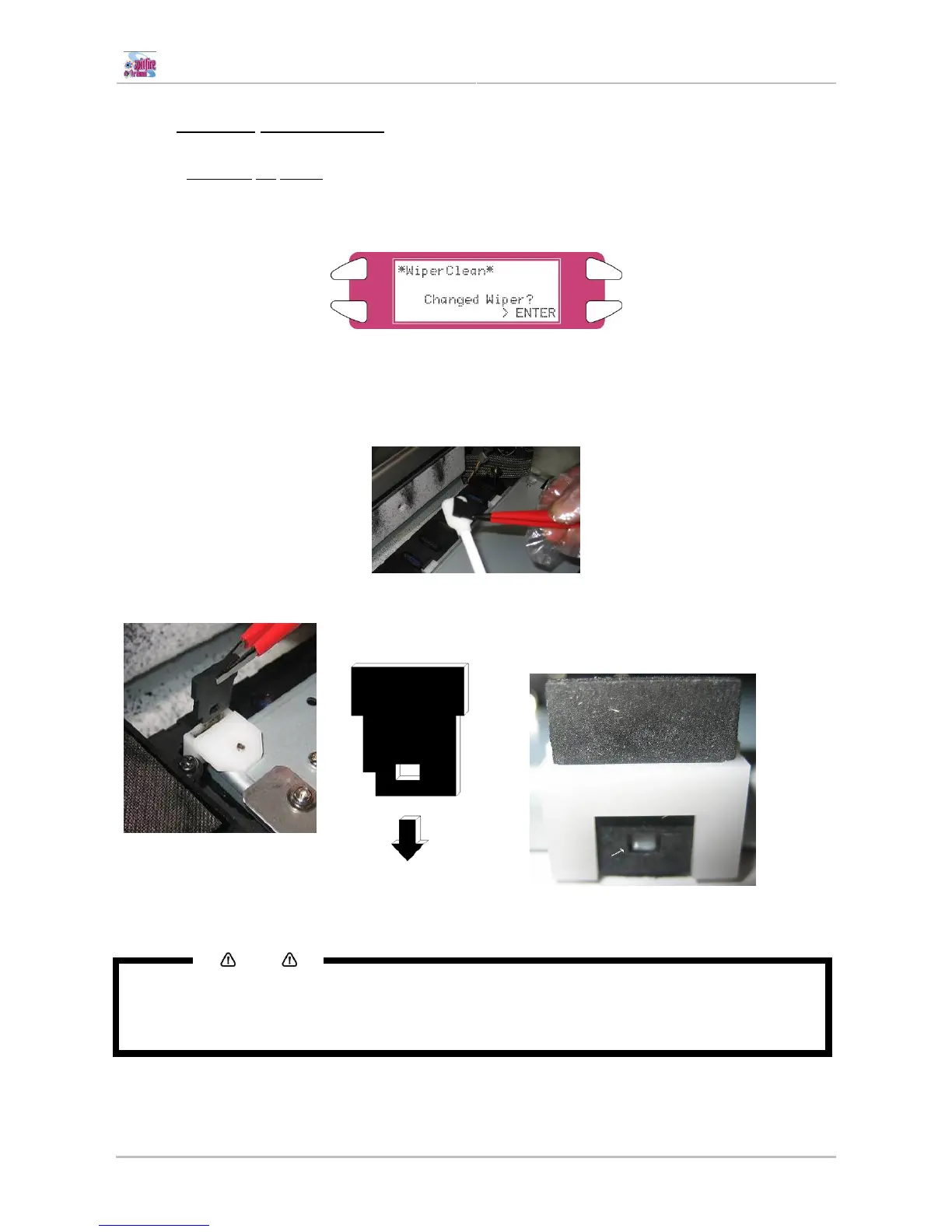
Step 1 : Power ON the printer and go to the “WiperClean-Menu”. This will cause the unlocking of the
carriage.
Step 2 : Slide the carriage to the left side of the machine.
Step 3 : Remove the old wipers with a pair of tweezers
Step 4 : Before inserting a new wiper, moisten the wiper with Spitfire Cleaning Liquid.
Step 5 : Insert the moistened wiper with a pair of tweezers.
Be sure to insert the wiper
correctly as shown below:
When standing in front of
the machine.
Be sure that the wiper clicks in the wiper
holder!
Step 6 : Close the front cover and press the [ENTER] key. The head will cap in.
Notes
• Be careful not to break the lips of the wiper arm while installing the wipers.
• Do not touch the wipers with your bare hands to avoid fat or dirt get in contact with the wipers and
automatically the nozzle plate. Use a pair of tweezers to avoid this. Clean wipers with appropriate
cleaning liquid in case of dirt.















 To Next Page