Operation Instructions Spitfire 65/90 Extreme
CHAPTER 3 : BASICS
32 AP-77140 – Rev. 1.1 – 05/04/07
3.6.2 Selecting the correct modes
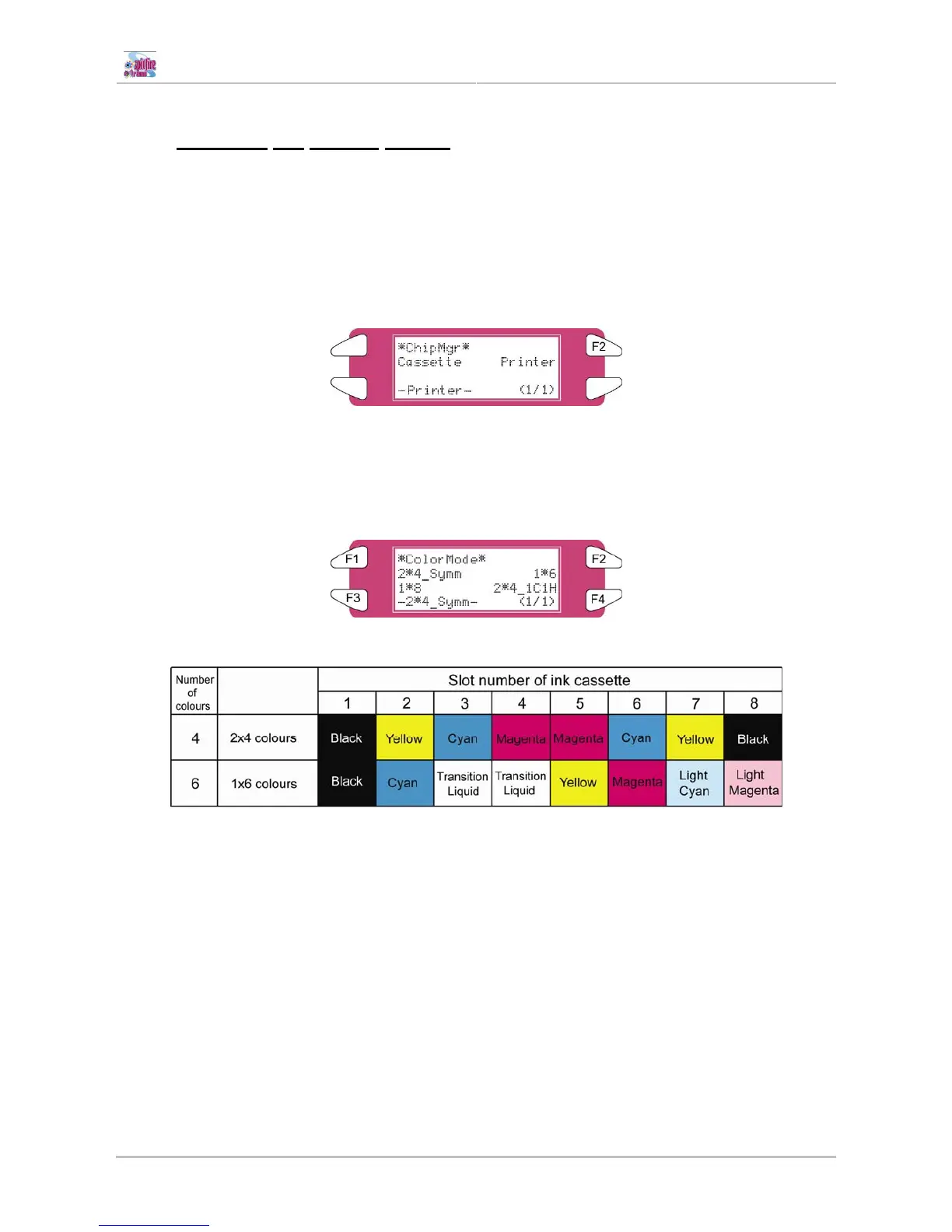
Depending on printing with ink cassettes or with a bulk ink system, the ink volume has to be transferred in a
different way. You can choose between printer and cassette mode in the ChipManager menu:
Please follow the steps to switch between the two modes:
Step 1 : Power ON the unit.
Step 2 : Go to InkManager → ChipMgr to choose between printer and cassette mode
Step 3 : When you have selected cassette mode, you are ready to print, no further settings should be
made.
Step 4 : When you have selected printer mode, the colour mode should be set.
Go to SetupMenu 5/7 ► InkManager ► ColorMode
Step 5 : Choose between 2*4_Symm or 1*6















 To Next Page