Operation Instructions Spitfire 65/90 Extreme
CHAPTER 4 : PERIODICAL MAINTENANCE
46 AP-77140 – Rev. 1.1 – 05/04/07
4.1.4.3 Head cleaning
If printouts become faint or partially missed, perform head cleaning to clean the surface of the head and the
nozzles.
Follow the steps below to perform head cleaning.
Step 1 : Make sure that the state of the product is normal.
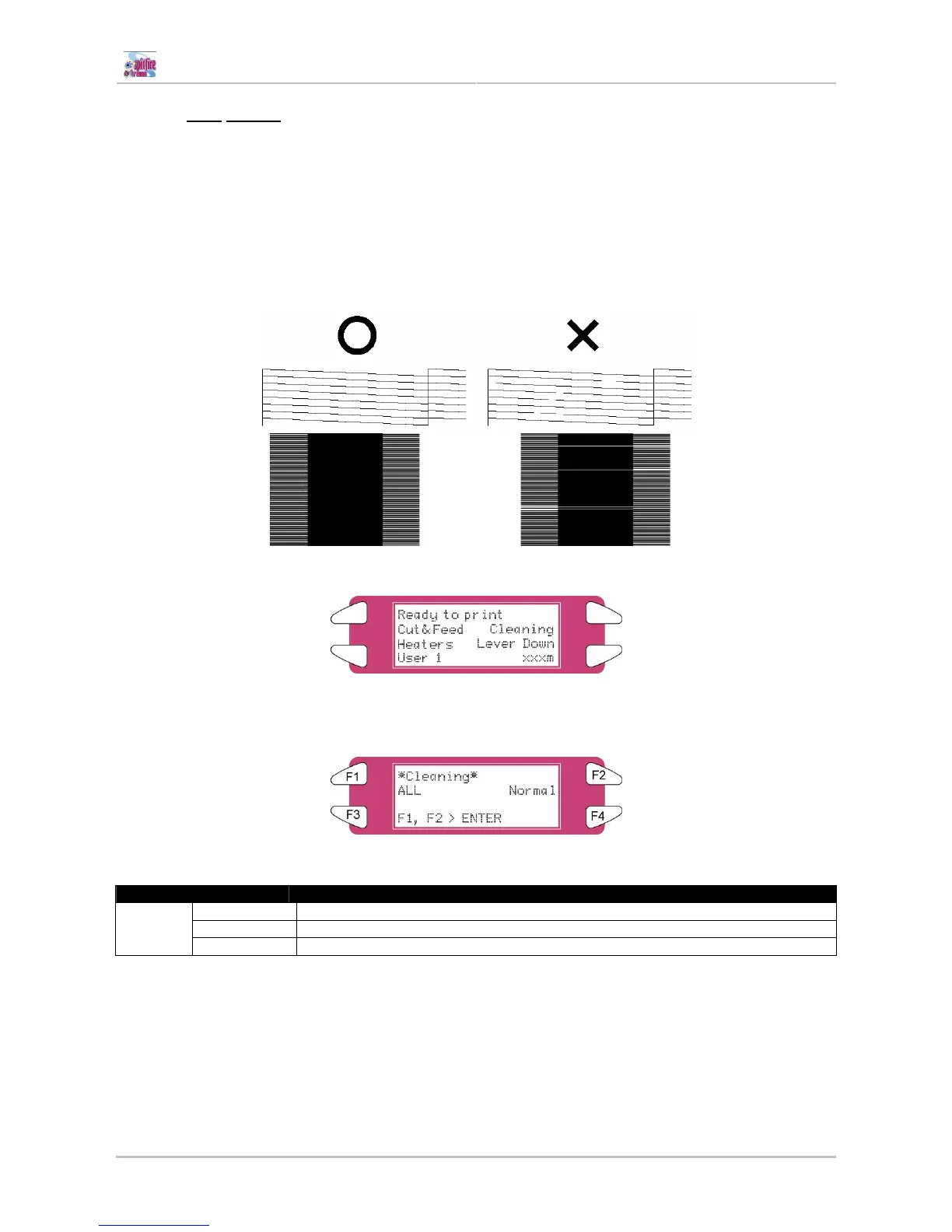
Step 2 : Refer to "TestPrinting" to perform nozzle check printing.
Step 3 : Check if the print head, referring to the diagram below.
Step 4 : Check the printer is in the main screen.
Step 5 : Press the [F2] key on the operation panel.
I) The printer enters the cleaning menu.
Step 6 : Press the [F2] key on the operation panel to change the parameters.
Key Parameter Description
Small Small cleaning is performed.
Normal Normal cleaning is performed.
F2
Strong Strong cleaning is performed.
Step 7 : Press the [ENTER] key on the operation panel to start the head cleaning.
Step 8 : When the head cleaning has been completed, the printer returns to the main screen.
Step 9 : Perform a nozzle check again and check the print head.















 To Next Page