4.7 Error check delay for EtherNet/IP
4-30
4.7 Error check delay for EtherNet/IP
Due to the specification of EtherNet/IP device, it needs some time to wait for the establishment of EtherNet/IP
communication, for example at the timing of power on or initializing sequence. In this case, robot controller may
detect the error of “E960: Some or all I/O links are currently stopped”. In order to avoid this error, it is possible to
delay the error check timing.
IMPORTAN
When error check delay is used, it is possible to operate the robot before EtherNet/IP
communication is established. If any operation such as start is attempted in this period, robot
controller detects the error of “E960: Some or all I/O links are currently stopped” even before
elapsing of the error check delay time.
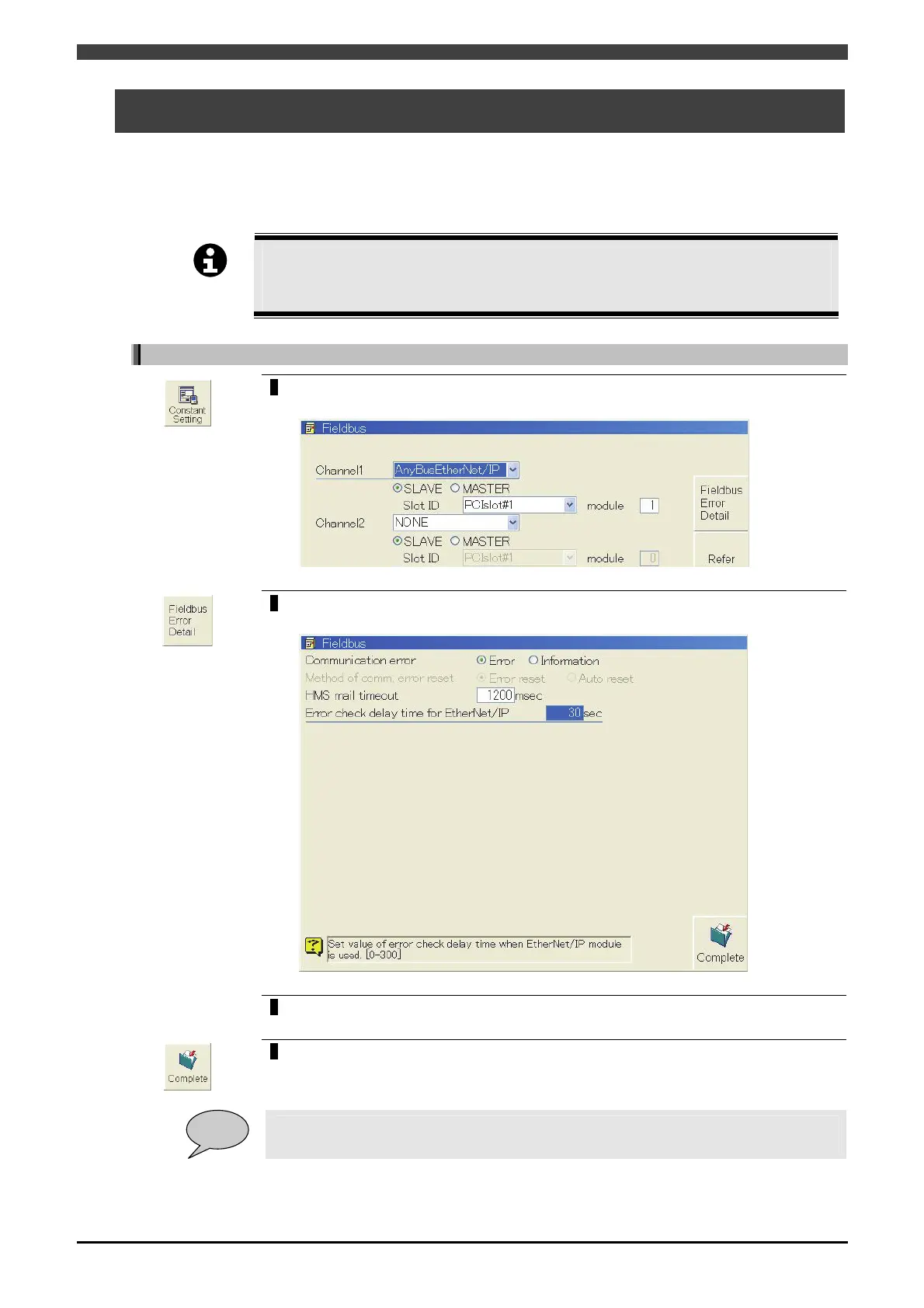
How to set the EtherNet/IP error check delay time
1
Open <Constant Settings> -[8 Communication] -[3 Fiedlbus].
>> The following screen will appear.
2
Press the f key <Fieldbus Error Detail>.
>> The following screen will appear.
3
Set the “EtherNet/IP error check delay time” and press [Enter] key.
4
Press the f key <Complete>.
POINT
At the timing of the EtherNet/IP communication establishment , “Fieldbus act.” output signal
is immediately turned on even before elapsing of the error check delay time.



 To Next Page