5.3 Detailed Field Bus Error Settings
5-4
5.3 Detailed Field Bus Error Settings
The following settings can be made regarding operations when an I/O link error occurs.
・Error type when a communication error occurs
・Communication error reset method for restoring communications
The setting method is given below.
1
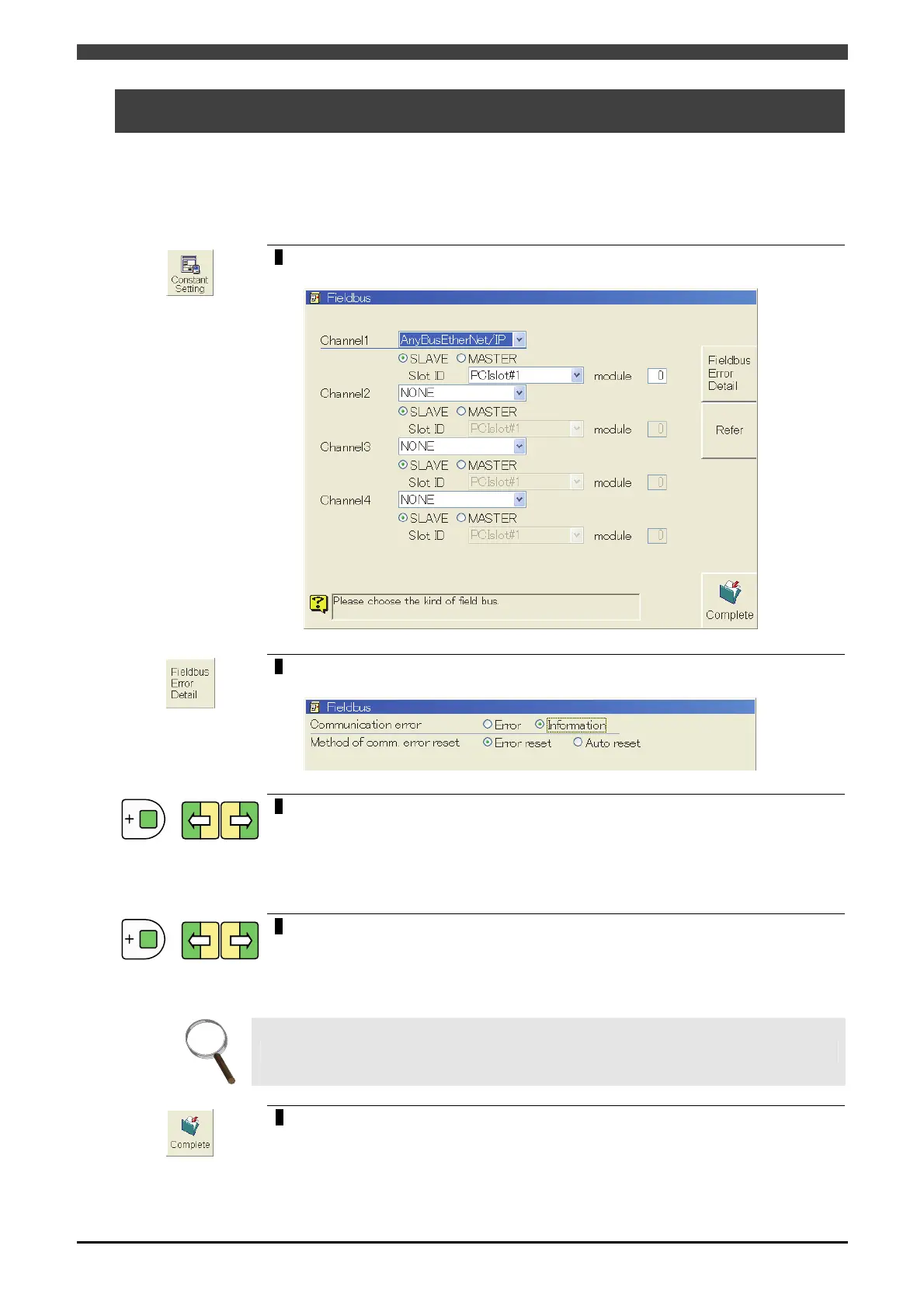
Open <Constant settings> - [8 Communications] - [3 Fieldbus] screen.
>> The following screen will appear.
2
Press the f-key < Fieldbus Error Detail>.
>> The following screen will appear.
+
3
Align the cursor with “Communication error” and Use the [Enable] + [Left] or
[Right] cursor keys to switch to the radio buttons (a horizontal row of selector
buttons), and select “Error” or “Information”.
>> When an I/O link error occurs;
・If “Error” is selected, E0960 is generated.
・If “Information” is selected, I3960 is generated.
+
4
Align the cursor with “Method of comm. error reset” and switch the radio
buttons, and select “Error reset” or “Auto reset”.
>> When recovering from a communication error;
・
If error reset is selected, a communication error is maintained until the system is reset.
・
If automatic reset is selected, a communication error is automatically reset.
INFO.
This item cannot be selected if “Communication error” is set to “error.”
5
Press the f-key < Complete > to save settings.



 To Next Page