Nasuni Edge Appliance Initial Configuration Guide 8.3 94
Overview
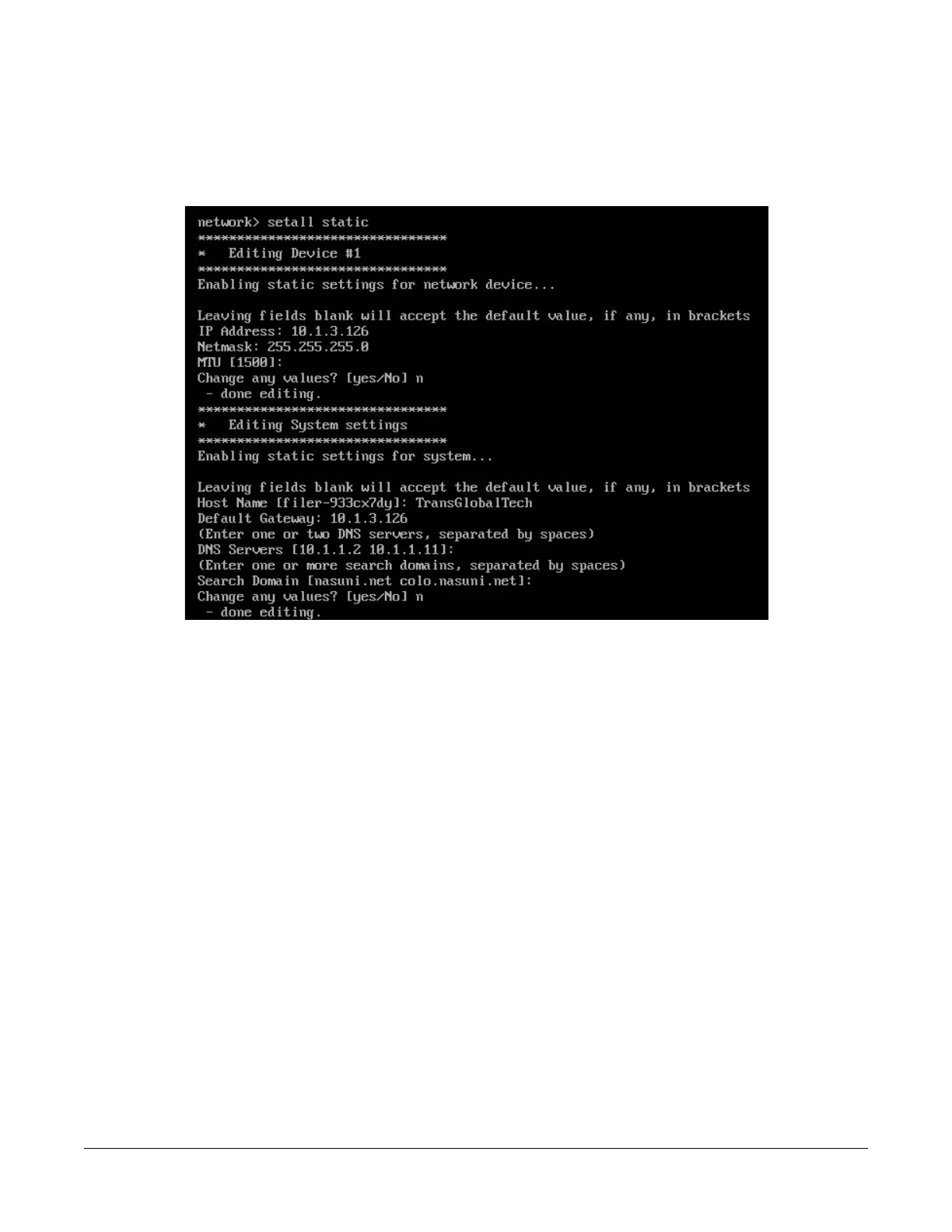
5. To use static settings for the network device and the system, enter the following command:
setall static
Press Enter. The setall static command runs:
Figure A-10: setall static command.
a. To change the IP address, enter a new IP address and press Enter. To leave the current IP
address unchanged, press Enter.
b. To change the netmask, enter a netmask and press Enter. To leave the current netmask
unchanged, press Enter.
c. To change the MTU, enter an MTU and press Enter. To leave the current MTU unchanged,
press Enter.
The maximum transmission unit (MTU) is the size (in bytes) of the largest protocol data unit
that the layer can pass onwards. A larger MTU brings greater efficiency, because each
packet carries more user data while protocol overheads, such as headers, remain fixed; the
resulting higher efficiency means a slight improvement in the bulk protocol throughput. A
larger MTU also means processing fewer packets for the same amount of data. However,
large packets can occupy a slow link for some time, causing greater delays to following
packets, and increasing lag and minimum latency.
d. To change any of the above values, enter yes, then use step a, step b, and step c to change
the values.
Alternatively, to leave the values unchanged, enter No or press Enter.
e. To change the hostname, enter a new hostname and press Enter. To leave the current
hostname unchanged, press Enter.



 To Next Page