Data Port Protocol
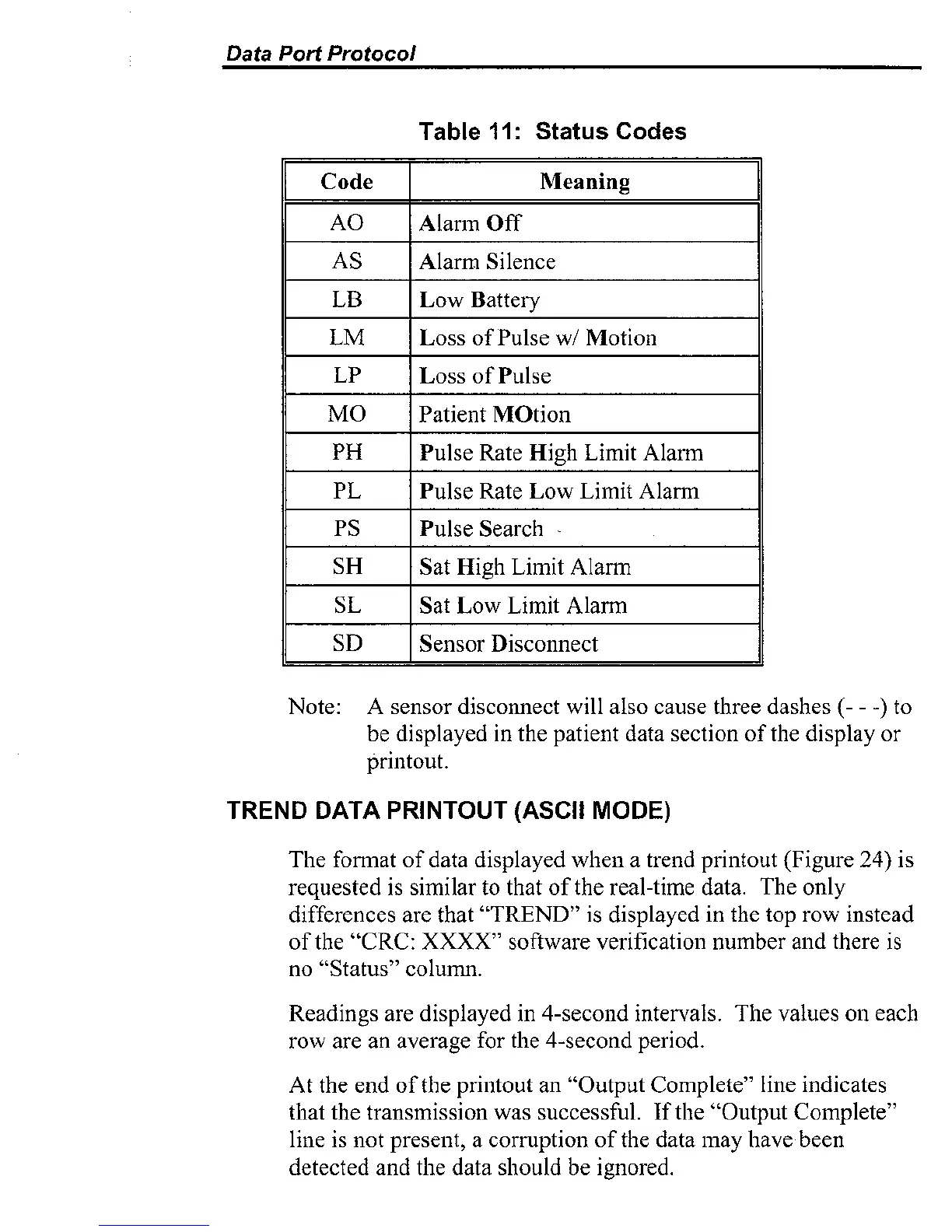
Table
4
1
:
Status Codes
11
AS
I
Alarm Silence
11
Code
A0
11
LB
I
Low Battery
Meaning
Alarin Off
11
LM
I
Loss of Pulse wl Motion
11
LP Loss of Pulse
MO Patient
MOtion
11
PH
I
Pulse Rate High Limit Alarm
11
PL
I
Pulse Rate Low Limit Alarm
11
PS
I
Pulse Search
-
11
SH
I
Sat High Limit Alarm
11
11
SL
I
Sat Low Limit Alarm
11
11
SD
I
Sensor Disconnect
11
Note:
A
sensor disconnect will also cause three dashes
(-
-
-)
to
be displayed in the patient data section of the display or
printout.
TREND DATA PRINTOUT (ASCII MODE)
The fornat of data displayed when a trend printout (Figure 24) is
requested is similar to that of the real-time data. The only
differences are that "TREND" is displayed in the top row instead
of the
"GRC:
XXXX"
software verification number and there is
no "Status"
columa.
Readings are displayed in 4-second intervals. The values on each
row are an average for the 4-second period.
At the
end of the printout an ""Output Complete" line indicates
that the transmission was successful. If the
"Output Complete"
line is
not present, a corruption of the data inay have been
detected and the data should be ignored.



 To Next Page