BTS User Manual
Neware Technology Ltd.
http://www.newarebattery.com
8.2. Tag Management
The variable management interface is mainly used to edit custom expressions or custom
functions.
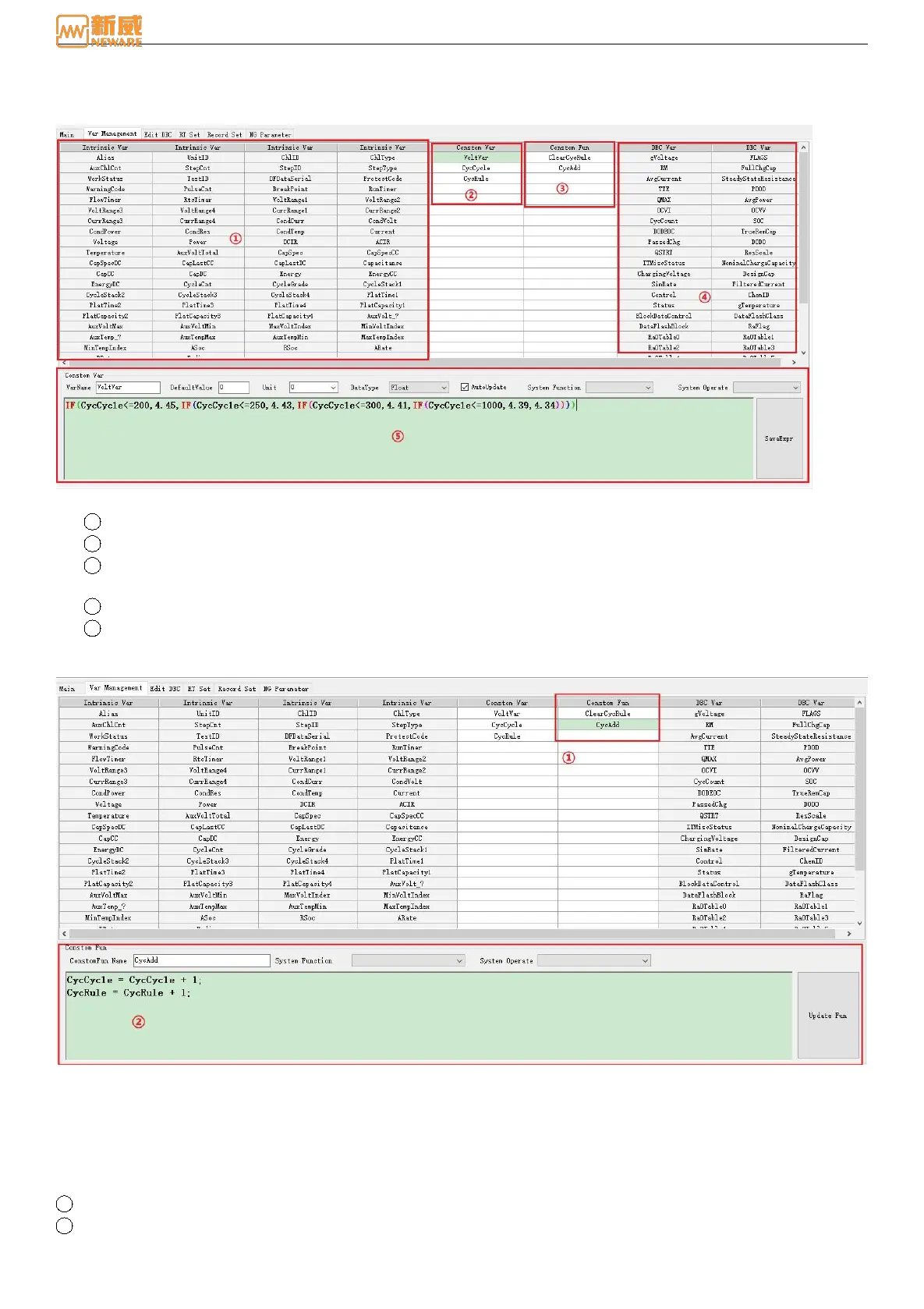
Figure 8-8 The Variable Management
1 The built-in variable area is the system's default setting and cannot be modified.
2 Self-defining variable area, self-defining variables, independent storage space, and it can be modified.
3 Self-defining function area, self-defining function, no storage space, can be called to execute the corresponding
function body.
4 DBC variable area, user-loaded DBC variables.
5 In the variable editing area, Figure 8-8 is the expression of self-defining variable VoltVar. Check automatic solution
(active real-time update calculation), if not check, it will calculate by passive invocation. Figure 8-9 is a
self-defining function, whose function body is an assignment expression.
Figure 8-9 Self-defining function
8.3. Edit DBC
Edit DBC interface is used to edit DBC variables, storage, loading, and other related operations. If the battery does not
have the communication function, you do not need to edit this interface and set the communication mode to null. Otherwise,
a communication error will be reported. As Figure 8-10, loading the .dbc template and storing it as a .dbc template or
loading it into a step file to start the test.
1 .dbc file name, you can click to load it.
2 Communication mode, delay, etc.



 To Next Page