BTS User Manual
Neware Technology Ltd.
http://www.newarebattery.com
2.) When different positions in a string of data represent different information, you can practice the following operations.
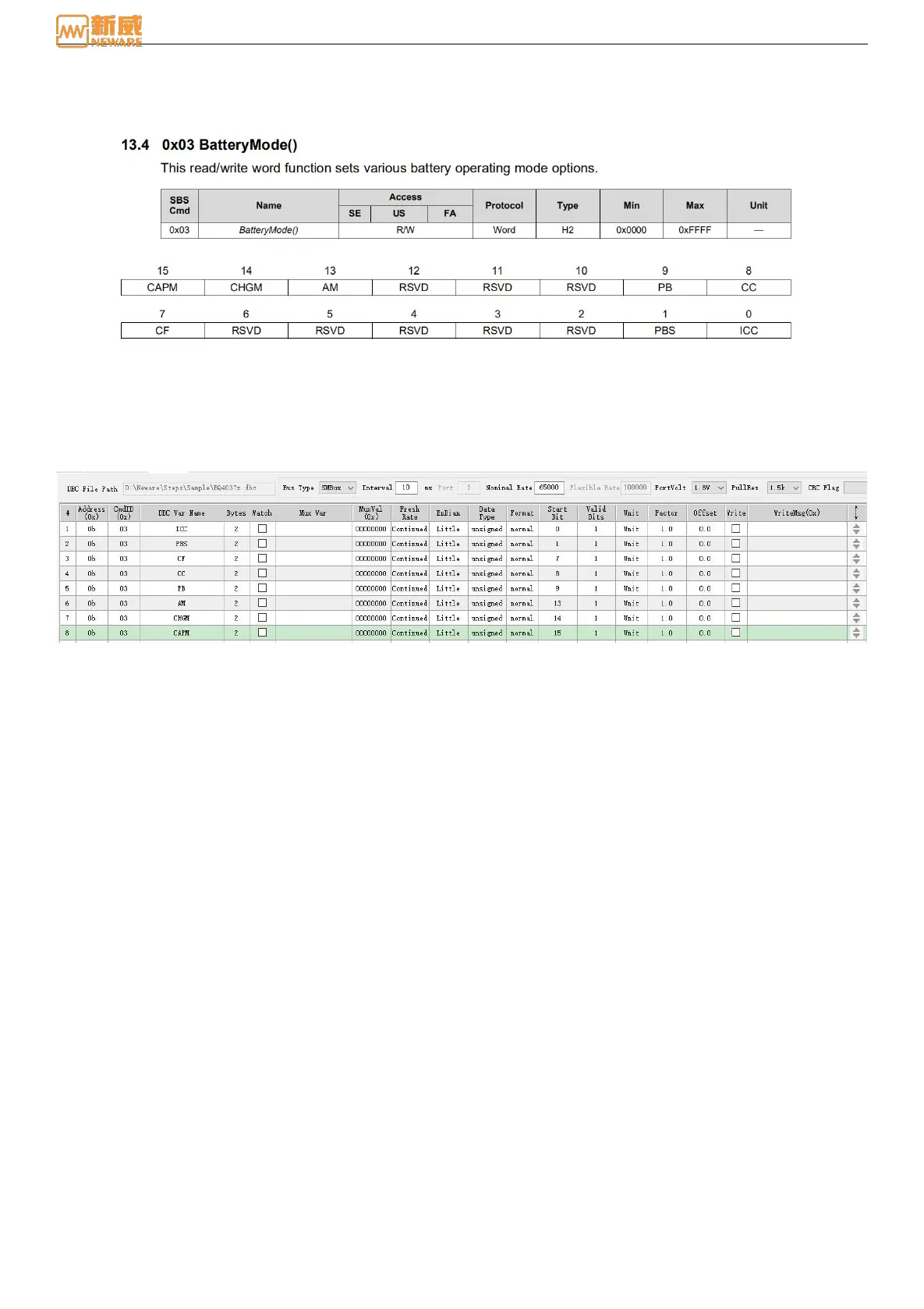
Figure 8-18 Manual of chip-BatteryMode
As shown in the figure above: BatteryMode is a 16-bit, 2-byte data type. Each bit of BatteryMode represents a specific
piece of information. In this case, each bit needs to be read out separately:
Figure 8-19 Edit DBC- Split interpret DBC variables
The address is 03, but the DBC variable name is different. Since BatteryMode is a 16-bit, 2-byte data format, put a 2 in the
byte column. There is no use for the multiway switch function, so do not fill it in. As shown in the figure above, ICC is in
position 0, so the starting bit should be 0. Only 1 bit is used, so the effective bit should be 1. And so on, PBS starts at 1, the
effective bit is 1, until the last bit.
8.7. Operation Process
Here is the introduction of how to set the step parameters to start the test when you get a new battery and test process.
It covers preparation for the test, usage of main step and step-flow setting, DBC (coulometer) import/edit, modify/import
DBC information, and successfully startup.
1.Pretest preparation
1.) Check if the equipment is normally functioning. Inspect the power supply. Whether the device can be connected to
the upper-machine (After the device is successfully connected to the upper-machine, the corresponding device number will
be displayed on the interface of software).
If the device is displayed in gray color, it means the device is disconnected. In this case, you can check whether the IP
address of the server on the device corresponds to the IP address of the computer.
2.) Check if the batteries is functional (charge/discharge function, communication function).
3.) Prepare the cell (coulometer) data sheet (for viewing Data Command to edit DBC).
4.) Prepare for the test process.
2.How to setting the operation process of main steps.



 To Next Page