BTS User Manual
Neware Technology Ltd.
http://www.newarebattery.com
Figure 5-5 Configuration of default step protection parameters
5.6. Data Download
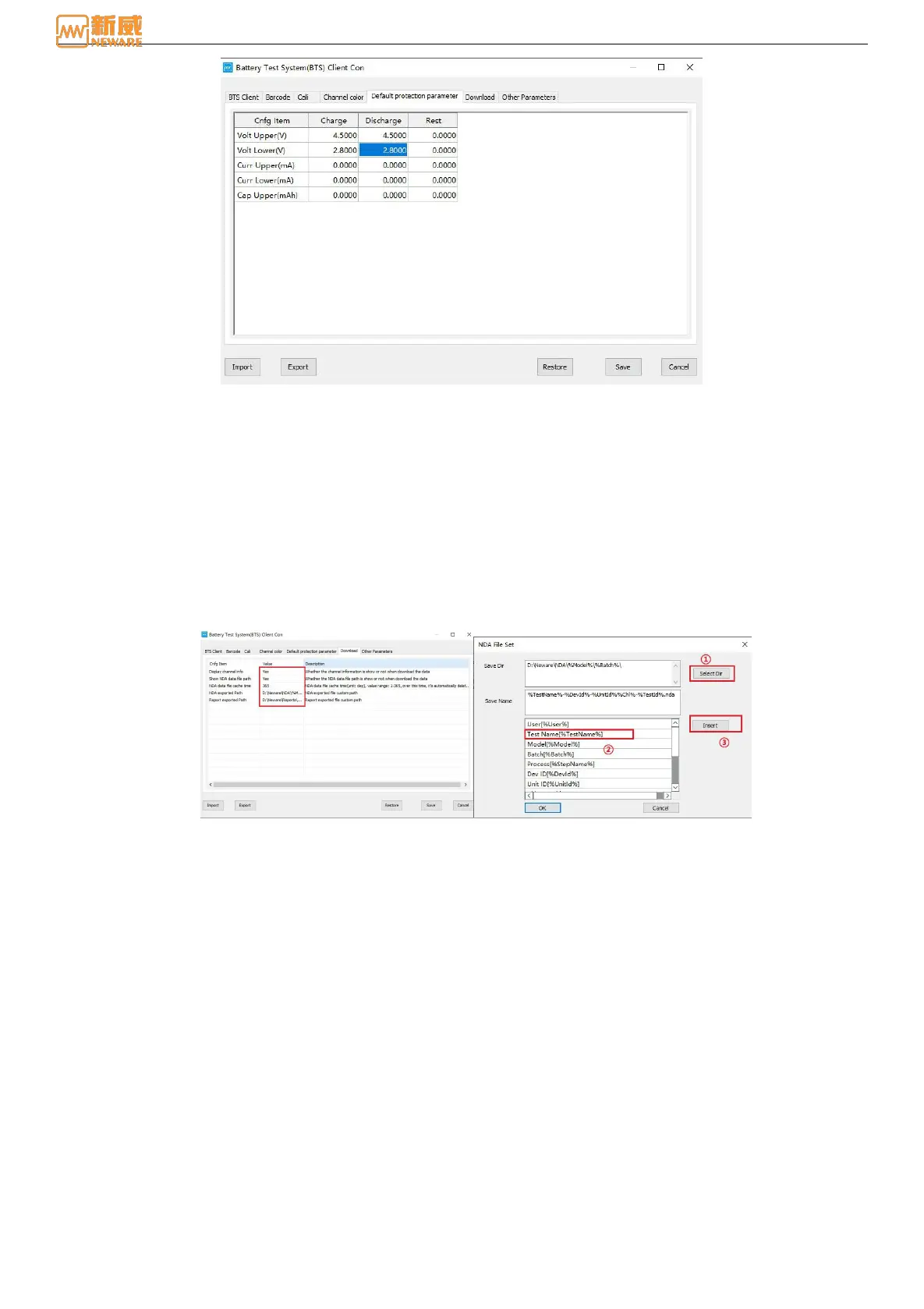
By clicking the "Data Download" option, the user can set the NDA export file directory, cache time, and other settings. You
can customize the NDA export path as required, including the save directory and save name, as shown in Figure 5-6. The
user-defined content includes the combination of user, batch number, process, channel, test ID, battery bar code, tray bar
code, date, NUID of the mid-machine, and NUID of the unit.
1. Save contents
Select "Save directory" text box → select keyword → click Insert, you can use this keyword as the file name of "Save
directory". For example, insert User [%User%]. Only the placeholder %User% of the keyword is displayed in the
directory. During the generation of the NDA file, this placeholder is replaced with the actual "user" information as the
name of the n-level directory, as shown in the following figure. Upper-level directories and lower-level directories are
distinguished by slashes (\), and users need to enter them manually.
Figure 5-6 Download data Figure 5-7 NDA file configuration
2. Save name
You can customize the name of the NDA file as required. You can manually enter the corresponding name (suffix. Nda) or
select the corresponding keyword as the name of the saved file: Select the "Save Name" text box → Select the keyword →
click Insert to use the keyword as the name of the saved file in NDA. If you do not specify a save name, the system uses
the last prefix in the save directory as the save name by default, as shown in Figure 5-7. In this figure, the save name is
named after the last placeholder "%User%" in the save directory.
During the creation of NDA files, the system replaces placeholders with actual user information, batch number information,
and flow information, and creates folders with corresponding names as n-level directories for data storage.
5.7. Other Parameters
Users can set limitation to the maximum serial number of the test record data as required, and pause the test when the
warning limit is reached, which is mainly used to prevent data coverage and loss caused by large data during offline
operation:



 To Next Page