BTS User Manual
Neware Technology Ltd.
http://www.newarebattery.com
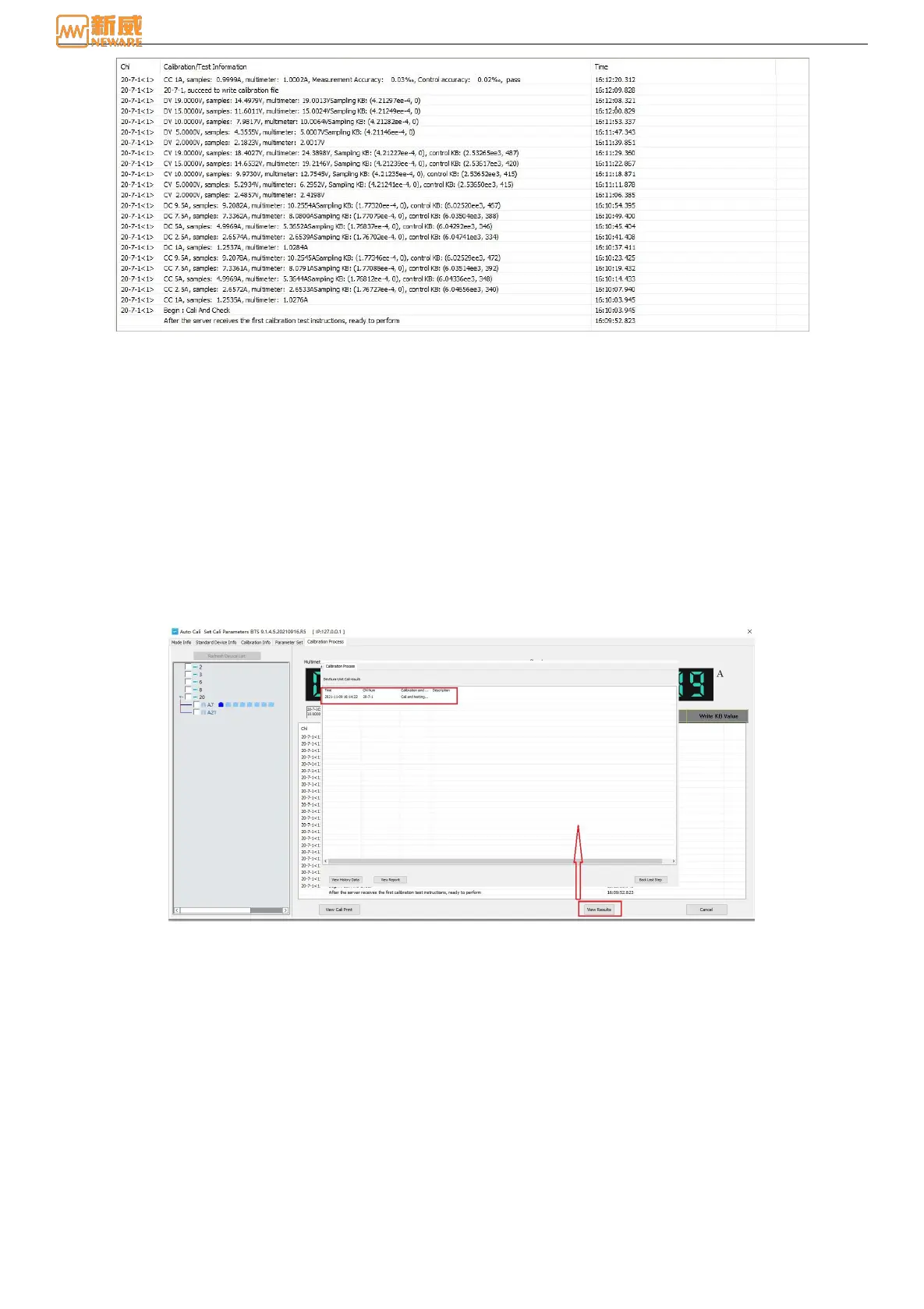
Figure 7-12 Calibration/Test status information
Status: It is divided into charging current, discharging current, charging voltage, discharging voltage and write KB
value. When status is detected by calibration/test, the status is displayed in blue color. As shown in figure, it indicates
that the current is the discharge current of calibration/test.
Information zone: Charging current corresponding to the calibration test information symbol is displayed as CC.
The calibration test information symbol of discharge current is displayed as DC.
Charging voltage corresponding calibration test information symbol is displayed as CV.
The calibration test information symbol of discharge voltage is displayed as DV.
Calibration/Test: Approved, then automatically start the next step. If not, you can re-collect data for a maximum of two
times. The result is based on the last sampling value.
7.3. View Result
After the channel calibration and test is complete, click View Result. On the displayed page, you can view the time,
calibration channel number, calibration result, and description, as shown in Figure 7-13.
Figure 7-13 Calibration result
1. Check historical data
You can click View Historical Data to view the historical calibration of the device based on the device ID, unit ID, or
channel ID, as shown in Figure 7-14:



 To Next Page