BTS User Manual
Neware Technology Ltd.
http://www.newarebattery.com
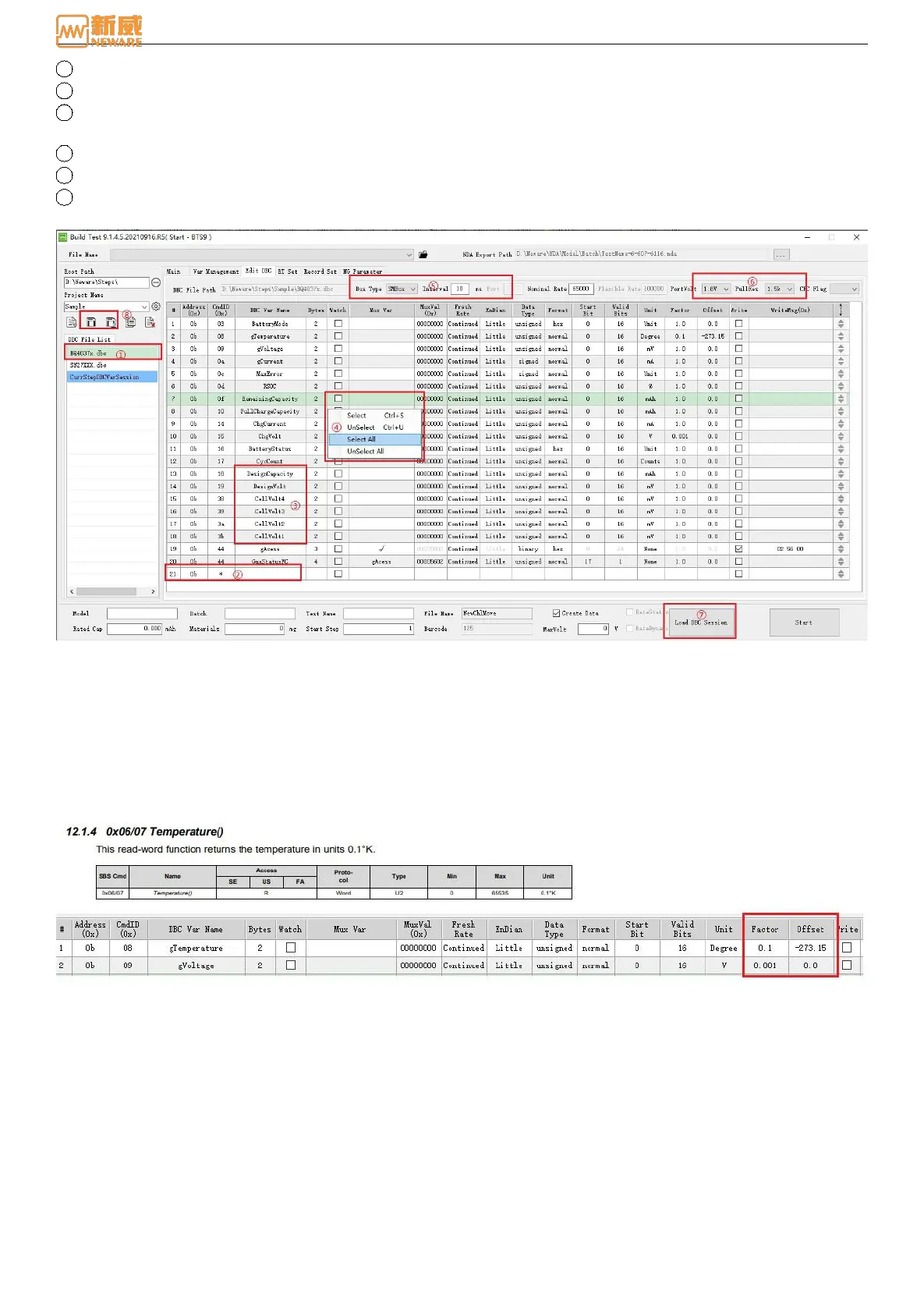
3 The port voltage and pull-up resistance must be configured based on the chip.
4 Click here to add DBC variables.
5 Refer to the chip manual, DBC variable are customizable and easy to recognize, and not able to have the same names as
a built-in or custom variable.
6 Attention area: For adding the required attention into communication queue, after the editing is complete.
7 DBC cache loading: Loading the DBC variable into step file, including the information of voltameter.
8 Storage the .dbc file template, stored as a template to facilitate future usage. No need to edit again.
The size, type, start bit, effective bit, and unit are all defined in the chip manual and can be filled in.
Figure 8-10 editing DBC
Notes on gain and bias:
Original value(value read from coulometer) * gain + bias value = terminal value
In Figure 8-11, the specified temperature unit of the coulometer is 0.1K Kelvin, but in reality situation, the coulometer
requires a gain value of 0.1 and a bias value of -273.15.
Figure 8-11 Gain and bias
8.4. Display Settings
Display Settings is for setting the content to be displayed on the software interface



 To Next Page