Page 14
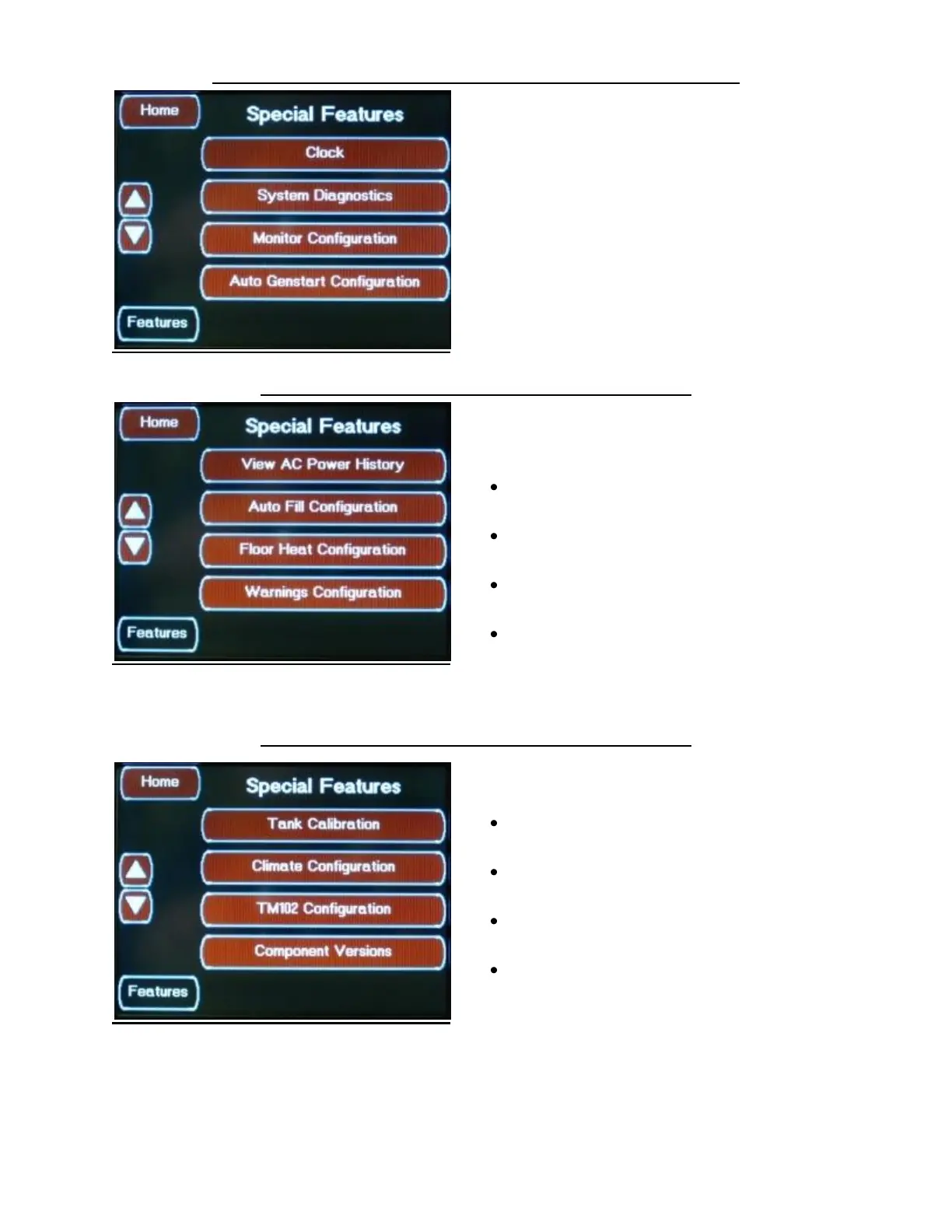
FEATURES SCREENS FLOOR HEAT OPTION SCREEN 1
This screen is the same as the Base System
Screens
FEATURES FLOOR HEAT OPTION SCREEN 2
This screen has the optional Floor Heat
Configuration Button
Floor Heat Option Screen 2 allows access to the
following features:
View AC Power History Button
Accesses the AC Power History Screen
Auto Fill Configuration Button
Accesses the Auto Fill Configuration Screens
Floor Heat Configuration Button
Accesses the Floor Heat Configuration Screen
Warnings Configuration Button
Accesses the Warnings Configuration Screens
FEATURES FLOOR HEAT OPTION SCREEN 3
Floor Heat Option Screen 3 allows access to the
following features:
Tank Calibration Button
Accesses the Tank Calibration Screens
Climate Configuration Button
Accesses the Climate Configuration Screens
TM102 Configuration Button
Accesses the TM102 Configuration Screen
Component Versions Button
Accesses the Component Versions Screen


 To Next Page