Page 34
FEATURES CLIMATE CONFIGURATION SCREEN 4
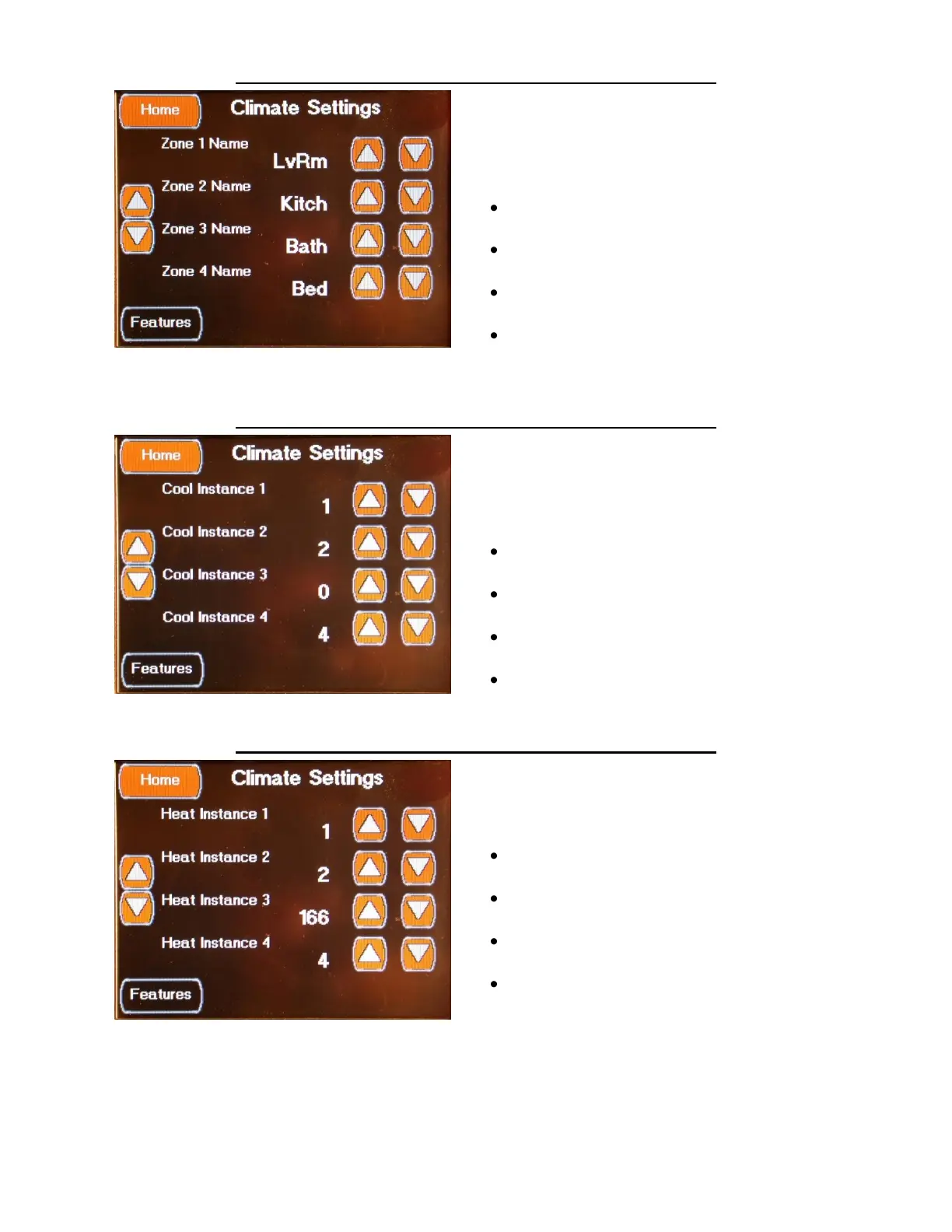
The fourth Climate Setting screen is accessed
by pressing the Left Down Arrow on the first
Climate Setting screen or by the Left Up Arrow
on the fifth Climate Setting screen.
This screen determines the Zone Labels that are
displayed on the Climate control screens and
has the following settings:
Zone 1 Name Set to LvRm
Select using the Up / Down Arrows
Zone 2 Name Set to Kitch
Select using the Up / Down Arrows
Zone 3 Name Set to Bath
Select using the Up / Down Arrows
Zone 4 Name Set to Bed
Select using the Up / Down Arrows
FEATURES CLIMATE CONFIGURATION SCREEN 5
The fifth Climate Setting screen is accessed by
pressing the Left Down Arrow on the third
Climate Setting screen or by the Left Up Arrow
on the sixth Climate Setting screen.
This screen sets the Cool Source to the HVAC
Zones.
Cool Instance 1 Set to 1
Select using the Up / Down Arrows
Cool Instance 2 Set to 2
Select using the Up / Down Arrows
Cool Instance 3 Set to 0
Select using the Up / Down Arrows
Cool Instance 4 Set to 4
Select using the Up / Down Arrows
FEATURES CLIMATE CONFIGURATION SCREEN 6
The sixth Climate Setting screen is accessed by
pressing the Left Down Arrow on the fourth
Climate Setting screen or by the Left Up Arrow
on the seventh Climate Setting screen.
This screen sets the Heat Source to HVAC
Zones.
Heat Instance 1 Set to 1
Select using the Up / Down Arrows
Heat Instance 2 Set to 2
Select using the Up / Down Arrows
Heat Instance 3 Set to 166
Select using the Up / Down Arrows
Heat Instance 4 Set to 4
Select using the Up / Down Arrows


 To Next Page