Page 7
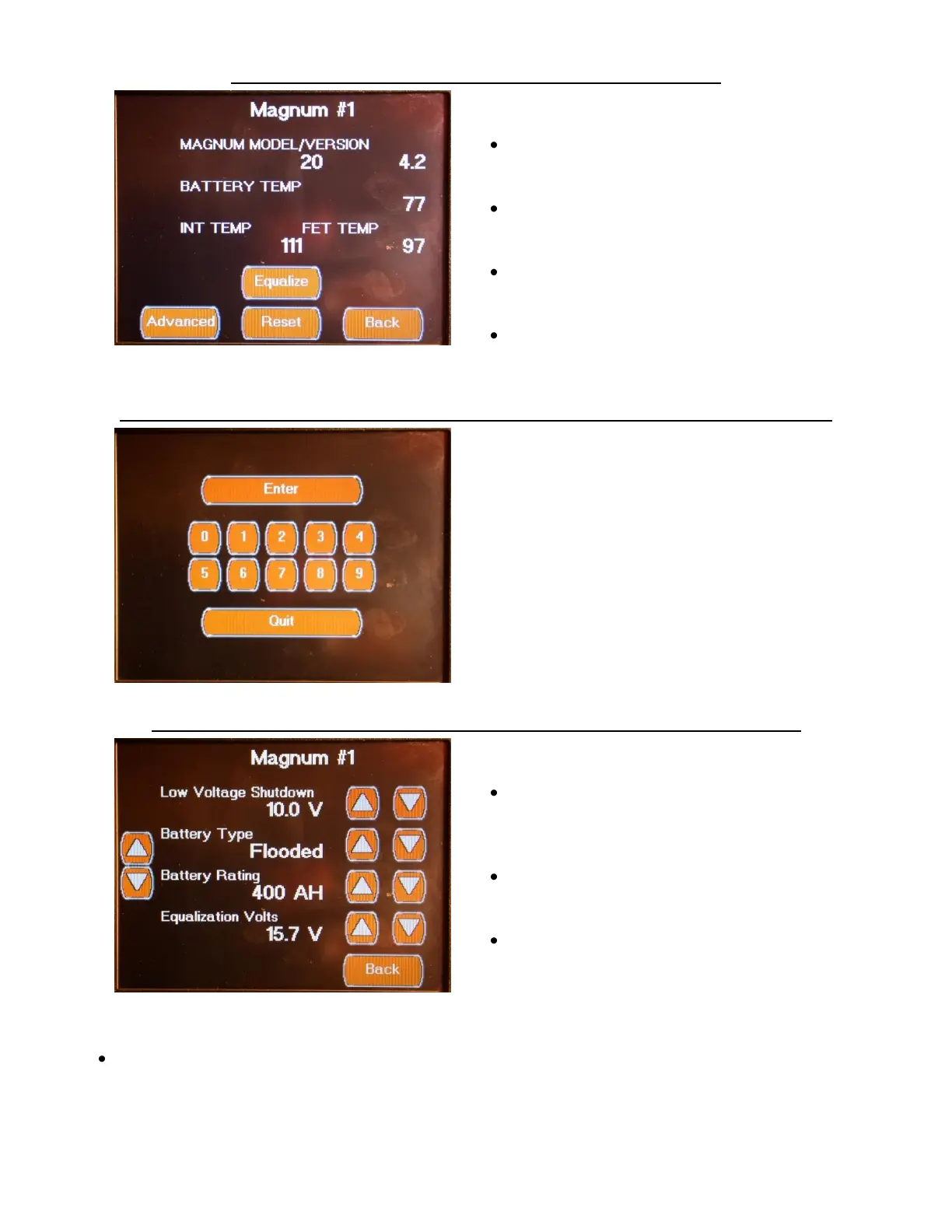
DC POWER SCREENS MAGNUM STATUS SCREEN
The DC Power (Settings) Magnum Status Screen
displays the following Status Values:
Magnum Model/Version
This value is read from the inverter via the
Inverter Module.
Battery Temperature
This value is read from the inverter battery
temperature sensor via the Inverter Module.
Internal Temperature
This value is read from the inverter via the
inverter Module.
FET Temperature
This value is read from the inverter via the
Inverter Module.
DC POWER SCREENS MAGNUM ADVANCED SETTINGS SCREEN ACCESS
The Password Access Screen is displayed to
provide access to advanced system
configuration screens. The advanced
configuration screens contain control settings
that should only be changed by qualified
individuals. Changing these control settings to
an improper setting can adversely affect the
operation of the control system and may cause
damage to the coach.
DC POWER SCREENS MAGNUM ADVANCED SETTINGS SCREEN 1
The Magnum Advanced Settings Screen has the
following Configuration Values:
Low Voltage Shutdown ( DC Voltage)
This setting is the low DC Voltage trigger point
that will turn off the Inverter.
Battery Type Flooded / Gel /
AGM / AGM2
This should be set to match the physical
battery type.
Battery Rating (AH)
This should be set to match total house
battery power capacity
Equalization Volts ( DC Voltage)
This setting should match the manufacturer
setting for the battery type.


 To Next Page