Page 35
FEATURES CLIMATE CONFIGURATION SCREEN 7
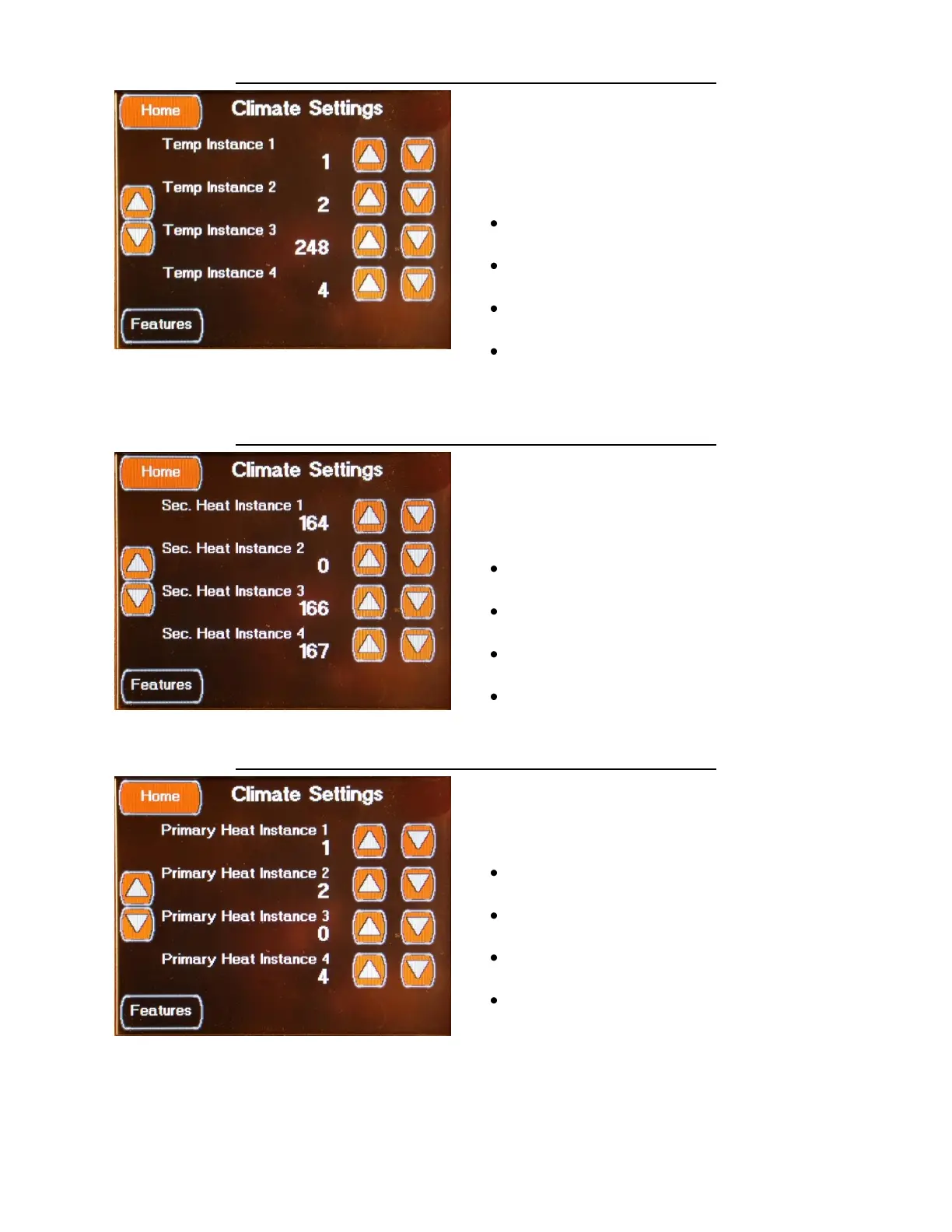
The seventh Climate Setting screen is accessed
by
pressing the Left Down Arrow on the fifth
Climate Setting screen or by the Left Up Arrow
on the eighth Climate Setting screen.
This sets the Temperature Sensors to the HVAC
Zones.
Temp Instance 1 Set to 1
Select using the Up / Down Arrows
Temp Instance 2 Set to 2
Select using the Up / Down Arrows
Temp Instance 3 Set to 248
Select using the Up / Down Arrows
Temp Instance 4 Set to 4
Select using the Up / Down Arrows
FEATURES CLIMATE CONFIGURATION SCREEN 8
The eighth Climate Setting screen is accessed
by pressing the Left Down Arrow on the sixth
Climate Setting screen or by the Left Up Arrow
on the ninth Climate Setting screen.
This screen specifies the Oasis Zones to control
from the HVAC Zone settings.
Sec. Heat Instance 1 Set to 164
Select using the Up / Down Arrows
Sec. Heat Instance 2 Set to 0
Select using the Up / Down Arrows
Sec. Heat Instance 3 Set to 166
Select using the Up / Down Arrows
Sec. Heat Instance 4 Set to 167
Select using the Up / Down Arrows
FEATURES CLIMATE CONFIGURATION SCREEN 9
The ninth Climate Setting screen is accessed by
pressing the Left Down Arrow on the eighth
Climate Setting screen. This screen is used to
set the Primary Heat Zone control.
Primary Heat Instance 1 Set to 1
Select using the Up / Down Arrows
Primary Heat Instance 2 Set to 0
Select using the Up / Down Arrows
Primary Heat Instance 3 Set to 0
Select using the Up / Down Arrows
Primary Heat Instance 4 Set to 4
Select using the Up / Down Arrows


 To Next Page