Page 31
FEATURES TANK CALIBRATION SCREENS
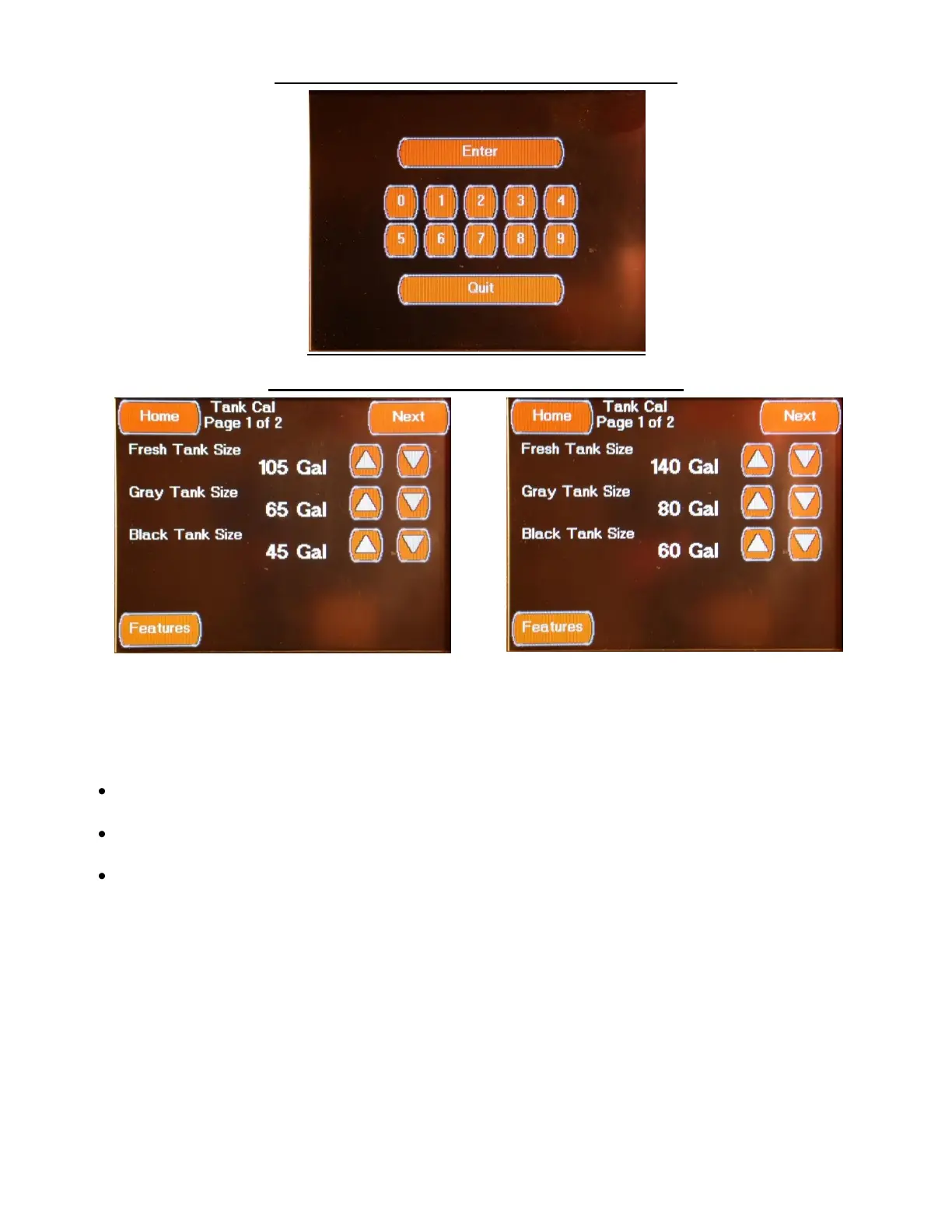
FEATURES TANK CALIBRATION SCREEN 1
ESSEX TANK CALIBRATION SCREEN 1 KING AIRE TANK CALIBRATION SCREEN 1
The first Tank Cal screen is accessed by pressing the Tank Calibration Button located on the Features
Configuration Screen and entering the correct password or by pressing the “Prev” Button located on the
second Tank Cal screen. This screen sets the tank capacities for the coach with the following settings:
Fresh Tank Size (Essex = 105 Gal, King Aire = 140 Gal)
Select value using the Up / Down Arrows
Gray Tank Size (Essex = 65 Gal, King Aire = 80 Gal)
Select value using the Up / Down Arrows
Black Tank Size (Essex = 45 Gal, King Aire = 60 Gal)
Select value using the Up / Down Arrows


 To Next Page