EN
14 – English
L3 NL2L1
PE
V WU
BRAKE
13
6
4
A
A
13
6
4
L3 NL2L1
PE
V WU
BRAKE
13
6
4
A B
13
6
4
A
B
A
B
17
Motor with mechanical limit switch
3.8 Connection of a radio receiver
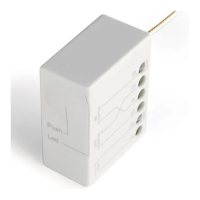
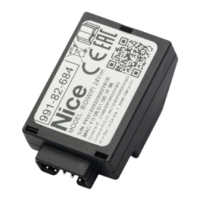
The control unit has an SM connector for connecting a SMXI, SMXIS, OXI, OXIT
or OXIBD radio receiver (with Nice one-way radio transmitter) or similar (the
radio receiver is an optional accessory, not provided).
To insert the radio receiver, disconnect the control unit from the power supply
and insert the receiver as shown in g.18.
13
6
4
18
Parameter P106 (see chap. “5. LIST OF PARAMETERS AND ERRORS” on p.
20) lists the actions performed by the control unit depending on the activated
outputs or the commands sent by the radio receiver.
Note - For any other information, please refer to the receiver's
instruction manual.
To use the radio receiver, set parameter P106 to one of the available values (see
chap. “5. LIST OF PARAMETERS AND ERRORS” on p. 20). By default,
door movement via radio receiver is deactivated.
3.9 Initial switch-on and checking connections
After supplying power to the control unit, carry out the following checks:
• the green LED U10 (on the logic board) must ash regularly at a frequency of
1 ash per second.
• the photocell LEDs (if present) must ash (RX); the type of ashing is not
signicant because it depends on other factors.
• the red LED near the safety edge connector is off.
If one or more checks fails, disconnect the control unit from the power supply
and check the various electrical connections made previously.
3.10 Resetting door cycles - “Service” error
If the control unit display reads “Service”, the number of cycles performed (P1
value) has reached the value set in parameter P2, so maintenance must be
performed on the automation. The error, even if present, does not affect the
operation of the automation, which can be used normally. Proceed as follows
to clear the error:
TABLE 7 - Enabling partial opening
Number Operation to be performed Graphical description
1 “Service” displayed
2 Set DIP switch 1 to ON
ON
1 2 3 4
OFF
ON
1 2 3 4
OFF
ON
1 2 3 4
OFF
ON
1 2 3 4
OFF
ON
1 2 3 4
OFF
ON
1 2 3 4
OFF
ON
1 2 3 4
OFF
3
Use the rear buttons to scroll
through the parameters to
parameter “P1”
4 Set DIP switch 4 to ON
ON
5
The display shows the total
number of cycles completed by
the door. The value is the same
as that set in parameter P2 (e.g.:
2000)
6
Press and hold the two rear
buttons for about 2 seconds
until the display reads “0”
+
7 Set all DIP switches to OFF
ON
3.11 Deleting the control unit memory
All data stored in the control unit can be deleted and the unit restored to factory
settings.
• Single-phase motors (only those using the “boost capacitor” board) and
three-phase motors (380/400V) = “EE_0” type deletion.
• Inverter motors 1.1kW or 2.2kW without an identication label on the
side of the inverter: EE_1 type deletion.
• Inverter motors 1.1kW or 2.2kW with an identication label on the side
of the inverter: deletion type stated on label.
In all three cases, validate the operation by proceeding as follows:
TABLE 8 - Resetting control unit to factory settings
Phase Operation to be performed Graphical description
1
Set DIP switches 1, 2 and 3 to
ON
ON
1 2 3 4
OFF
ON
1 2 3 4
OFF
ON
1 2 3 4
OFF
ON
1 2 3 4
OFF
ON
1 2 3 4
OFF
ON
1 2 3 4
OFF
ON
1 2 3 4
OFF
2
Select the type of deletion to
be performed using the rear
buttons
3
Press and hold the two rear
buttons simultaneously for
about 2 seconds
+
4
Release them when the display
shows 4 dashes at the bottom
5
The control unit will reboot showing the rmware version on
the display
7 Set all DIP switches to OFF
ON


 To Next Page