154
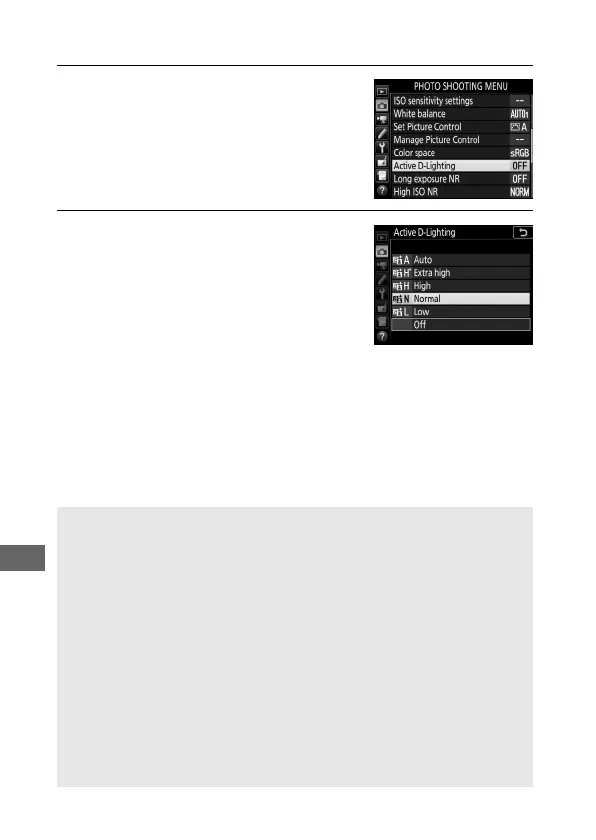
To use Active D-Lighting:
1 Select Active D-Lighting.
Highlight Active D-Lighting in the
photo shooting menu and press 2.
2 Choose an option.
Highlight the desired option and
press J. If YAuto is selected, the
camera will automatically adjust
Active D-Lighting according to
shooting conditions (in mode M,
however, YAuto is equivalent to
Q Normal).
D Active D-Lighting
Noise (randomly-spaced bright pixels, fog, or lines) may appear in
photographs taken with Active D-Lighting. Uneven shading may be
visible with some subjects. Active D-Lighting does not apply at high
ISO sensitivities (Hi 0.3–Hi 5).
A Active D-Lighting and Movies
If Same as photo settings is selected for Active D-Lighting in the
movie shooting menu and Auto is selected in the photo shooting
menu, movies will be shot at a setting equivalent to Normal. Active
D-Lighting does not apply at a frame size of 3840 × 2160.
A See Also
For information on varying Active D-Lighting over a series of shots, see
“Bracketing” (0 219).



 To Next Page