309
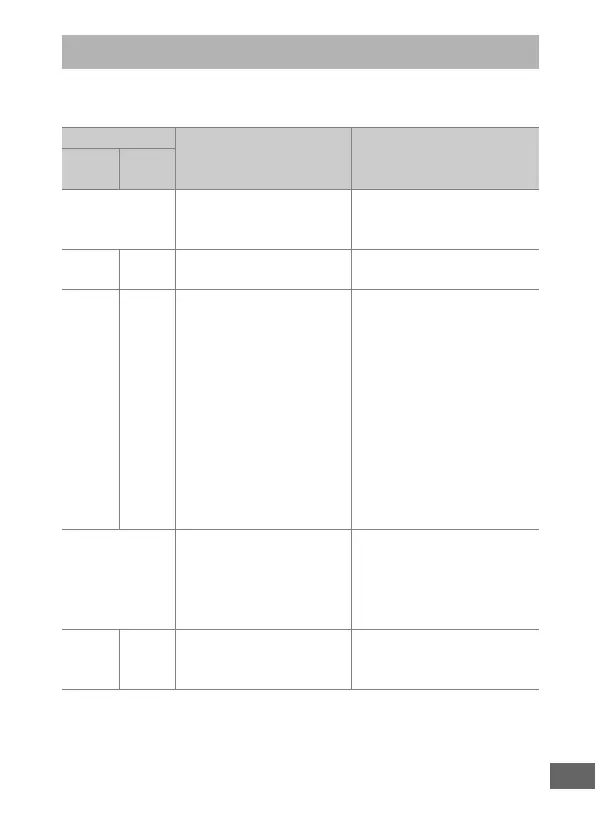
This section lists the indicators and error messages that appear
in the viewfinder, control panel, and monitor.
Error Messages
Indicator
Problem Solution
Control
panel
View-
finder
B
(flashes)
Lens aperture ring is not
set to minimum aperture.
Set ring to minimum
aperture (highest
f-number; 0 72).
H d Low battery.
Ready a fully-charged
spare battery (0 19).
H
(flashes)
d
(flashes)
• Battery exhausted. • Recharge or replace
battery (0 19, 21, 287).
• Battery can not be used. • Contact Nikon-
authorized service
representative.
• An extremely exhausted
rechargeable Li-ion
battery or a third-party
battery is inserted in the
camera.
• Replace the battery, or
recharge the battery if the
rechargeable Li-ion
battery is exhausted.
• High battery
temperature.
• Remove battery and wait
for it to cool.
i
(flashes)
• No lens attached. • Attach a CPU lens. If a CPU
lens is already attached,
remove and reattach the
lens (0 24, 279).
• Non-CPU lens attached. • Select mode M (0 72).
—
FH
(flashes)
Camera unable to focus
using autofocus.
Change composition or
focus manually (0 114,
115).



 To Next Page