270
Image Dust Off ref photo
Start Acquire reference data for the Image
Dust Off option in Capture NX-D (0 iv).
Clean sensor and then start
Image comment
Attach comment Add a comment to new photographs as
they are taken. Comments can be
viewed as metadata in ViewNX-i or
Capture NX-D (0 iv).
Input comment
A Text Entry
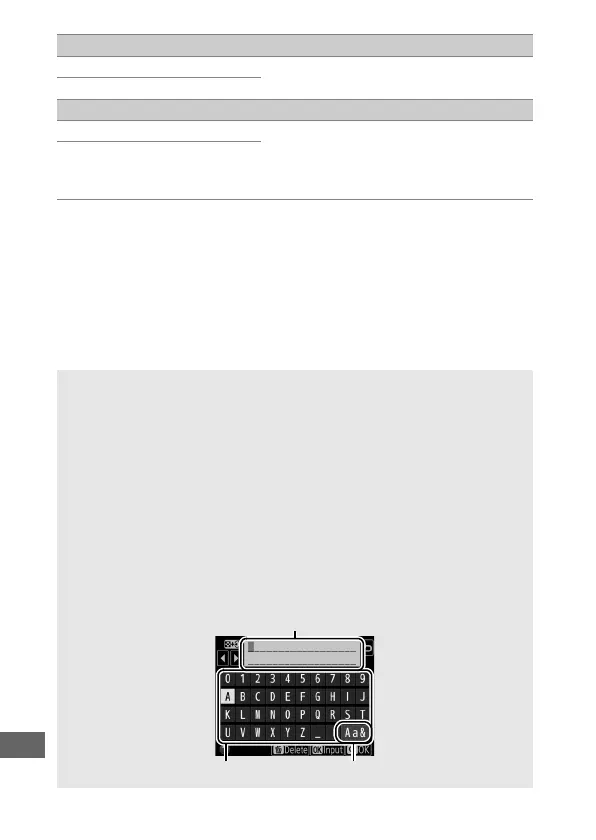
A keyboard is displayed when text entry is required. Enter text by
tapping the characters on the touch screen (to cycle through the
upper- and lower-case and symbol keyboards, tap the keyboard
selection button). You can also use the multi selector to highlight the
desired character in the keyboard area and press J to insert the
highlighted character at the current cursor position (note that if a
character is entered when the field is full, the last character in the field
will be deleted). To delete the character under the cursor, press the O
(Q) button. To move the cursor to a new position, tap the display or
hold the W (Z) button and press 4 or 2. To complete entry and
return to the previous menu, press the X (T) button.
Text display area
Keyboard area Keyboard selection



 To Next Page