65
1 The built-in flash turns off.
2 The AF-assist illuminator turns off.
i
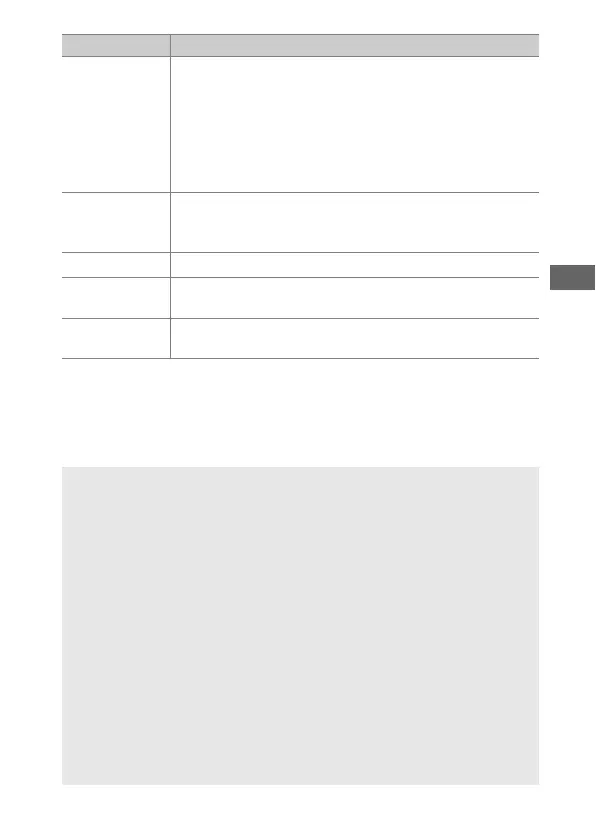
Miniature
Effect
Create photos that appear to be pictures of dioramas.
Works best when shooting from a high vantage point.
Miniature effect movies play back at high speed,
compressing about 45 minutes of footage shot at 1920
× 1080/30p into a silent movie that plays back in about
three minutes. The effect can be adjusted in live view
(0 68).
1, 2
u
Selective
Color
All colors other than the selected colors are recorded in
black and white. The effect can be adjusted in live view
(0 70).
1
1
Silhouette Silhouette subjects against bright backgrounds.
1
2
High Key
Use when shooting bright scenes to create bright
images that seem filled with light.
1
3
Low Key
Use when shooting dark scenes to create dark, low-key
images with prominent highlights.
1
A Preventing Blur
Use a tripod to prevent blur caused by camera shake at slow shutter
speeds.
A NEF (RAW)
NEF (RAW) recording is not available in %, f, d, e,
', (, and u
modes. Pictures taken when an NEF (RAW) or NEF (RAW) + JPEG option
is selected in these modes will be recorded as JPEG images. JPEG
images created at settings of NEF (RAW) + JPEG will be recorded at the
selected JPEG quality, while images recorded at a setting of NEF (RAW)
will be recorded as fine-quality images.
A e and i Modes
Autofocus is not available during movie recording. The live view
refresh rate will drop, together with the frame rate for continuous
release mode; using autofocus during live view will disrupt the
preview.
Option Description



 To Next Page