Chapter 12 On-Screen Measurement
128
Scale, Annotation,
and Measurement
Functions
12.2.4
Measuring the Diameter of a Circle
You can measure the diameter of a circle that you draw on the screen. To do this:
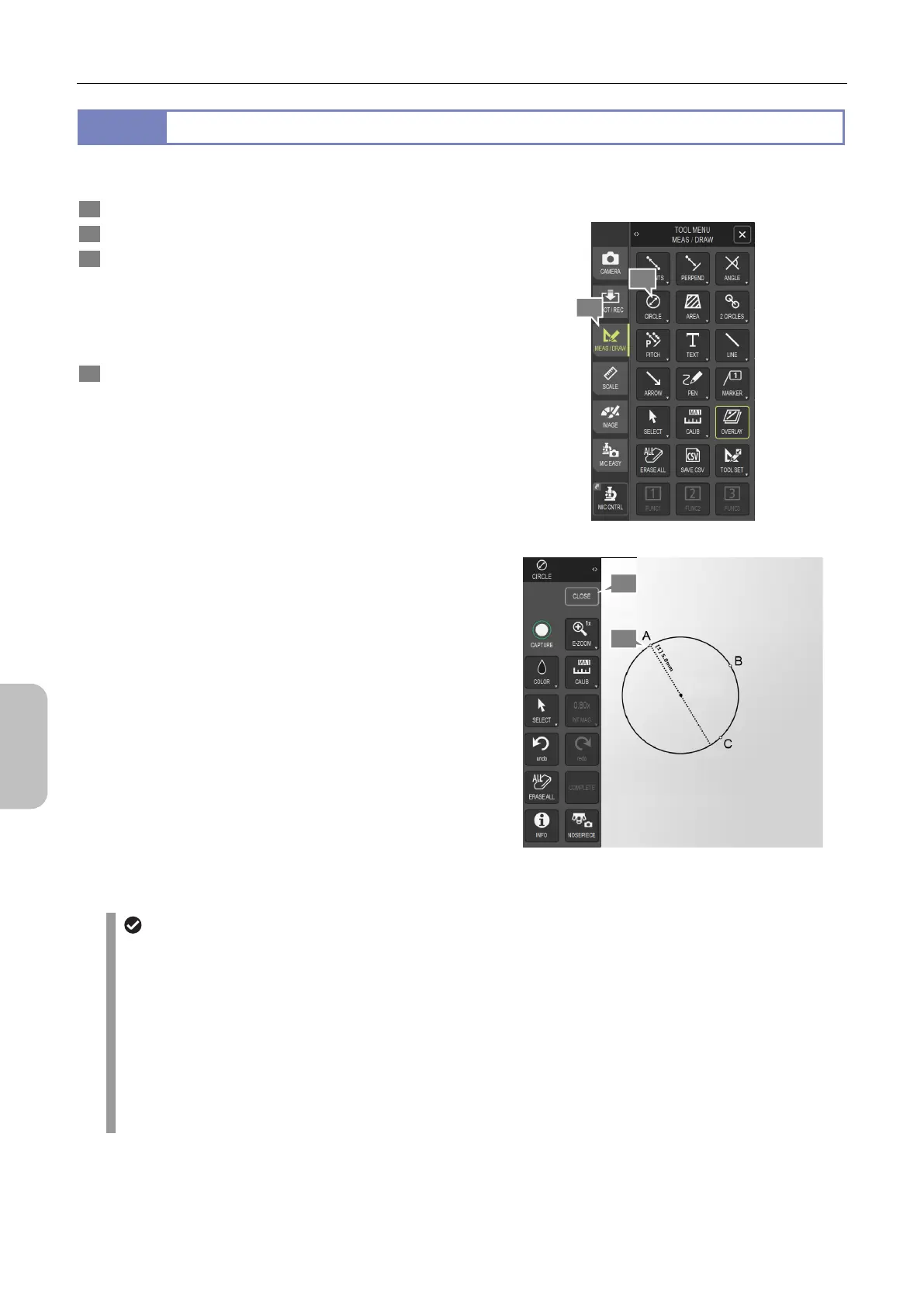
1 Display the [TOOL MENU: MEAS/DRAW] screen.
2 Tap [CIRCLE].
3 On the screen, specify three points (A, B, and C in the
figure) to draw a circle determined by those points.
A circle whose circumference passes through the three
points is drawn, and the diameter of the circle is displayed.
To continue measurement, repeat the above steps.
4 To terminate measurement, tap [CLOSE] to redisplay the
[TOOL MENU: MEAS/DRAW] screen.
Measuring the diameter of a circle
Adjusting measurement results
After measuring the diameter of a circle, you can adjust the measurement result. To do this:
(1) Tap [SELECT].
(2) Select a desired measurement result.
(3) Adjust the measurement result.
- You can move the displayed value of a measurement result by mouse dragging.
- You can move a circle by mouse-dragging its circumference.
- You can resize a circle by mouse-dragging one of the three points on the circumference of the circle.
(4) To redisplay the [CIRCLE] menu, tap [X] in the [SELECT] menu.
3
1
2
4



 To Next Page