19
WAN SERVICE
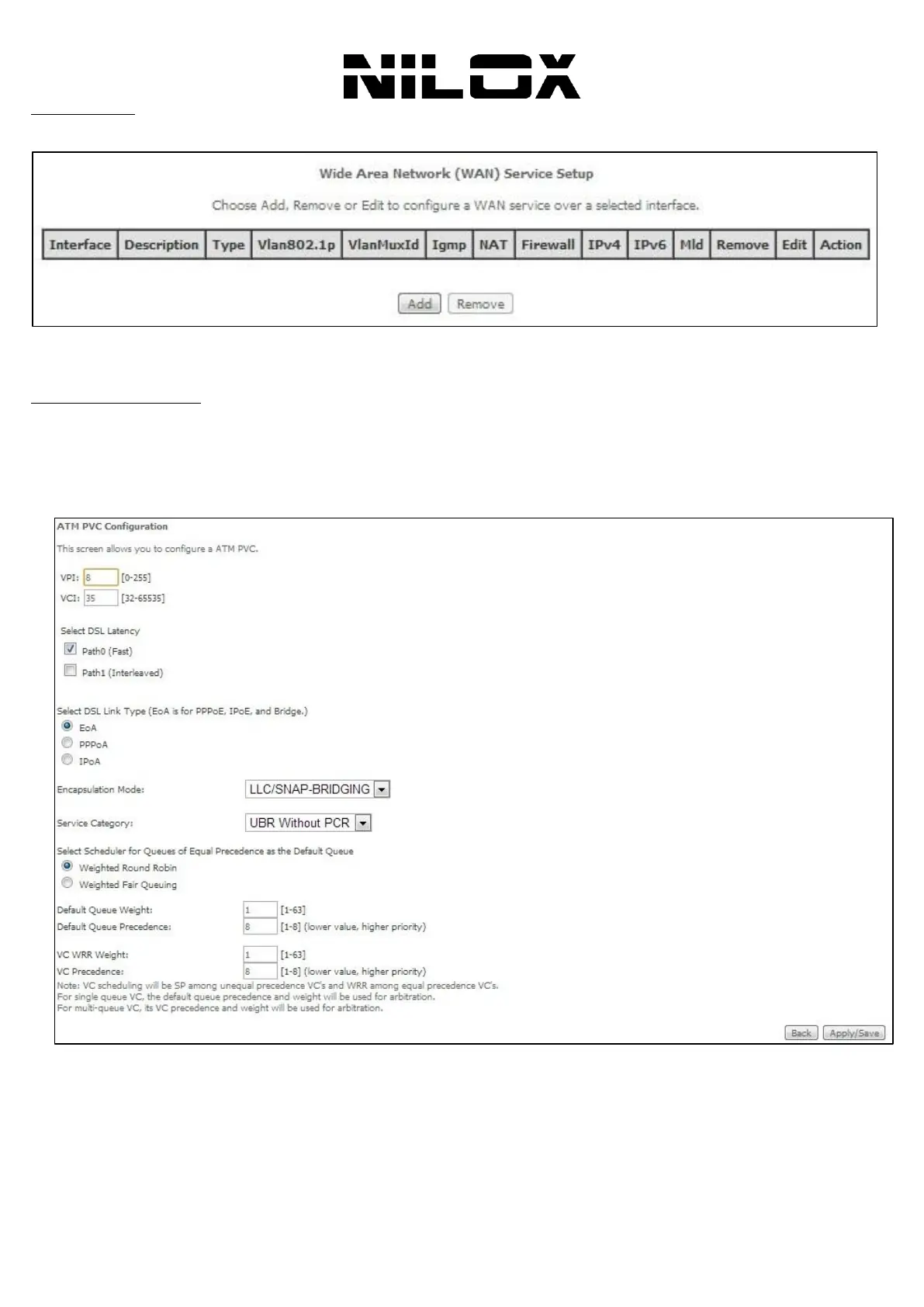
Choose Advanced Setup > WAN Service, and the following page appears.
In this page, you are allowed to add, remove, or edit a WAN service.
WAN SERVICE(PPPOE)
This section describes the steps for adding the PPPoE WAN service.
Step0 Choose Advanced Setup > Layer2 Interface > ATM Interface . In this page, you can add or remove to
configure DSL ATM Interfaces. Click Add to add ATM Interface and the following page appears. DSL Link Type: EoA
(it is for PPPoE, IPoE, and Bridge) and select the encapsulation mode to be LLC/SNAP-Bridging (according
to the uplink equipment). Click Apply/Save to save the configuration, and return the following page.
Step1 Choose Advanced Setup > WAN Service, and the following page appears. Click Add. In the Wide Area
Network (WAN) Service Setup page, click the Add button to display the following page. (At first, you must add a proper
ATM interface for this WAN service).


 To Next Page