52
CERTIFICATE
Choose Advanced Setup > Power Management and the following page appears.
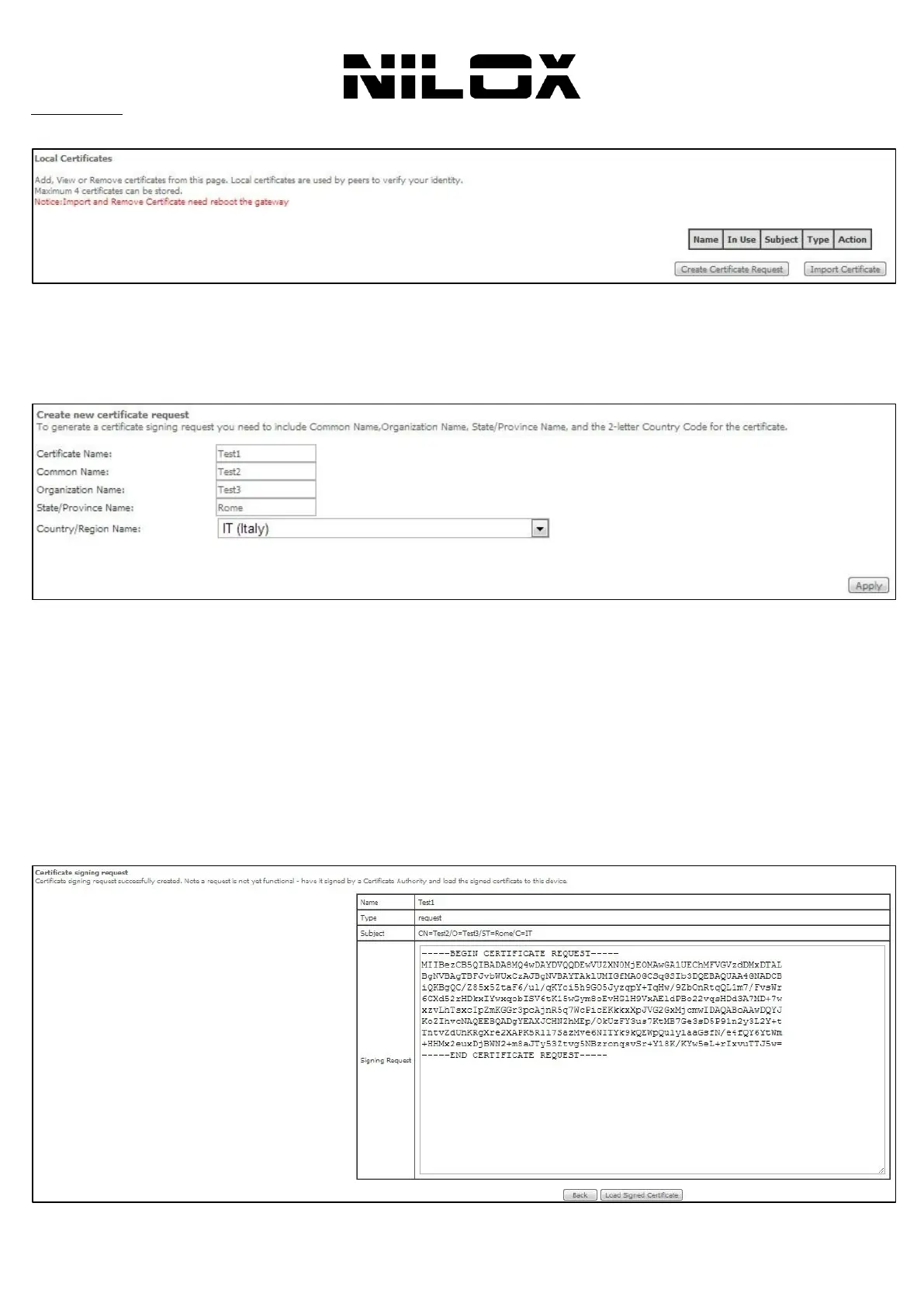
In this page, you can acquire the local certificate by creating a certificate request or importing a certificate. You may also
create or remove a certificate.
Creating a New Certificate Request
Click the Create Certificate Request button to display the following page.
In this page, please set the following parameters.
Certificate name: Set the certificate name.
Common Name: The common name is the "fully qualified domain name," (or FQDN) used for DNS lookups of your
server (for example, www.mydomain.com). Browsers use this information to identify your Web site. Some browsers will
refuse to establish a secure connection with your site if the server name does not match the common name in the
certificate. Please do not include the protocol symbol "http://" or any port numbers or pathnames in the common name.
Do not use wildcard characters such as * or ?, and do not use an IP address.
Organization Name: The name of the organization to which the entity belongs (such as the name of a company).
State/Province Name: This is the name of the state or province where your organization's head office is located.
Please enter the full name of the state or province.
Country/Region Name: This is the two-letter ISO abbreviation for your country (for example, GB for the United
Kingdom).
After finishing setting, click the Apply button to apply the settings.


 To Next Page