27
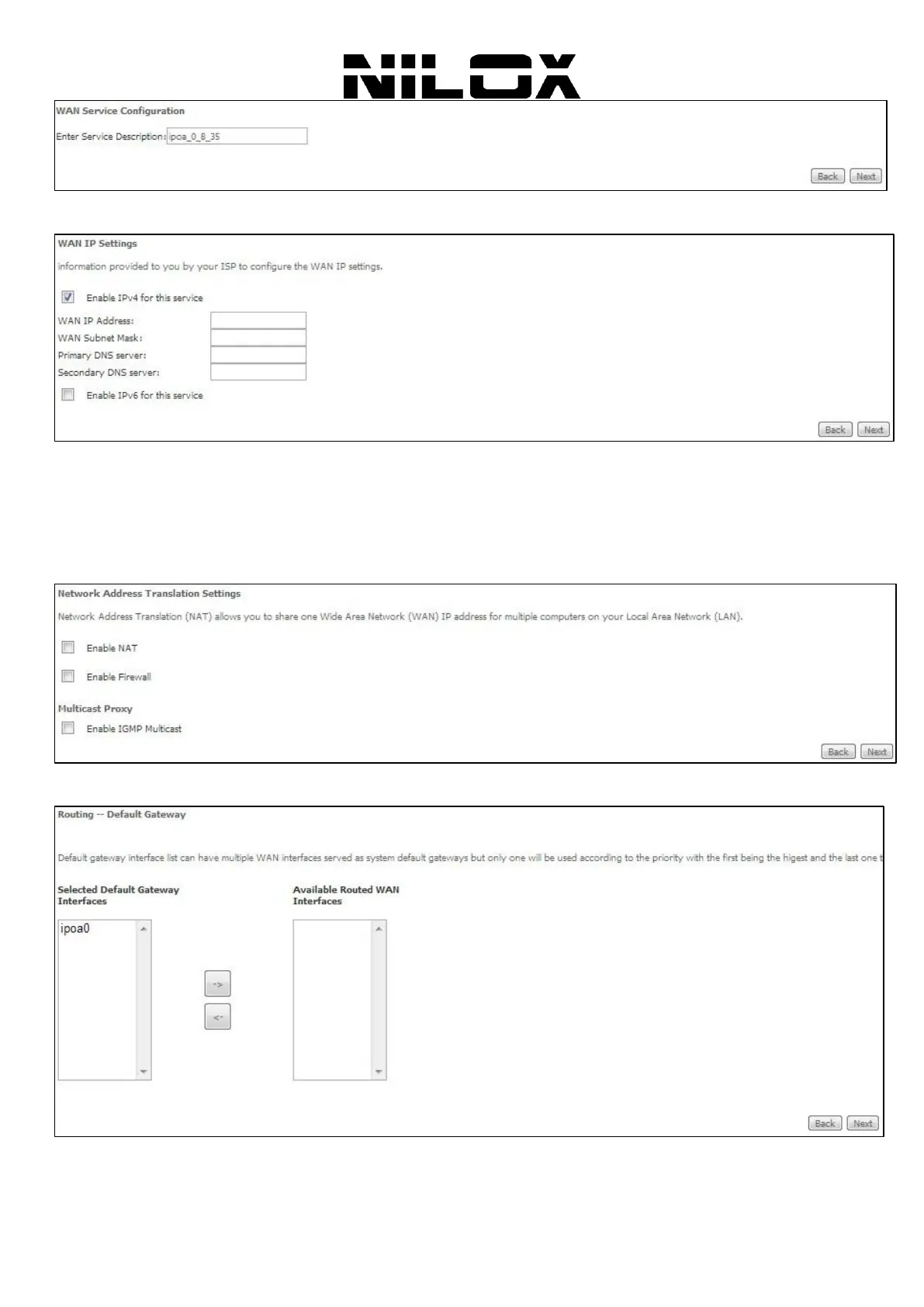
Step4 In this page, enter the WAN IP address, the WAN subnet mask, and primary DNS server provided by your ISP
and then click Next to display the following page.
Step5 After setting the parameters, click Next to display the following page. In this page, Network Address
Translation (NAT) allows you to share one Wide Area Network (WAN) IP address for multiple computers on your
Local Area Network (LAN). If you do not want to enable NAT, and wish the user of modem to access the Internet
normally, you need to add a route on the uplink equipment. Otherwise, the access to the Internet fails. Normally, please
enable the NAT function. Enable Fullcone NAT:. NAT is one where all requests from the same internal IP address and
port are mapped to the same external IP address and port. Furthermore, any external host can send a packet to the
internal host, by sending a packet to the mapped external address. Then click Next to display the following page.
Step6 In this page, select a preferred WAN interface as system default gateway and then click Next to display the
following page.
Step7 In this page, you can obtain the DNS server addresses from the selected WAN interface. Click Next, and the
following page appears.


 To Next Page