User Interfaces
User Interfaces
32 33
The expandable tab area shows and provides all item-related aspects. Parameter edits
can be realized in the Parameter tab.
The chapters 4.2 to 4.6 refer to a selected parameter- or preset-related item. Further
(menu-related) items and access to them will be explained in the chapters 4.7 to 4.15)
4.2 Editing a Parameter
Adjust Control Position, coarse
Use the Encoder to adjust the currently
selected parameter.
The Dec and Inc buttons can be used for
stepwise adjustments.
→ Base Unit
The Mode button can put Ribbon 1 into
Edit mode. Display and touch strip of Rib-
bon 1 will represent the currently selected
parameter, while Ribbon 2 still operates in
Play mode.
→ Graphical UI
If the external device features a mouse or
touch display, use drag gestures to adjust
the currently selected parameter. (Use the
Parameter tab slider or main area element,
if GUI settings allow for it.)
If the external device features a keyboard,
K and M keys can be used for stepwise
adjustments (K for incremental, M for
decremental adjustments).
Info
Shi
Fine
Default
Enter
Undo
Edit
RedoDec (–) Inc (+)
MK
→ Graphical UI
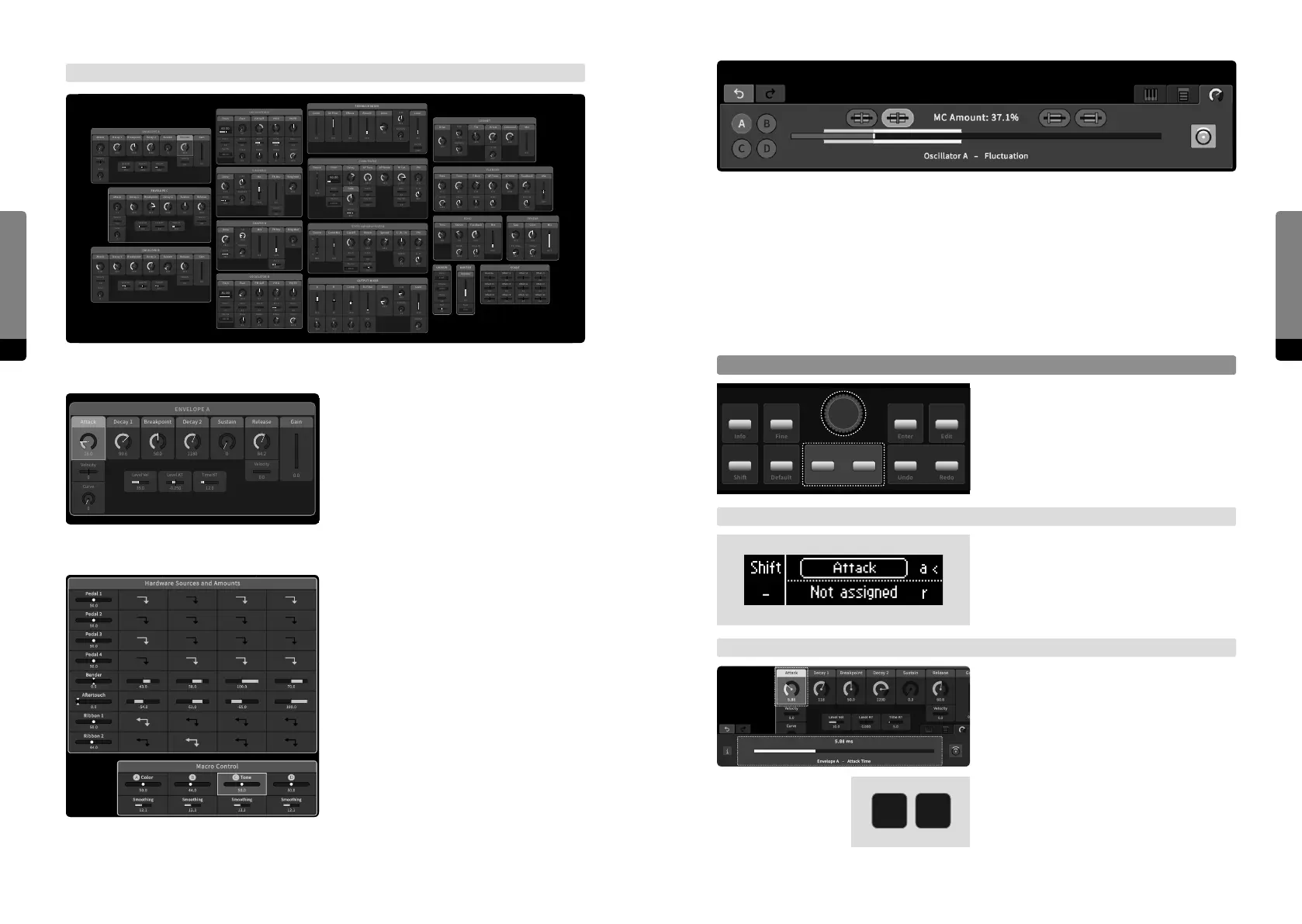
All parameters are shown in the main area and can be selected by clicking.
A highlighted element background indi-
cates the current selection. The mouse
wheel or pinch gestures on the main area
background will zoom into the provided
map. On dierent zoom levels, dierent
details emerge. High priority parameters
are always visible.
Macro Controls and Hardware Sources
appear as separate groups in the main
area, providing all related aspects.
STATE VARIABLE FILTER
FM
18.0
50.0
L - B - H
0.0
A - B
0.0
Parallel
Reson
66.0
Cut O
18.2
Spread
COMB FILTER
PM
0.0
50.0
Hi Cut
118.0
A - B
AP Tune
140.0
Decay
251
Gate
50.0
75.0
Pitch
33.0
AP Reson
OSCILLATOR A
0
PM FB
0
Shaper
120.0
Chirp
0.0
Phase
0.0
Shaper
PM Self
62.0
Fluct
0.0
Key Trk
Pitch
60.00
60.00
100.10
-22.0
PM B
0.0
ENVELOPE A
Velocity
0.0
Release
0
Curve
Decay 2
1180
Breakpoint
50.0
Attack
0.1
Decay 1
99.6
Velocity
0
0
Sustain Gain
ENVELOPE C
Velocity
0.0
Release
84.2
0
Curve
Decay 2
1040
Breakpoint
50.0
Attack
0.1
Decay 1
66.3
Velocity
0.0
0.0
Sustain
SHAPER A
Ring Mod
14.0
Mix FB Mix
CABINET
Cab LevelDrive
22.0
25.0
Asymetry
25.0
Fold
Tilt MixHi Cut
FLANGER
T ModRate Time
90.0
Phase
120.0
Hi Cut
MixAP Tune
Hi Cut
ECHO
Time Stereo
120.0
Hi Cut
MixFeedback
50.0
Cross FB
REVERB
Size Color
26.3
Pre Delay
68.3
Chorus
Mix
Comb Mix
OUTPUT MIXER
-12.0
Pan
B
-18.0
Pan
0
Pan
SV Filter
12.0
Pan
Comb
Drive
22.3
25.2
Fold
0.0
Asymetry
Drive
11.5
50.0
Fold
0.0
Asymetry
14.0
Key Pan
Level
Volume
MASTER
Tune
0.00
UNISON
Voices
1 (o)
Detune
0.000
Env C
0.0
Env C
0.0
Env A
47.0
Env B
80.0
Env C
0.0
Phase
0.0
Pan
0.0
SCALE
Env C
0.0
Key Trk
0.0
Env C
0.0
Key Trk
Env C
0.0
Key Trk
0.0
Env C
0.0
Key Trk
-14.0
Key Trk
66.0
Env C
0.0
Env A
40.0
-14.0
0.0
0.0
32.0
50.0
SHAPER B
Ring Mod
0.0
Mix FB Mix
Drive
18.0
100.0
Fold
18.0
Asymetry
11.6 47.2
AP Mod
47.8
Feedback
-67.02.7 27.8
50.0256 -9.5 50.030.0
84.0
Source
66.0 -29.0 0.025 -4.32
A
A
B
13.0
Source
50.0
Cross FB
50.0
84.2
ENVELOPE B
Velocity
0.0
Release
0
Curve
Decay 2
1180
Breakpoint
50.0
Attack
2.25
Decay 1
99.6
Velocity
0.0
15.0
Sustain
84.2
0.0
Gain
0.0
-30.0
20.0 86.3
Time KT
17.0
Level KT
-0.100
Level Vel
35.0
Env C
22.0
0.0 23.0
Env B
75.0
100.00
Env C
0.0
Key Trk
100.0
A
B
Time KT
20.0
Level KT
0.0
Level Vel
15.0
Time KT
12.0
Level KT
-0.250
Level Vel
35.0
OSCILLATOR B
33.0
PM FB
0.0
Shaper
120.0
Chirp
0.0
Phase
0.0
Shaper
PM Self
0.0
Fluct
16.0
Key Trk
Pitch
100.06
25.0
PM A
81.00
Env C
0.0
Env C
0.0
Env B
0.0
Env A
33.0
Env C
0.0
112.0-12.0
FEEDBACK MIXER
SV FilterComb ReverbEects
Drive
5.0
50.0
Fold
0
Asymetry
Level
Key Trk
0.000
0.0 0.0 25.0 -8.775.0
30.0
Lo Cut
0.0
Stereo
Base Key
C
Oset +1
0.0
Oset +2 Oset +3
0.0
Oset +4
0.0
Oset +5
0.0
Oset +6
0.0
Oset +7
0.0
Oset +8
0.0
Oset +9
0.0
Oset +10
0.0
Oset +11
0.0
0.0
ENVELOPE A
Velocity
0.0
Release
0
Curve
Decay 2
1180
Breakpoint
50.0
Attack
28.0
Decay 1
99.6
Velocity
0
0
Sustain Gain
84.2
Time KT
12.0
Level KT
-0.250
Level Vel
35.0


 To Next Page