User Interfaces
User Interfaces
64 65
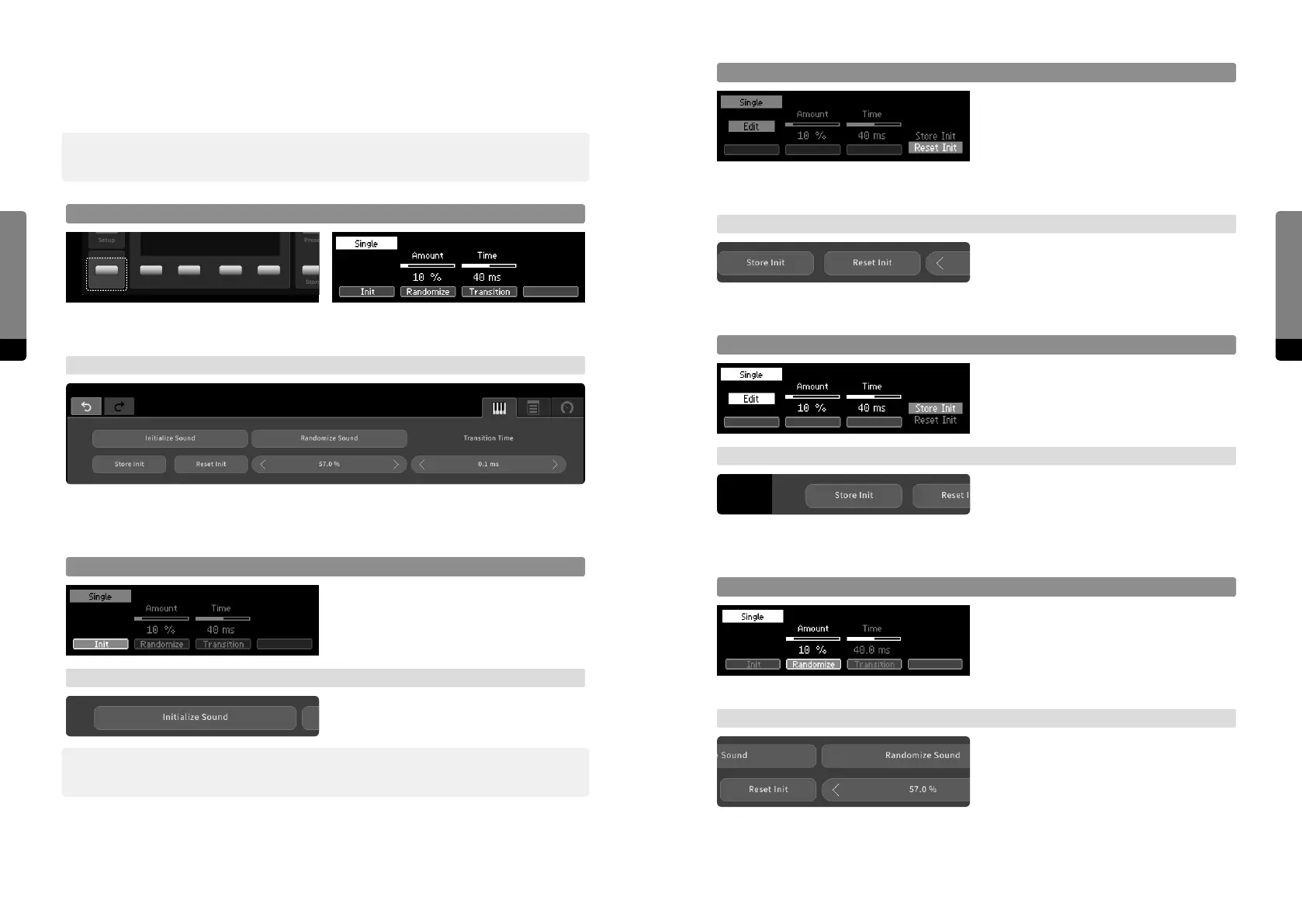
Reset Init
Press the Edit button to invoke a menu
stack on the right, navigate with So But-
ton 4 and press Enter in order to reset the
Init sound. The factory default settings will
be restored to all parameter default values.
The Init sound will not be loaded, though.
→ Graphical UI
When clicking on the „Reset Init“ icon, the
default value of every parameter will be
reset to the factory default settings.
Store Init
The menu stack also provides an option in
order to store the current sound as the new
default settings for all parameters.
→ Graphical UI
When clicking on the „Store Init“ icon, the
default value of every parameter will be
overwritten by the corresponding current
value.
Randomize
Press So Button 2 in order to focus on the
sound randomization. The amount of the
randomization can be adjusted like editing
a parameter. Press the Enter button in
order to randomize all parameters.
→ Graphical UI
When clicking on the „Randomize Sound“
icon, all parameters will be randomized
according to the randomization amount,
shown below. Use drag gestures on the
amount value in order to change the
amount like adjusting a parameter.
4.11 Sound Manipulation
The current setting can be further manipulated, aecting all parameters at once.
߰ Note that initializing or randomizing the sound will occur within the „Edit Smoothing Time“,
defined in the system settings. A preset recall on the other hand uses the „Transition Time“.
Focus on Sound Screen
Pressing the Sound button will invoke the Sound screen, providing options to further
manipulate the current sound or sound transition.
→ Graphical UI
The Sound tab provides options to further manipulate the current sound or sound
transition.
Init Sound
Press So Button 1 to select and then the
Enter button to recall the Init sound. Every
parameter will load its default value.
→ Graphical UI
When clicking on the „Init Sound“ button,
every parameter will load its default value.
߰ Note that the factory default values for Output Mixer component levels are zero, meaning
that the initial sound is silent.
Setup
Sound


 To Next Page