User Interfaces
User Interfaces
68 69
Saving and Restoring Backups on External Device (Graphical UI only)
The background menu of the Graphical
User Interface provides options for saving
and restoring backups. When „Save all
Banks as Backup File“ is selected, all banks
will be copied into a single file which then
will be downloaded on the external device.
When „Restore all Banks from Backup
File“ is selected, a backup file present on
the external device can be chosen and uploaded. You will find the downloaded file at a
location depending on your browser settings.
߱ Please keep in mind that when restoring from a backup file, all banks currently
present on the C15 will be lost. We recommend to save a backup file before
restoring in order to maintain all preset data.
4.14 Base Unit Functionality
Here is a quick recap of the Base Unit functionality, compiling all available features into a
single overview.
The Mode button cycles four distinct
operation modes, which are explained
in the following. The functionality of the
remaining buttons depends on the current
mode.
In Play mode, both Ribbons function as
ordinary Hardware Sources. If they are
assigned to a Macro Control, they will be
operable. The +/- buttons can be used for
transposing the whole instrument (note shi). Pressing a single button will perform an
octave shi, pressing one button while holding the other will perform a semitone shi.
The Funct button switches between absolute and relative behavior for the most recently
used Ribbon (indicated by a pointy bracket).
Funct Mode
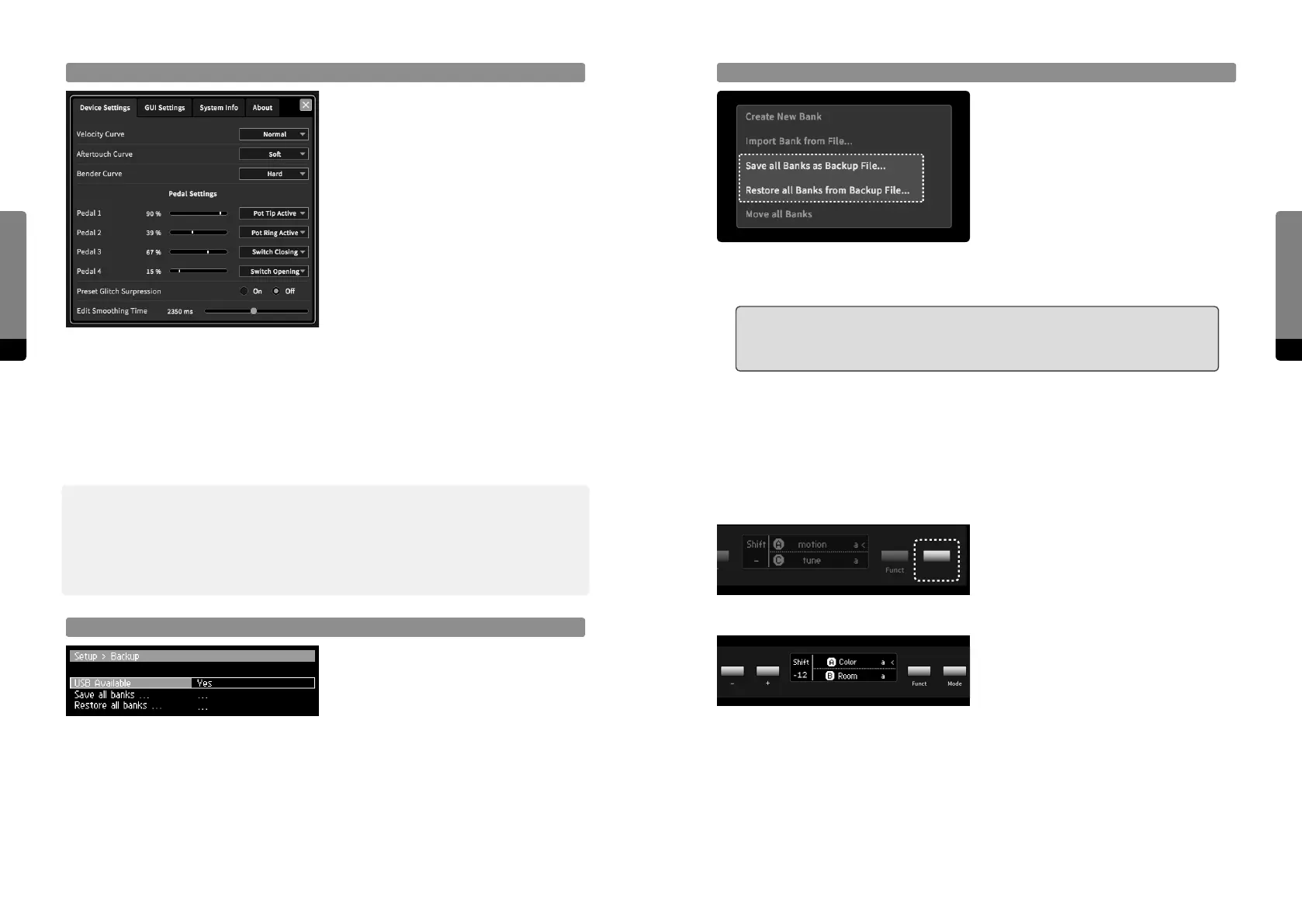
Setup Window (Graphical UI only)
The topright View menu provides the
„Show/Hide Setup“ option, toggling the
visibility of the Setup window. The menu
content is organized in tabs which can
be focussed. In each tab, the correspond-
ing properties are provided and can be
adjusted (some properties have context
menus, some can be adjusted by drag
gestures, like a parameter).
4.13 Backups
As previously mentioned, single banks can be imported and exported from an to either
a connected USB stick or the connected external device. In addition, the transfer of all
banks at once is also provided, which allows for fast and easy backups
߰ We recommend creating backups of your banks regularly. Although the C15 can hold an
arbitrary number of banks, it can be helpful to keep the interface clean by not overloading
it with banks, speeding up booting, backup and shutdown processes. Using single backup
files for bank collections may also be helpful for live musicians who may need to load their
presets on a C15.
Saving and Restoring Backups on USB Stick (Panel Unit only)
In the Setup menu of the Hardware User
Interface, the Backup submenu can be
found, providing a Restore and a Save
option. When a USB stick is connected,
pressing the Enter button will allow for
exporting or restoring of backups.


 To Next Page