User Interfaces
User Interfaces
42 43
→ Graphical UI
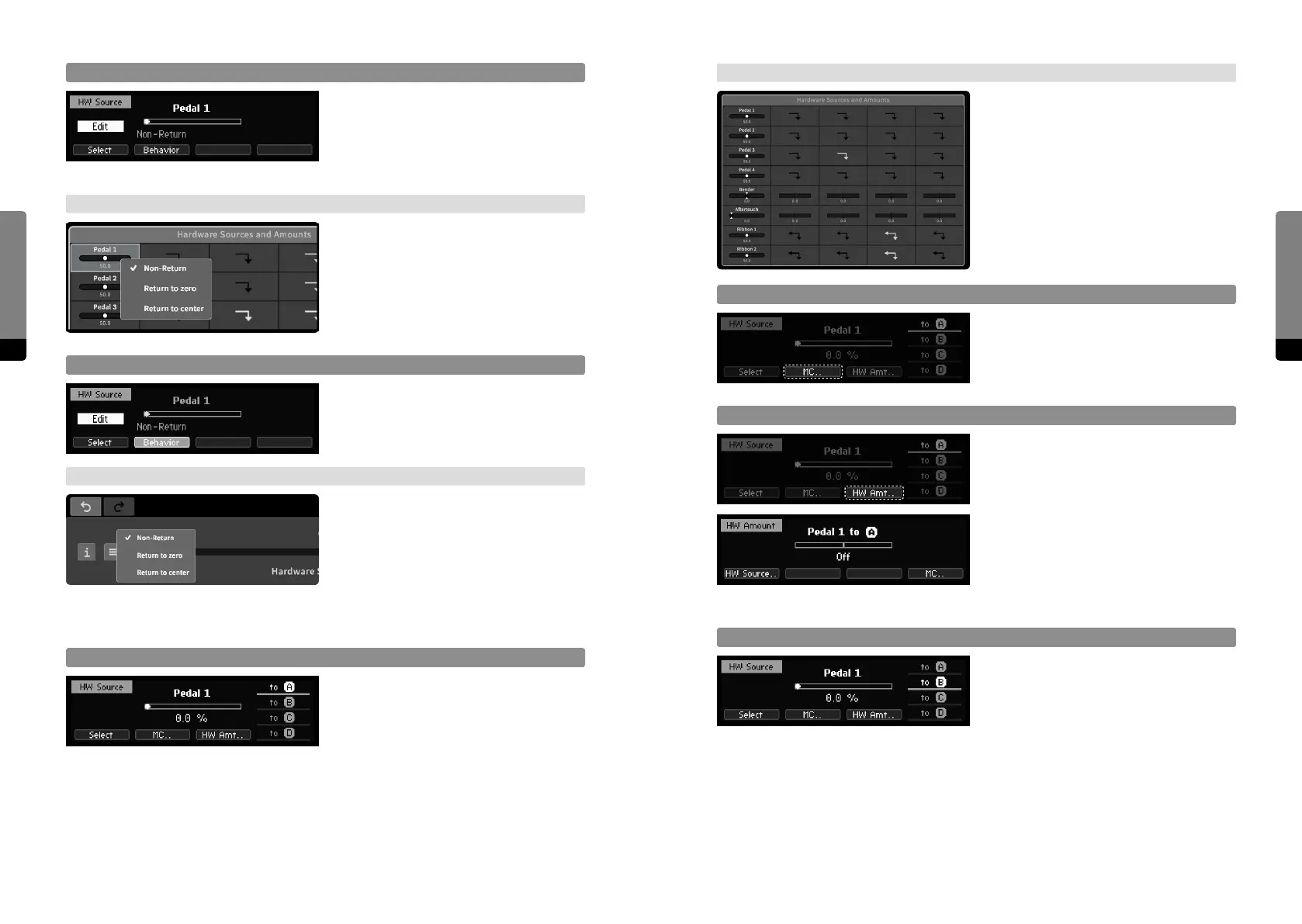
The top-center parameter group „Hardware
Sources and Amounts“ provides access to
all Hardware Sources and their amounts
on Macro Controls, represented as a
modulation matrix. Items of interest can be
selected and adjusted like a parameter.
Macro Control Selector
Pressing So Button 2 will redirect to the
currently associated Macro Control.
HW Source Amount
Pressing So Button 3 will redirect to the
Hardware Amount screen, showing the
amount of the currently selected Hardware
Source on the currently associated Macro
Control. The amount can be edited like
adjusting a parameter. Pressing So
Button 1 will redirect to the Hardware
Source, So Button 4 will redirect to the
Macro Control.
MC Target Selection Stack
Pressing So Button 4 will cycle through
the rightmost stack of Macro Controls in
order to change the current association.
Focus on Hardware Source Properties
For Pedals and Ribbons, the return behav-
ior can be edited. Pressing Edit button
when a Hardware Source is selected will
redirect to the Edit screen. Use So But-
tons to select one of the provided aspects.
→ Graphical UI
In the main area, a right click on a Hard-
ware Source element will invoke a context
menu providing access to the properties.
Edit Return Behavior
Edit the return behavior like adjusting a
parameter. Returning behavior allows Hard-
ware Source amounts to Macro Controls to
be continuous.
→ Graphical UI
The context menu provides available return
behaviors to select. Returning behavior
allows Hardware Source amounts to Macro
Controls to be continuous.
4.5.3 Mapping a Hardware Source to Macro Controls
Focus on Assignment Aspects
By default, the Hardware Source position is
in focus. So Buttons 1 to 4 provide focus
navigation, pressing a button twice will
return to the default focus. One Hardware
Source can be selected, and its eect on
one Macro Control can be edited.


 To Next Page