User Interfaces
User Interfaces
54 55
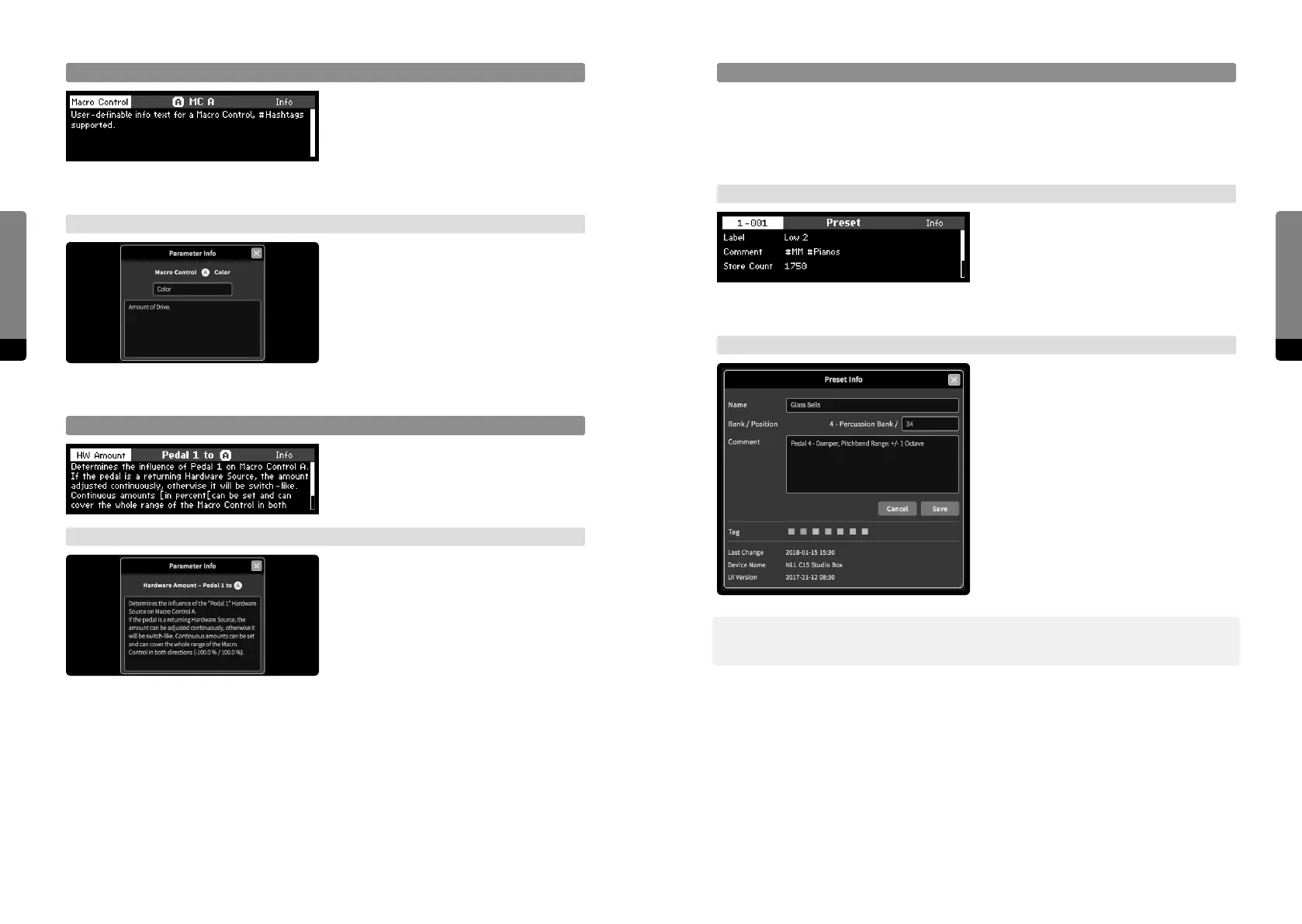
Preset Info
Presets contain a collection of metadata, some of which can be edited. The metadata
collection includes: a reference to the parent bank name, the preset position within the
parent bank, the preset name, a comment text, a color tag and information about the last
saved change (date, device name, ui version).
→ Panel Unit
When in the Preset screen, the Info button
invokes the Info screen for the currently
selected preset. The screen can be scrolled
by the Encoder or Inc, Dec buttons. When
pressing the Edit button, the comment text
can be edited in the Rename screen.
→ Graphical UI
The preset Info window can be made visi-
ble when clicking on the Preset Info icon in
the Preset tab or by a right click on a preset
within a bank, selecting the „show info“
option. The window can be le visible and
will update when loading other presets.
In addition, the global View menu also
provides a visibility option for the Preset
Info window.
߰ In the Graphical User Interface, the Preset Info Window allows for editing the preset
number (position in the bank), name, comment and color tag.
Macro Control Info
When a Macro Control is selected, the Info
button invokes the Info screen, showing the
description of the currently selected Macro
Control. When pressing the Edit button, the
user-definable info text can be edited in the
Rename screen.
→ Graphical UI
The Info icon in the Parameter tab works
accordingly when selecting a Macro
Control, context menus for the main area
elements are also provided. The pro-
vided Info window allows for edits on the
user-definable info text.
Hardware Source/Amount Info
When the focus is on a Hardware Source or
on a Hardware Amount to a Macro Control,
the Info button provides the Info screen
according to the item in focus.
→ Graphical UI
The Info window will display the descrip-
tion of a selected Hardware Source
or Amount as described for ordinary
parameters.


 To Next Page