Synthesis Engine
Synthesis Engine
110 111
Functionality Overview
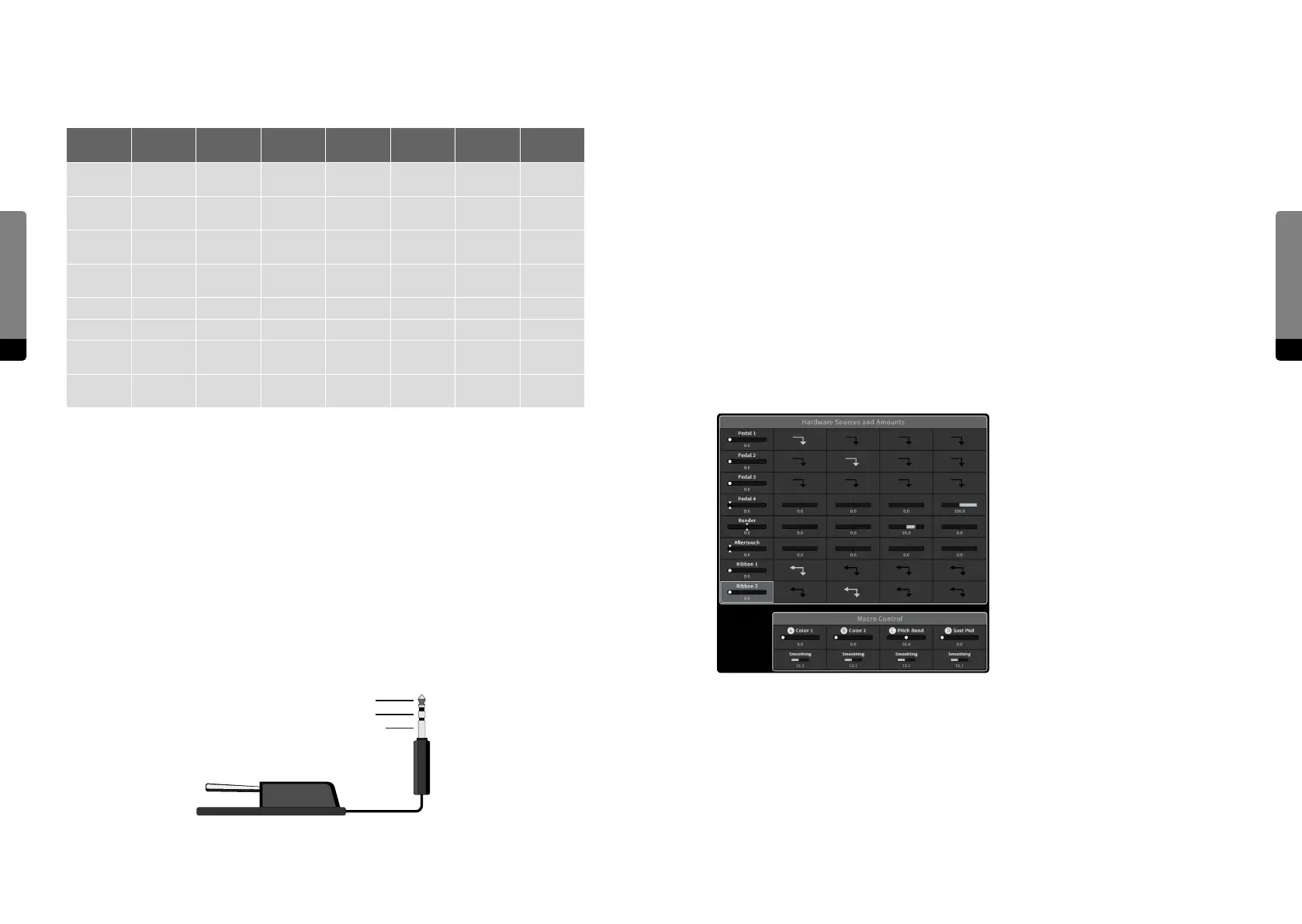
All the mentioned dierent aspects of Hardware Sources are shown in the following table:
Source Continuity Polarity
Return
Behavior
Integration
Recall
Behavior
Settings
Operation
Mode
Pedal 1
continuous /
switch
unipolar /
bipolar
non / zero /
center
external no
Pin
Assignment
absolute
Pedal 2
continuous /
switch
unipolar /
bipolar
non / zero /
center
external no
Pin
Assignment
absolute
Pedal 3
continuous /
switch
unipolar /
bipolar
non / zero /
center
external no
Pin
Assignment
absolute
Pedal 4
continuous /
switch
unipolar /
bipolar
non / zero /
center
external no
Pin
Assignment
absolute
Bender continuous bipolar center integrated n/a Curve absolute
Aertouch continuous unipolar zero integrated n/a Curve absolute
Ribbon 1 continuous
unipolar /
bipolar
non / center integrated yes
Relative
Factor
absolute /
relative
Ribbon 1 continuous
unipolar /
bipolar
non / center integrated yes
Relative
Factor
absolute /
relative
Pedal Integration
For now, the safe and recommended method of integrating external Pedals is to turn the
device o beforehand. Aer all Pedals are plugged in the provided sockets, the C15 can
be switched on again. The booting process will recognize the Pedals’ circuit architectures
and integrate them accordingly.
There is a Setup menu provided as well, in which the pin assignment of each Pedal can be
set manually. However, this menu should only be used if the pin assignment of a Pedal is
known, as wrong assignments can easily lead to overheating, possibly causing permanent
damage on the device. Besides, the menu is still in development and proper functionality
is not guaranteed for now.
Tip
Ring
Sleeve
Modulation Aspects
As already mentioned, the modulation amount of a certain Hardware Source on a Macro
Control depends on the source’s Return Behavior (only returning sources allow for a
continuous amount).
Furthermore, when a non-returning Ribbon is assigned to a Macro Control, the assign-
ment will be bidirectional. In other words, the Ribbon will move the Macro Control and
vice versa.
Considering the Hardware Sources, their current settings and the modulation amounts
on Macro Controls alltogether, they can be referred to as a „Modulation Template“. All
included settings will be stored and recalled with presets, but for dierent use cases (like
dierent Pedals on another device), the template may not work properly. We plan to
further investigate on template functionalities (like import and export functions) and may
oer solutions in the near future.
For the sound design (and included factory presets) so far, the following template
appeared to be meaningful, and it can be found in most of the presets:
The template defines two non-returning, continuous Pedals (1 and 2) for Macro Controls
A and B, which are used to modulate dierent sound aspects like phase modulation
intensities, filter frequencies, resonances or eect amounts, for example. Similarly, the
two Ribbons are mapped on the two Macro Controls as well.
In addition, Macro Control C is assigned to the Bender and primarily used for bending
pitches. The remaining Macro Control D is assigned to a returning, continuous Pedal (4),
which serves as a Sustain or Damper Pedal (depending on the sound).


 To Next Page