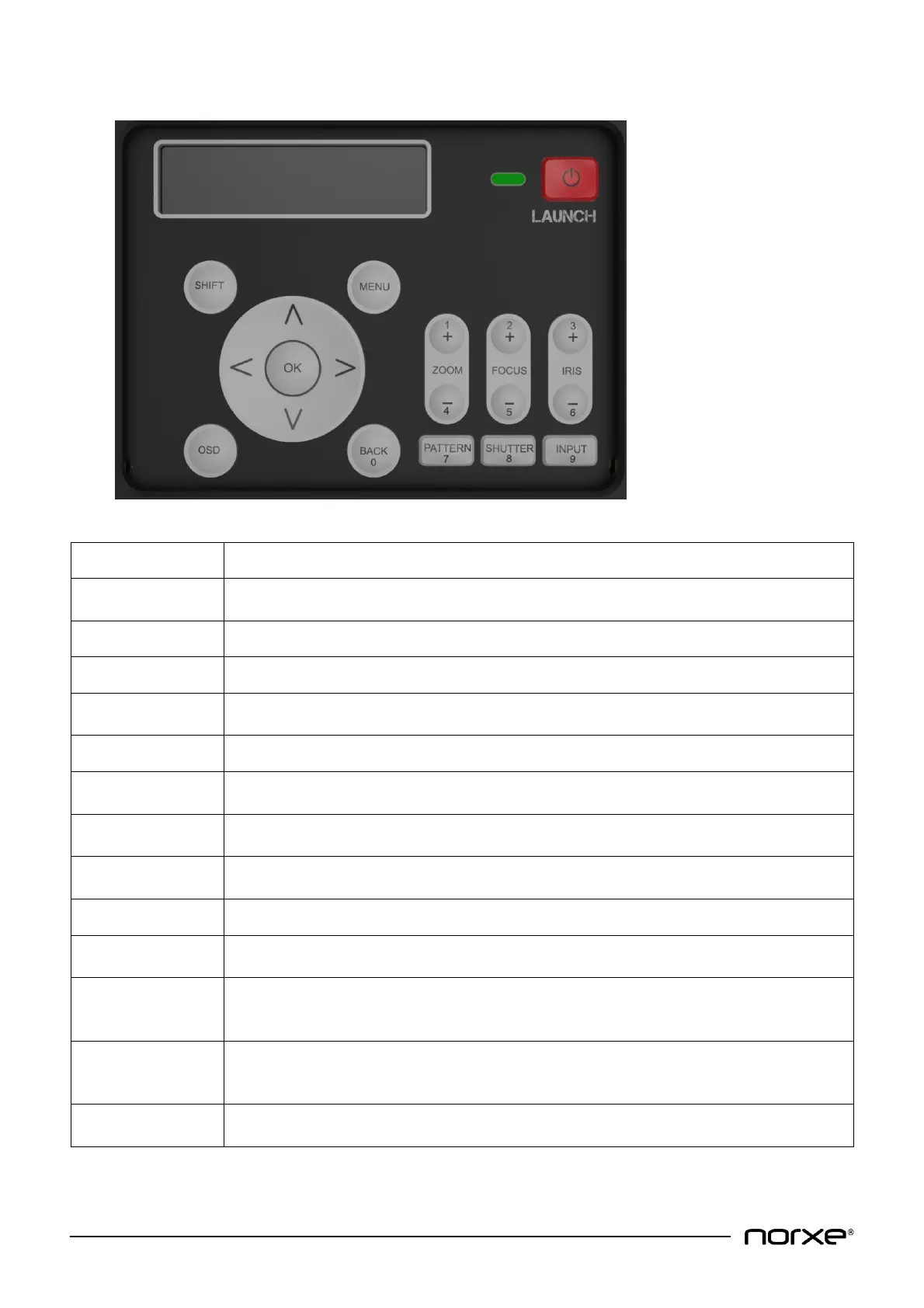
Press to activate the lens shift mechanism. Use the arrow keys to adjust lens shift
vertically or horizontally.
Press to enable or disable the on-screen menu system.
Toggles power on and off (press twice for off as per on-screen prompt).
Use to move lens shift up / down / left / right and to navigate the on-screen menu
system.
Press to select on-screen display sub-menu.
Press + or - to adjust zoom in or out. Provides additional numeric functionality for
values 1 and 4.
Press + or - to adjust lens focus in or out. Provides additional numeric functionality for
values 2 and 5.
Press + or - to open or close the lens iris. Provides additional numeric functionality for
values 3 and 6.
Toggles the OSD (On Screen Display) on and off.
Press to move back in the menu system. Provides additional numeric functionality for
value 0.
Press to display test pattern image. Pressing repeatedly cycles through a set of
preconfigured embedded test patterns. Provides additional numeric functionality for
value 7.
Toggles the illumination system on and off to give a black image (while the LAUNCH key
above controls the power to the projector itself). Provides additional numeric
functionality for value 8.
Press to sequence between the source inputs. Provides additional numeric functionality
for value 9.



 To Next Page